
साझेदार कार्यक्रम
वह पार्टनर प्रोग्राम (लेवल कंप्रेशन मॉडल, जिसे इनवाइट एंड अर्न के रूप में भी प्रस्तुत किया गया है) एक रैखिक, स्थिति-आधारित मॉडल है जो सक्रिय एटलस सिस्टम प्रतिभागियों को अपनी निचली पार्टनर संरचना के भीतर उत्पन्न डेल्टा से पार्टनर पुरस्कार प्राप्त करने की अनुमति देता है।.
यह मॉडल स्थिति-आधारित संपीड़न (status-based compression) का उपयोग करता है: किसी शाखा से मिलने वाला पुरस्कार उस शाखा के प्रत्येक सक्रिय पार्टनर की प्रतिशत योग्यता पर निर्भर करता है।.

एक नज़र में
| सक्रियण | पहले योग्य स्मार्ट साइकिल के बाद 10 USDT या उससे अधिक की सपोर्ट राशि के साथ स्वचालित रूप से |
| स्थितियाँ | 19 स्तर: स्टार्ट, बिल्डर 1–7, मास्टर 1–7, स्ट्रेटजिस्ट, एंबेसडर, डायरेक्टर और एग्जीक्यूटिव |
| संरचना पुरस्कार | 15% से 60% तक डेल्टा का, जो पार्टनर स्टेटस और कंप्रेशन नियमों पर निर्भर करता है। |
| गहरााई | असीमित गहराई, स्थिति-आधारित संकुचन और भारित संरचना-आयतन गुणांकों के साथ |
| सत्यापन | उपार्जन व्यक्तिगत डैशबोर्ड पर प्रदर्शित होते हैं; ब्लॉकचेन ट्रांसफर को BscScan पर चेक किया जा सकता है। |
पार्टनर रिवार्ड्स की गणना वर्तमान पार्टनर प्रोग्राम नियमों के तहत डेल्टा से की जाती है। साइकिल वॉल्यूम का उपयोग स्टेटस योग्यता के लिए किया जाता है; यह स्वयं रिवार्ड बेस नहीं है। उदाहरण और स्क्रीनशॉट भविष्य के रिवार्ड्स की गारंटी नहीं देते हैं।.
1. भागीदारी कैसे शुरू होती है
पाँच चरणों में सक्रियण
- वॉलेट को आधिकारिक एटलस सिस्टम पर्सनल डैशबोर्ड से कनेक्ट करें।.
- एक सपोर्ट राशि के साथ पहला क्वालिफाइंग स्मार्ट साइकिल बनाएं 10 यूएसडीटी या अधिक.
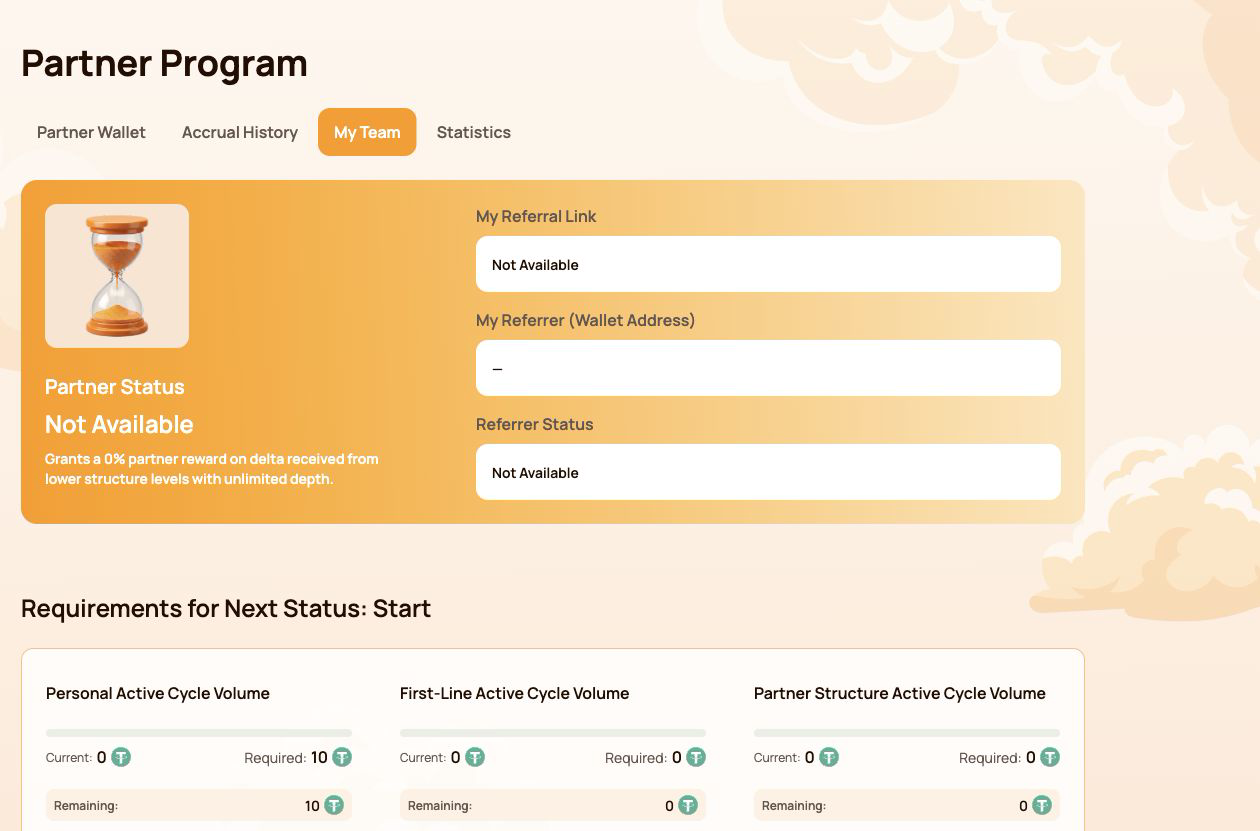
- खोलें पार्टनर प्रोग्राम → मेरी टीम.
- कॉपी मेरा रेफरल लिंक और इसे उस प्रतिभागी के साथ साझा करें जिसे आप आमंत्रित करना चाहते हैं।.
- आमंत्रित प्रतिभागी के लिंक के माध्यम से जुड़ने के बाद, उनका वॉलेट आपकी एकीकृत एटलस सिस्टम पार्टनर संरचना का हिस्सा बन जाता है।.
इसके लिए किसी अलग पार्टनर प्रोग्राम पंजीकरण फॉर्म की आवश्यकता नहीं है। सक्रियण और गणना कार्यक्रम के नियमों के तहत स्वचालित रूप से किए जाते हैं।.
मेरी टीम में क्या दिखाई देता है
| क्षेत्र | इसका क्या अर्थ है |
|---|---|
| पार्टनर स्थिति | वर्तमान स्थिति और संरचना पुरस्कार प्रतिशत |
| मेरा रेफरल लिंक | नए प्रतिभागियों को आमंत्रित करने के लिए उपयोग किया जाने वाला व्यक्तिगत लिंक |
| मेरा रेफ़रर (वॉलेट पता) | वह वॉलेट जिसका रेफ़रल लिंक शामिल होने पर इस्तेमाल किया गया था |
| रेफ़रल स्थिति | रेफर करने वाले की वर्तमान पार्टनर स्थिति |
यदि मेरा रेफरल लिंक प्रदर्शित करता है उपलब्ध नहीं है, सबसे पहले यह जाँच लें कि कनेक्टेड वॉलेट में एक योग्य स्मार्ट साइकिल है और उसका ब्लॉकचेन लेन-देन कन्फर्म हो गया है।.
एटलस इकोसिस्टम में एक संरचना
एक आमंत्रित प्रतिभागी स्थायी रूप से एकीकृत एटलस सिस्टम पार्टनर स्ट्रक्चर से जुड़ा हुआ है। नए इकोसिस्टम उत्पादों और कार्यक्रमों के उपलब्ध होने पर समान संरचना का उपयोग किया जा सकता है।.
इसका अर्थ है:
- हर नए एटलस उत्पाद के लिए एक टीम का पुनर्निर्माण करने की आवश्यकता नहीं है;
- पार्टनर संबंध मूल रेफरल संरचना से जुड़े रहते हैं;
- वर्तमान लेवल कम्प्रेशन मॉडल अपने स्वयं के योग्यता और पुरस्कार नियम लागू करता है;
- भविष्य के पार्टनर मॉडल अपनी गणनाओं, वॉल्यूम और पुरस्कारों को अलग रखते हुए एक ही मूल संबंध का उपयोग कर सकते हैं;
- एक ही वॉल्यूम की गणना एक साथ कई कार्यक्रमों में अपने आप नहीं की जाती है।.
एक रेफरल कनेक्शन पुरस्कार के लिए स्वचालित अधिकार नहीं बनाता है। एक रेफरल लिंक पार्टनर संरचना के भीतर वॉलेट को जोड़ता है, जबकि प्रत्येक सक्रिय मॉडल अपने स्वयं के योग्यता नियमों की जांच करता है। यह आमंत्रित करने वाले को किसी अन्य प्रतिभागी के वॉलेट या फंड पर नियंत्रण नहीं देता है।.
2. पार्टनर प्रोग्राम इंटरफ़ेस मैप
पार्टनर प्रोग्राम अनुभाग में चार टैब हैं। प्रत्येक टैब एक अलग प्रश्न का उत्तर देता है।.
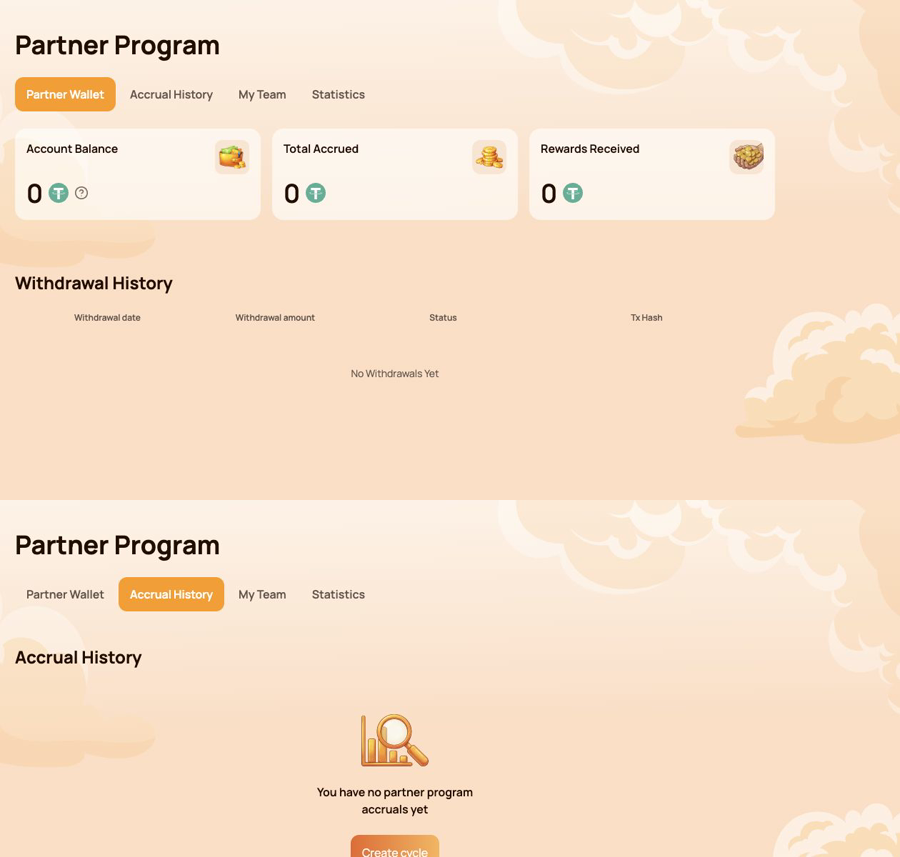
पार्टनर वॉलेट — क्या ट्रांसफर किया जा सकता है?
उपयोग पार्टनर वॉलेट जाँच करने के लिए:
- खाता शेष;
- कुल उपार्जित;
- प्राप्त पुरस्कार;
- निकासी इतिहास;
- ऑन-चेन ट्रांसफर के लिए Tx हैश।.
उपार्जन इतिहास — पुरस्कार कहाँ से आया था?
उपयोग उपार्जन इतिहास पहचानने के लिए
- उपार्जन तिथि;
- बोनस का प्रकार;
- संचित पुरस्कार राशि.
उपार्जन (अक्रूअल) और ब्लॉकचेन ट्रांसफर अलग-अलग चरण हैं। पहले उपार्जन इतिहास (अक्रूअल हिस्ट्री) की जाँच करें, फिर पार्टनर वॉलेट और निकासी इतिहास (विड्रॉल हिस्ट्री) की।.
मेरी टीम — अगली स्थिति (स्टेटस) के लिए क्या आवश्यक है?
उपयोग मेरी टीम समीक्षा के लिए:
- रेफ़रल और रेफ़रर की जानकारी;
- वर्तमान पार्टनर स्थिति;
- वर्तमान / आवश्यक / शेष वॉल्यूम;
- स्थिति आवश्यकताएँ;
- संरचना रेखाएँ;
- वॉलेट पते से खोजें;
- संरचना के भीतर नेता और गतिविधि।.
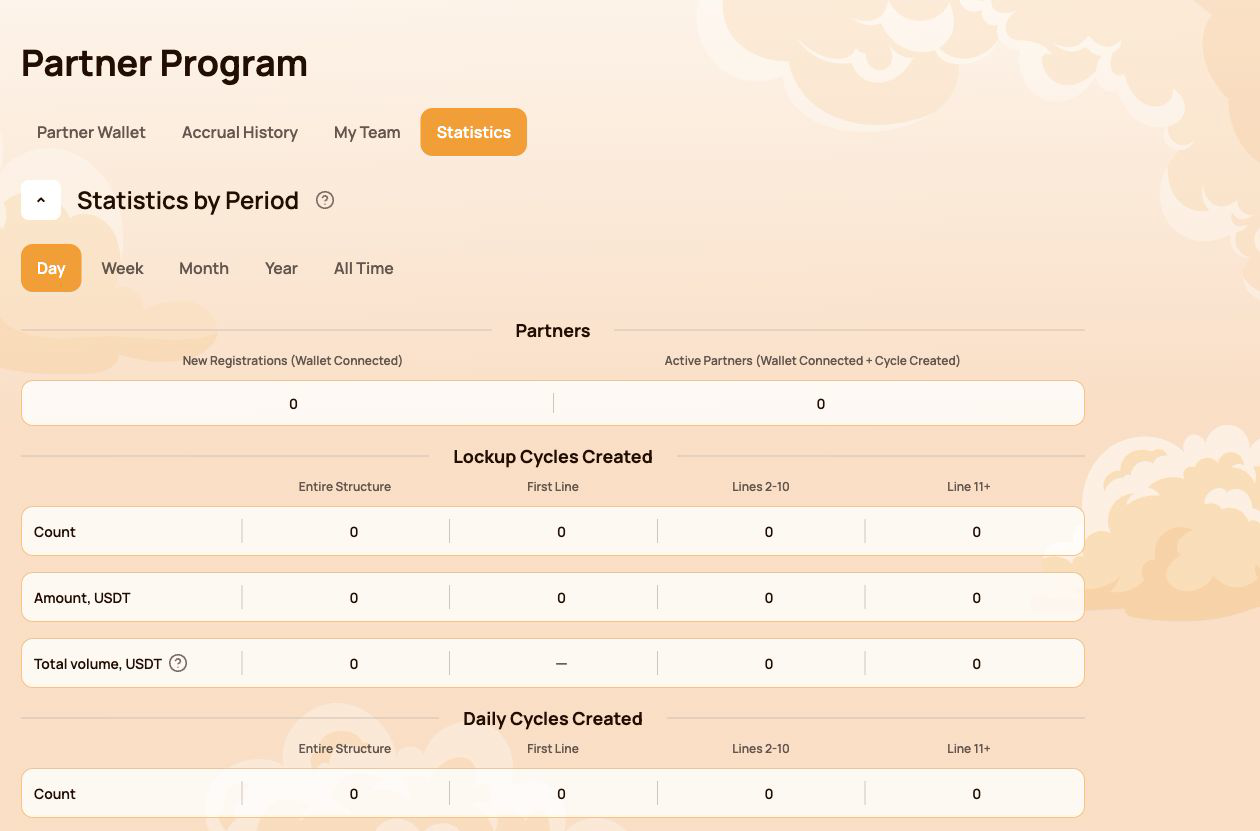
आँकड़े — संरचना का विकास कैसे हो रहा है?
उपयोग आँकड़े तुलना करना
- दिन / सप्ताह / महीना / वर्ष / सभी समय;
- नए पंजीकरण और सक्रिय भागीदार;
- लॉकअप फ्लो और डेली फ्लो गतिविधि;
- संपूर्ण संरचना, पहली पंक्ति, पंक्तियाँ 2–10 और पंक्ति 11+;
- सबसे सक्रिय लाइनें.
कार्य के अनुसार त्वरित मार्ग
| मैं चाहता हूँ… | खोलें... |
|---|---|
| मेरा रेफ़रल लिंक कॉपी करें | मेरी टीम |
| जाँच करें कि अगली स्थिति के लिए क्या गायब है | मेरी टीम → अगले स्टेटस के लिए आवश्यकताएँ |
| इnam का स्रोत ढूँढें | उपार्जन इतिहास |
| एक स्वचालित ट्रांसफर की जाँच करें | Partner Wallet → Withdrawal History |
| Verify a transfer on-chain | Tx Hash → BscScan |
| Find a participant in the structure | My Team → Search by Wallet Address |
| Compare structure activity over time | आँकड़े |
The Personal Dashboard shows the result of the calculation. The following sections explain the status, compression, flow-specific and Matching Reward rules behind it.
3. Partner Status: how qualification works
Partner Status determines two parameters: the participant's Structure Reward rate and, from Master 1 onward, the Matching Reward rate. The system checks the qualification conditions automatically.
Three indicators are checked
| सूचक | What is counted |
|---|---|
| Personal Active Cycle Volume | The participant's own qualifying Smart Cycles |
| First-Line Active Cycle Volume | Qualifying volume created by personally invited participants |
| Partner Structure Active Cycle Volume | Qualifying volume across the lower Partner Structure, subject to the program's depth coefficients |
To receive a status, all requirements shown for that level must be met. If a requirement is marked Not required, it does not affect that status.
All 19 Partner Statuses
| स्थिति | Personal Active Cycle Volume | First-Line Active Cycle Volume | Partner Structure Active Cycle Volume | संरचना पुरस्कार | Matching Reward |
|---|---|---|---|---|---|
 प्रारंभ करें प्रारंभ करें |
10 | Not required | Not required | 15% | — |
 Builder 1 Builder 1 |
50 | 100 | Not required | 18% | — |
 Builder 2 Builder 2 |
100 | 300 | 1,000 | 21% | — |
 Builder 3 Builder 3 |
200 | 700 | 2,000 | 24% | — |
 Builder 4 Builder 4 |
300 | 1,200 | 4,000 | 27% | — |
 Builder 5 Builder 5 |
500 | 2,000 | 7,000 | 30% | — |
 Builder 6 Builder 6 |
700 | 3,000 | 12,000 | 33% | — |
 Builder 7 Builder 7 |
1,000 | 4,500 | 18,000 | 36% | — |
 Master 1 Master 1 |
1,500 | 7,000 | 28,000 | 38% | 5% |
 Master 2 Master 2 |
2,000 | 10,000 | 40,000 | 40% | 7% |
 Master 3 Master 3 |
3,000 | 17,000 | 70,000 | 42% | 9% |
 Master 4 Master 4 |
4,000 | 25,000 | 120,000 | 44% | 11% |
 Master 5 Master 5 |
5,000 | 35,000 | 200,000 | 46% | 13% |
 Master 6 Master 6 |
6,000 | 45,000 | 300,000 | 48% | 15% |
 Master 7 Master 7 |
7,000 | 60,000 | 450,000 | 50% | 17% |
 Strategist Strategist |
8,000 | 80,000 | 600,000 | 52.5% | 19% |
 Ambassador Ambassador |
10,000 | 100,000 | 800,000 | 55% | 21% |
 Director Director |
12,000 | 120,000 | 1,100,000 | 57.5% | 23% |
 Executive Executive |
15,000 | 150,000 | 1,500,000 | 60% | 25% |
All amounts in the table are shown in USDT-equivalent units used by the Atlas interface.
How to read progress in My Team
- वर्तमान — the volume already counted toward the selected requirement;
- Required — the target for the next status;
- Remaining — the amount still needed to satisfy that requirement.
Check every requirement card, not only the total Partner Structure Active Cycle Volume. A large structure alone does not replace the Personal Active Cycle Volume or First-Line Active Cycle Volume requirement.
A status rate is a qualification parameter used by the reward algorithm. It is not a promised percentage return on a participant's Smart Cycle.
4. Qualification volume, Delta and depth
Several similar-looking values serve different purposes. Keeping them separate makes the Partner Program much easier to understand.
The short version
| Value | Purpose |
|---|---|
| सहायता राशि | A participant's amount of provided aid in a Smart Cycle |
| Partner Structure Active Cycle Volume | Used to check Partner Status qualification |
| Delta generated in the lower Partner Structure | The reward calculation base for the applicable branch |
| संरचना पुरस्कार | The result calculated from Delta according to status-rate differences and compression rules |
The original Support Amount and the generated Delta are not the same value. Partner Rewards are calculated from डेल्टा, not from the full amount placed into a Smart Cycle.
Actual and Weighted Partner Structure Volume
- Actual Partner Structure Volume shows the structure's qualifying volume before depth coefficients are applied.
- Weighted Partner Structure Volume shows the volume after the coefficients are applied and is used for status qualification where the rules require it.
| Structure depth | Coefficient applied to volume |
|---|---|
| Lines 1–5 | 100% |
| Lines 6–10 | 50% |
| Line 11 and deeper | 10% |
Example of weighted volume
Suppose the structure has 1,000 USDT of qualifying volume on each of three depth groups:
| Group | Actual volume | Coefficient | Weighted volume |
|---|---|---|---|
| Lines 1–5 | 1,000 | 100% | 1,000 |
| Lines 6–10 | 1,000 | 50% | 500 |
| Line 11+ | 1,000 | 10% | 100 |
| Total | 3,000 | 1,600 |
This example explains status-volume weighting only. It does not calculate a Partner Reward.
Where to check the numbers
- open पार्टनर प्रोग्राम → मेरी टीम for qualification volumes and next-status progress;
- open आँकड़े to compare structure activity by depth and period;
- open उपार्जन इतिहास to see an actual calculated Partner Reward;
- use Partner Wallet → Withdrawal History to verify a completed transfer.
Do not use cycle volume, Partner Structure Volume and Delta as interchangeable terms. Cycle volume is used for status qualification; Delta is the reward calculation base.
5. Compression: who receives which part of the reward
Compression distributes the available Partner Reward according to the percentage qualifications of active partners in the branch. An upline participant receives the difference between their status rate and the rate already realised by a qualified partner below.
The rule in three situations
| Situation below you | What happens |
|---|---|
| The partner's status rate is lower than yours | You receive the positive difference between the two rates |
| There is no qualified partner between you and the Delta source | You may receive your full eligible status rate under the program rules |
| The partner's rate is equal to or higher than yours | You receive 0% from the structure compressed behind that partner |
The position of a wallet at the top of a branch does not guarantee a reward. Qualification and active status determine how the available percentage is distributed.
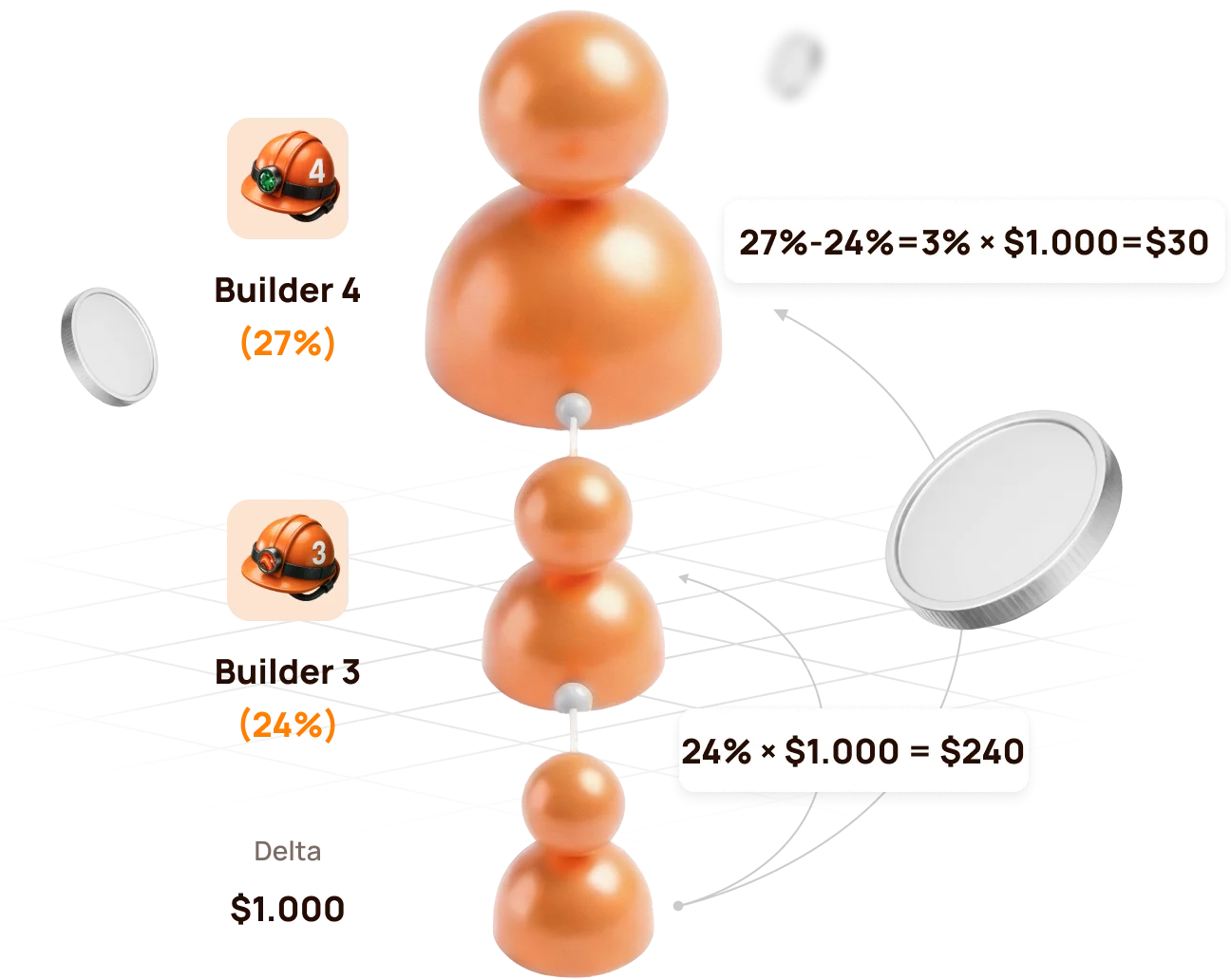
Official example: Builder 4 above Builder 3
The lower structure generates 1,000 USDT of Delta.
| Participant | पार्टनर स्थिति | Rate | Calculation | Partner Reward |
|---|---|---|---|---|
| Lower qualified partner | Builder 3 | 24% | 24% × 1,000 | 240 USDT |
| Upline partner | Builder 4 | 27% | (27% − 24%) × 1,000 | 30 USDT |
| Total distributed by status rates | 27% | 270 USDT |
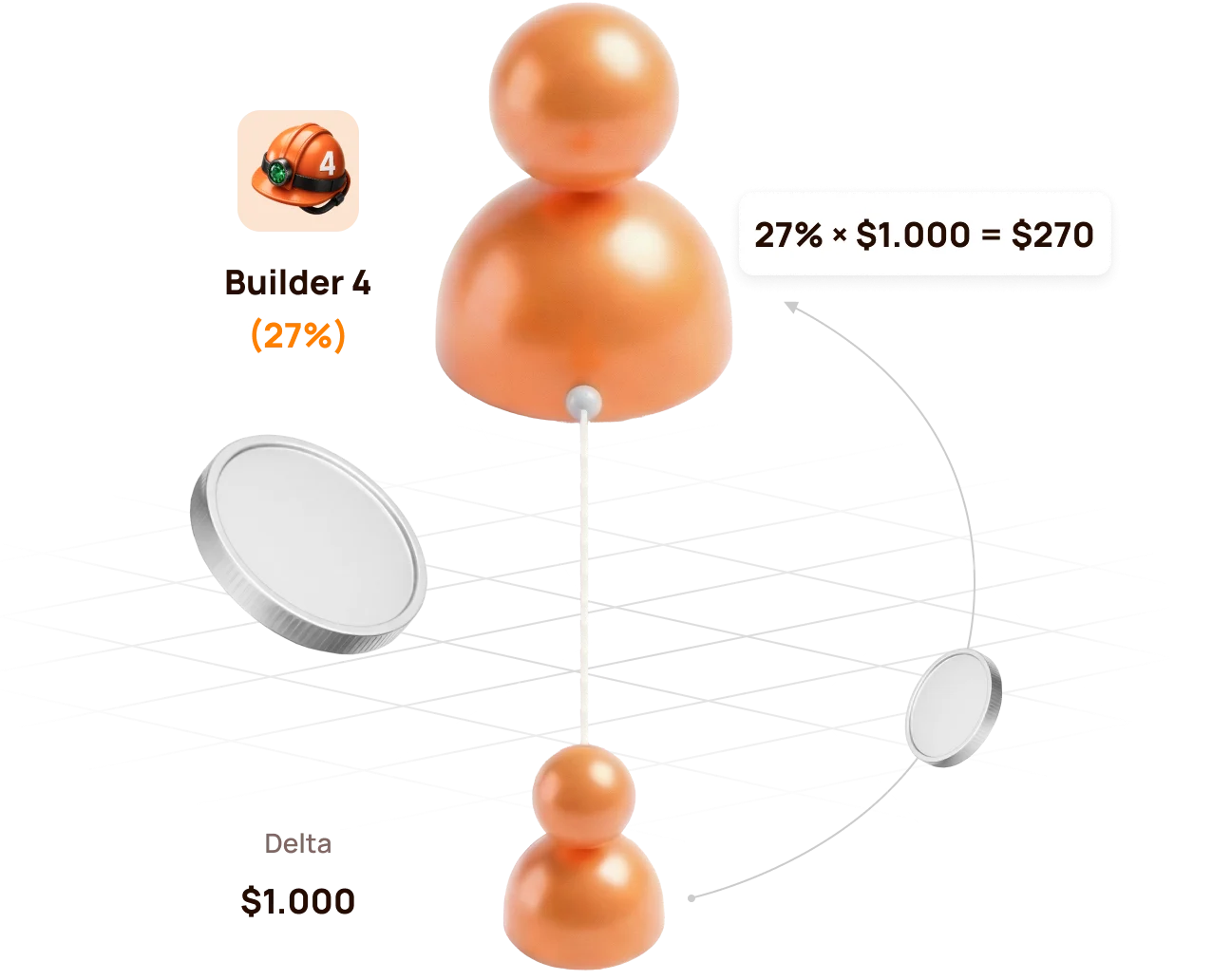
If there is no Builder 3 between the source and Builder 4
Builder 4 can realise the full eligible rate:
27% × 1,000 USDT = 270 USDT
If the lower partner reaches the same or a higher rate
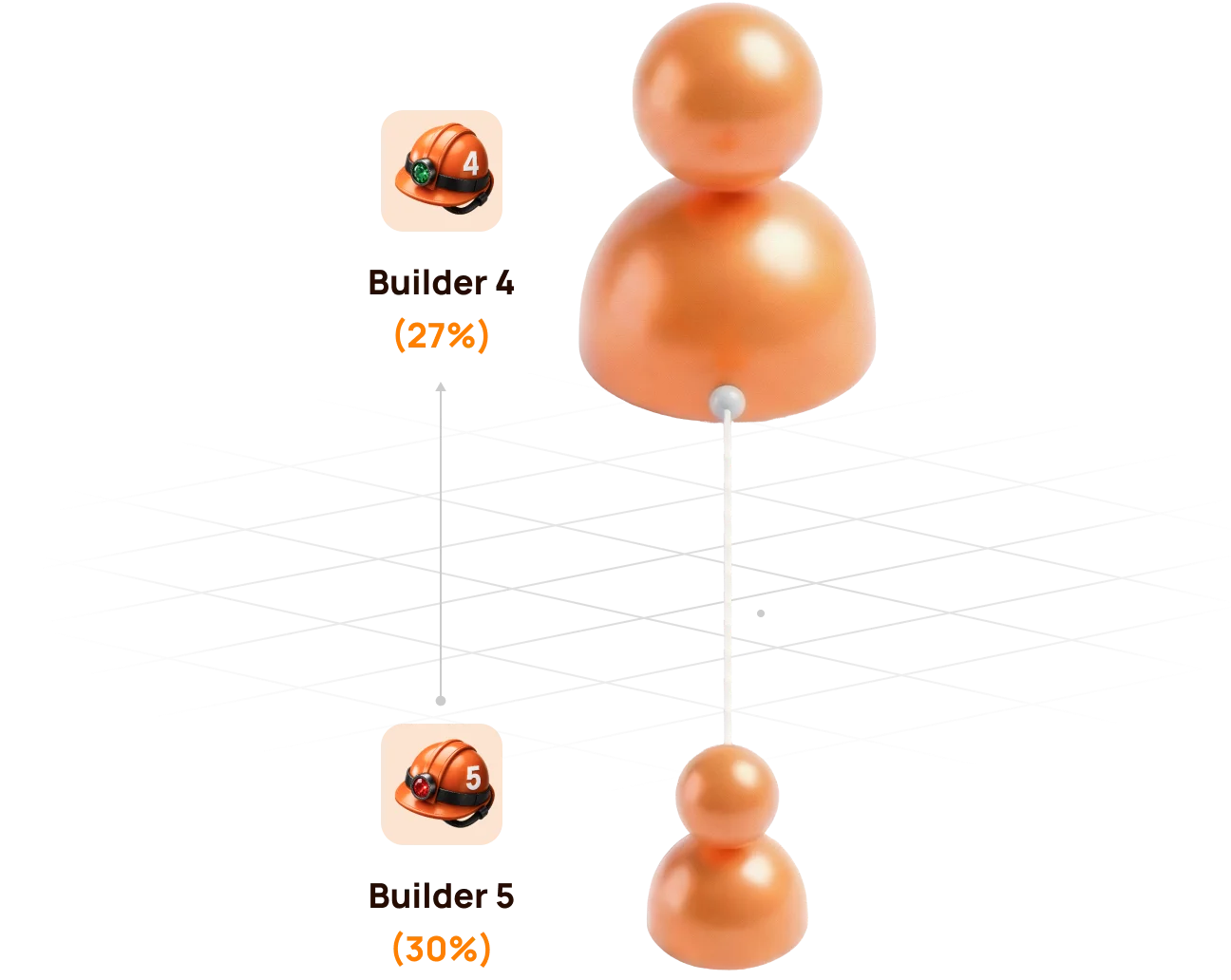
If the lower partner reaches Builder 4 (27%) or a higher status, the upline Builder 4 no longer has a positive percentage difference. The structure behind that partner is compressed for the upline participant.
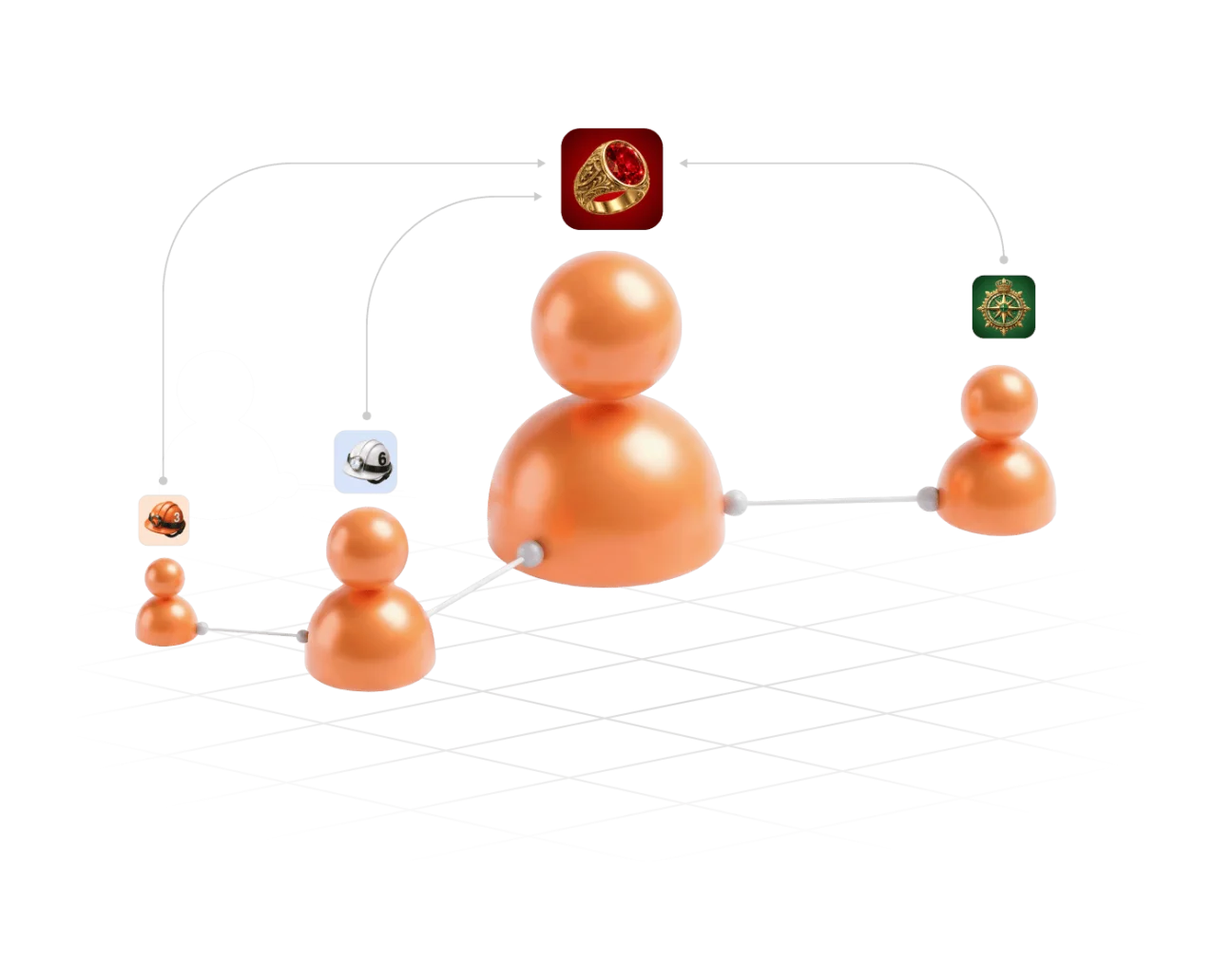
Compression does not remove a participant from the Partner Structure. It changes how the Partner Reward is distributed for the relevant Delta source.
6. Partner Rewards from Lockup Flow
For a qualifying Lockup Flow Smart Cycle, the inviter receives a Partner Reward calculated as a percentage of the invited participant's Delta.
When and how it is calculated
- The invited participant creates a Lockup Flow Smart Cycle.
- The system records the inviter's Partner Status at that moment.
- The applicable status and compression rules are applied to the cycle's Delta.
- The Partner Reward is accrued once when the Smart Cycle is created; the inviter does not wait for the invited participant to Claim.
| Question | Lockup Flow rule |
|---|---|
| What is the calculation base? | The invited participant's Delta, not the full Support Amount |
| Which status rate is used? | The inviter's applicable Partner Status when the invited participant creates the Smart Cycle |
| When is it accrued? | Once, at Smart Cycle creation |
| Where is it shown? | Partner Program → Accrual History |
| Where is the available balance shown? | Partner Program → Partner Wallet |
Automatic transfer rule
- if an accrued Lockup Flow Partner Reward is more than 10 USDT, it is automatically credited to the inviter's wallet after formation;
- an amount below 10 USDT is credited to the Partner Balance;
- when the accumulated Partner Balance reaches 10 USDT, 10 USDT is automatically transferred to the inviter's wallet.
Check the sequence in Accrual History → Partner Wallet → Withdrawal History → Tx Hash.

A Partner Reward accrual and the invited participant's Claim are separate events. The accrual does not mean that the inviter controls or initiates the invited participant's Claim.
7. Partner Rewards and qualification from Daily Flow
For Daily Flow, the inviter's applicable Partner Reward percentage is calculated from the invited participant's Delta. The percentage is determined by the inviter's Partner Status when the invited participant creates the Smart Cycle.
For दैनिक प्रवाह, 20% of the Partner Reward is credited when the cycle is created, and the remaining 80% is paid in equal parts over the 200-day cycle. Use उपार्जन इतिहास और पार्टनर वॉलेट to verify actual accruals and transfers.
How Daily Flow is counted for status qualification
Daily Flow contributes to the structure's qualifying volume with a coefficient of 0.5. Short-term Smart Cycle plans are counted with a coefficient of 1.0.
| Activity | Amount | Qualification coefficient | Counted volume |
|---|---|---|---|
| Short-term Smart Cycle | 100 USDT | 1.0 | 100 USDT |
| Daily Flow · 200 days | 100 USDT | 0.5 | 50 USDT |
Formula: qualifying volume = short cycles × 1.0 + Daily Flow × 0.5.
The coefficient affects status qualification volume, not the participant's 1.1% / 1.3% daily assistance calculation and not the Partner Reward percentage itself.
Atlas explains the coefficient as a way to prioritise regular short-cycle activity, prevent one large long-term cycle from disproportionately accelerating status growth, and keep qualification conditions balanced across partner teams.
Hybrid visual: use the official Daily Flow qualification graphics showing 100% short cycles और 50% Daily Flow with the × 0.5 formula.
Daily Flow still contributes to qualification. The coefficient changes how much of its cycle volume is counted; it does not remove Daily Flow from the Partner Program.
8. Matching Reward
Matching Reward is an additional status benefit available from Master 1 onward. It allows a participant to receive the applicable Matching Reward percentage from the Partner Rewards of personally invited leaders.
Qualification condition
Matching Reward is awarded only when the personally invited participant:
- reaches the same Partner Status as the inviter; or
- reaches a higher Partner Status than the inviter.
If the personally invited participant's status is lower, Matching Reward is not awarded from that participant's Partner Rewards.
Matching Reward rates
| Status group | Matching Reward |
|---|---|
| Start and Builder 1–7 | Not available |
| Master 1–7 | 5–17% |
| Strategist | 19% |
| Ambassador | 21% |
| Director | 23% |
| Executive | 25% |
How to read the rule
Matching Reward is calculated from the Partner Reward received by the personally invited qualified participant. It is not calculated directly from that participant's Support Amount or total structure turnover.
Master 3 inviterpersonally invited→Master 3+Matching activeMaster 3 inviterpersonally invited→Master 2Not activeMatching Reward concerns personally invited participants only. The unlimited-depth Structure Reward and the personally invited leader's Matching Reward are different mechanisms.
9. How to verify an accrual and a transfer
Use the dashboard in chronological order. Each screen answers a different question.
Step 1 — find the calculation
खोलें Partner Program → Accrual History and check:
- Accrual Date — when the reward was recorded;
- Bonus — which Partner Reward mechanism was applied;
- Accrued Reward Amount — the amount added by the calculation.
An entry in Accrual History confirms an accrual. It does not by itself confirm that USDT has already reached the connected wallet.
Step 2 — check the partner balance
खोलें पार्टनर वॉलेट and compare:
| क्षेत्र | Meaning |
|---|---|
| Account Balance | Amount currently available in the Partner Wallet |
| Total Accrued | Cumulative Partner Rewards recorded by the system |
| Rewards Received | Rewards already processed as received according to the dashboard records |
The Partner Wallet balance is an internal dashboard value. It is not the same as the USDT balance displayed by MetaMask.
Step 3 — verify the blockchain transfer
खोलें Withdrawal History, find the relevant transfer and select its Tx Hash. BscScan should show:
- transaction status;
- date and time;
- sender and recipient addresses;
- token and amount;
- network fee and block confirmations.
Before comparing addresses, verify that the same wallet is connected in the Atlas dashboard and MetaMask.
If the numbers do not match immediately
- Check whether a Lockup Flow accrual is still below the automatic-transfer threshold.
- Check whether the record is an accrual rather than a completed withdrawal.
- Confirm the connected wallet address and BNB Smart Chain network.
- Open the Tx Hash instead of relying only on the dashboard total.
- If no Tx Hash exists, save the wallet address, Smart Cycle ID, date and screenshot before contacting support.
10. My Team and Statistics: managing the structure
My Team — qualification and people
उपयोग मेरी टीम when you need to:
- copy the referral link;
- confirm the referrer;
- see the current Partner Status and rate;
- compare Current / Required / Remaining values;
- inspect Structure Lines;
- search for a wallet address;
- identify leaders within the structure.
Statistics — activity and dynamics
उपयोग आँकड़े to answer a different set of questions:
- how many new registrations and active partners appeared;
- whether activity came from Lockup Flow or Daily Flow;
- which period changed: Day, Week, Month, Year or All Time;
- where the activity occurred: Entire Structure, First Line, Lines 2–10 or Line 11+;
- which lines are the most active.
Statistics helps explain development of the structure, but it does not replace Accrual History. Activity can exist without producing a Partner Reward for a particular wallet because status, compression and qualification rules still apply.
11. Three worked examples
Example A — Start with no qualified partner between
| Input | Value |
|---|---|
| Participant status | प्रारंभ करें |
| Eligible Structure Reward rate | 15% |
| Delta used in the example | 100 USDT |
| Qualified partner between participant and source | No |
Calculation: 15% × 100 = 15 USDT.
The result is recorded in उपार्जन इतिहास according to the applicable flow and accrual rules. This example assumes that no other qualification or compression condition changes the percentage.
Example B — Builder 4 above Builder 3
| Input | Value |
|---|---|
| Upline status | Builder 4 — 27% |
| Lower qualified status | Builder 3 — 24% |
| डेल्टा | 1,000 USDT |
- Builder 3:
24% × 1,000 = 240 USDT; - Builder 4:
(27% − 24%) × 1,000 = 30 USDT.
Example C — Matching Reward for a personally invited Master
Assume a participant has Master 1 status with a 5% Matching Reward rate. Their personally invited participant also reaches Master 1 or higher and receives a Partner Reward of 100 USDT.
Calculation: 5% × 100 = 5 USDT Matching Reward.
The 5% is applied to the personally invited leader's Partner Reward, not to their Support Amount and not to their total structure turnover.
Master 1 inviter · 5%→Partner Reward 100→Matching Reward 5All three examples isolate one rule for learning purposes. Actual dashboard results can combine compression, flow-specific rules, qualification and applicable fees.
12. Why a Partner Reward may be missing
| What you see | What to verify |
|---|---|
| Referral link is उपलब्ध नहीं है | A qualifying Smart Cycle of 10 USDT or more exists and its transaction is confirmed |
| Structure activity exists, but no reward appeared | The activity generated Delta and your rate remained positive after compression |
| Lower leader is active, but your Structure Reward is zero | Their status rate may equal or exceed yours |
| Matching Reward is missing | The participant was personally invited and has reached your status or a higher one |
| Lockup Flow amount remains in Partner Balance | The accumulated amount may be below the automatic-transfer threshold |
| Accrual exists, but MetaMask balance did not change | Check Partner Wallet, Withdrawal History and Tx Hash separately |
| Volume looks lower than expected | Compare Actual and Weighted Partner Structure Volume and the 100% / 50% / 10% depth coefficients |
| Search does not show the expected wallet | Recheck the full wallet address and whether it joined through the intended referral link |
Information to prepare for support
- connected wallet address;
- referrer or participant wallet address, if relevant;
- Smart Cycle ID and flow type;
- approximate date and time;
- screenshot of the relevant dashboard tab;
- Tx Hash, if one exists;
- short description of the expected and displayed result.
Never send a seed phrase, private key or wallet password to support.
13. Final checklist and risk warning
Before sharing the referral link
- the official Atlas dashboard is open;
- the intended wallet is connected on BNB Smart Chain;
- a qualifying Smart Cycle is active;
- मेरा रेफरल लिंक is available;
- the invited participant understands that wallet actions remain under their own control.
Before interpreting a reward
- identify whether it is Structure Reward or Matching Reward;
- identify whether the source is Lockup Flow or Daily Flow;
- use Delta as the reward base, not Support Amount;
- account for status-rate differences and compression;
- separate Actual and Weighted Partner Structure Volume;
- verify accrual, dashboard balance and blockchain transfer as separate stages.
Risk warning
Participation is voluntary. Delta, Partner Rewards and the return of a Support Amount are not guaranteed. Claims depend on sufficient smart-contract liquidity. Status tables, screenshots and numerical examples explain the current mechanics; they are not a promise of income or future results.

