
Program Mitra
Itu Program Mitra (Model Kompresi Level, juga disajikan sebagai Undang & Dapatkan) adalah model linier berbasis status yang memungkinkan peserta aktif Sistem Atlas untuk menerima Imbalan Mitra dari Delta yang dihasilkan di dalam Struktur Mitra bawah mereka.
Model menggunakan kompresi berbasis status: imbalan yang tersedia dari suatu cabang bergantung pada persentase kualifikasi dari setiap mitra aktif di cabang tersebut.

Sekilas
| Aktivasi | Secara otomatis setelah Smart Cycle yang memenuhi syarat pertama dengan Jumlah Dukungan sebesar 10 USDT atau lebih |
| Status | 19 level: Mulai, Builder 1–7, Master 1–7, Strategist, Ambassador, Director, dan Executive |
| Hadiah Struktur | Dari 15% hingga 60% di Delta, tergantung pada Status Mitra dan aturan kompresi |
| Kedalaman | Kedalaman tak terbatas, dengan kompresi berbasis status dan koefisien volume-struktur berbobot |
| Verifikasi | Akrual ditampilkan di Dasbor Pribadi; transfer blockchain dapat dicek di BscScan |
Partner Rewards dihitung dari Delta berdasarkan aturan Program Mitra saat ini. Volume siklus digunakan untuk kualifikasi status; itu sendiri bukan basis rewards. Contoh dan tangkapan layar tidak menjamin rewards di masa mendatang.
1. Bagaimana partisipasi dimulai
Aktivasi dalam lima langkah
- Hubungkan dompet ke Dasbor Pribadi Sistem Atlas resmi.
- Buat Smart Cycle Kualifikasi pertama dengan Jumlah Dukungan sebesar 10 USDT atau lebih.
- Buka Program Mitra → Tim Saya.
- Salin Tautan Referensi Saya dan bagikan kepada peserta yang ingin Anda undang.
- Setelah peserta yang diundang terhubung melalui tautan tersebut, dompet mereka menjadi bagian dari Struktur Mitra Sistem Atlas terpadu Anda.
Tidak diperlukan formulir pendaftaran Program Mitra terpisah. Aktivasi dan perhitungan dilakukan secara otomatis berdasarkan aturan program.
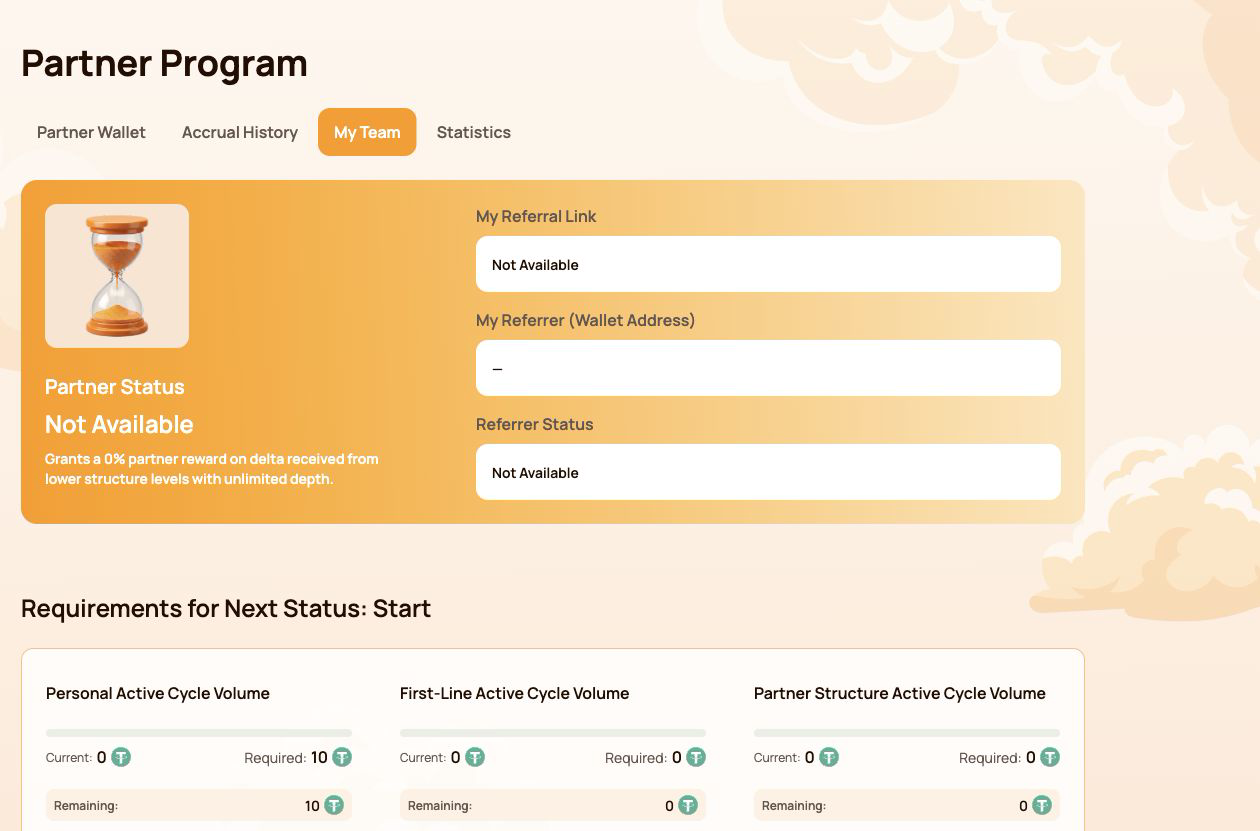
Apa yang muncul di Tim Saya
| Lapangan | Apa artinya |
|---|---|
| Status Kemitraan | Status saat ini dan Persentase Imbalan Struktur |
| Tautan Referensi Saya | Tautan pribadi yang digunakan untuk mengundang peserta baru |
| Referrer Saya (Alamat Dompet) | Dompet yang tautan rujukan miliknya digunakan saat bergabung |
| Status Perujuk | Status Kemitraan Saat Ini dari pihak yang merujuk |
Jika Tautan Referensi Saya menunjukkan Tidak Tersedia, pertama-tama periksa apakah dompet yang terhubung memiliki Smart Cycle yang memenuhi syarat dan transaksi blockchain-nya telah dikonfirmasi.
Satu struktur di seluruh ekosistem Atlas
Peserta yang diundang ditautkan secara permanen ke Struktur Mitra Sistem Atlas yang disatukan. Struktur yang sama dapat digunakan oleh produk dan program ekosistem baru saat tersedia.
Ini berarti:
- sebuah tim tidak perlu dibangun kembali untuk setiap produk Atlas yang baru;
- hubungan mitra tetap terhubung dengan struktur rujukan asli;
- Model Kompresi Level saat ini menerapkan aturan kualifikasi dan hadiahnya sendiri;
- model mitra di masa depan dapat menggunakan hubungan dasar yang sama sementara tetap memisahkan perhitungan, volume, dan imbalan mereka;
- volume yang sama tidak secara otomatis dihitung dalam beberapa program sekaligus.
Koneksi rujukan tidak serta-merta menciptakan hak otomatis atas imbalan. Tautan rujukan menghubungkan dompet dalam struktur mitra, sementara setiap model aktif memeriksa aturan kualifikasinya sendiri. Ini tidak memberikan pengundang kendali atas dompet atau dana peserta lain.
2. Peta antarmuka Program Mitra
Bagian Program Mitra berisi empat tab. Setiap tab menjawab pertanyaan yang berbeda.
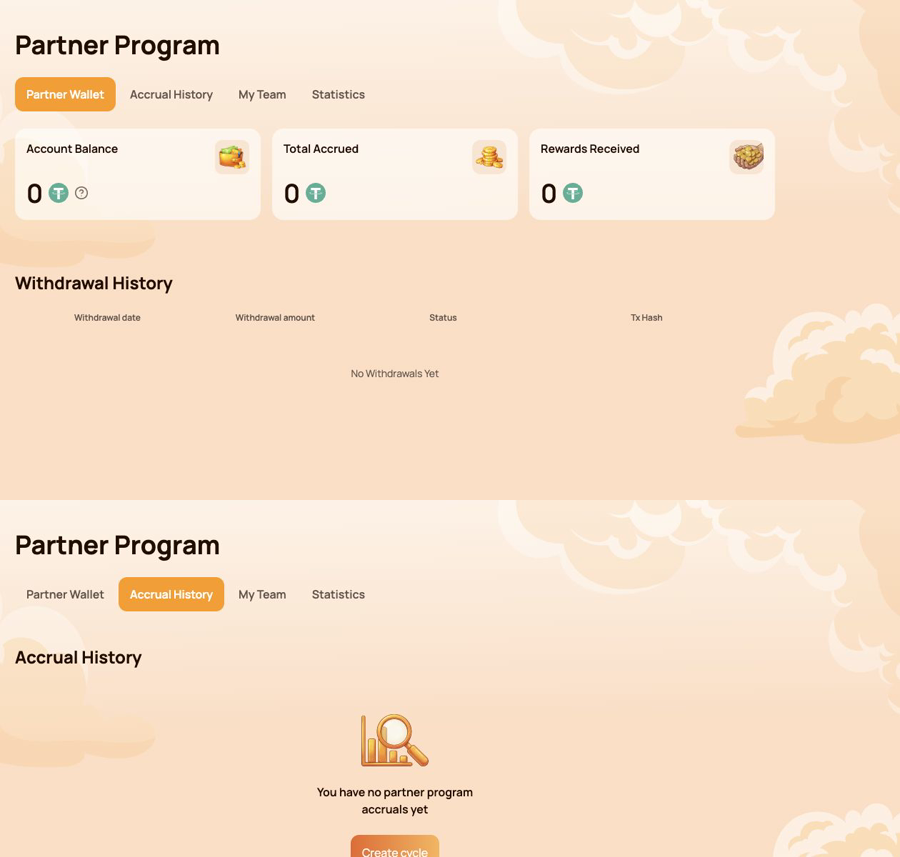
Dompet Mitra — apa saja yang dapat ditransfer?
Gunakan Dompet Mitra untuk memeriksa:
- Saldo Akun;
- Total yang Telah Terakumulasi;
- Hadiah yang Diterima;
- Riwayat Penarikan;
- Hash Tx untuk transfer on-chain.
Riwayat Akrual — dari mana hadiah itu berasal?
Gunakan Riwayat Akrual untuk mengidentifikasi:
- Tanggal Akrual;
- Jenis bonus;
- Jumlah Hadiah Akrual.
Akrual dan transfer blockchain merupakan tahap yang berbeda. Periksa Riwayat Akrual terlebih dahulu, kemudian Dompet Mitra dan Riwayat Penarikan.
Tim Saya — apa saja yang diperlukan untuk status berikutnya?
Gunakan Tim Saya untuk ditinjau:
- informasi rujukan dan perujuk;
- Status Mitra saat ini;
- Volume saat ini / yang dibutuhkan / yang tersisa;
- Persyaratan Status;
- Garis Struktur;
- Cari berdasarkan Alamat Dompet;
- para pemimpin dan kegiatan di dalam organisasi tersebut.
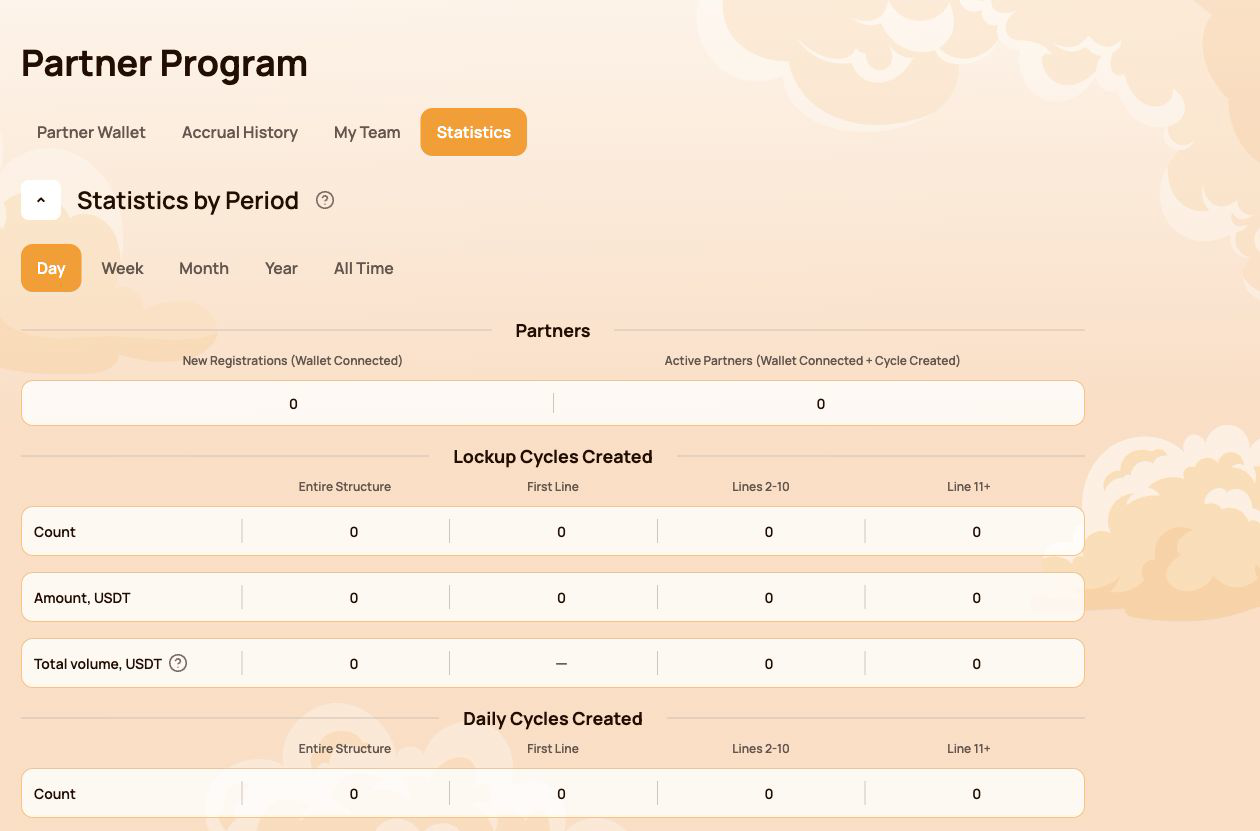
Statistik — bagaimana struktur tersebut berkembang?
Gunakan Statistik untuk membandingkan:
- Hari / Minggu / Bulan / Tahun / Seluruh Waktu;
- Pendaftaran Baru dan Mitra Aktif;
- Aktivitas Aliran Penahanan dan Aliran Harian;
- Seluruh Struktur, Baris Pertama, Baris 2–10, dan Baris 11+;
- Jalur Paling Aktif.
Rute cepat berdasarkan tugas
| Saya ingin… | Buka… |
|---|---|
| Salin tautan rujukan saya | Tim Saya |
| Periksa apa saja yang masih kurang untuk status berikutnya | Tim Saya → Persyaratan untuk Status Selanjutnya |
| Temukan sumber hadiah tersebut | Riwayat Akrual |
| Periksa transfer otomatis | Partner Wallet → Withdrawal History |
| Verify a transfer on-chain | Tx Hash → BscScan |
| Find a participant in the structure | My Team → Search by Wallet Address |
| Compare structure activity over time | Statistik |
The Personal Dashboard shows the result of the calculation. The following sections explain the status, compression, flow-specific and Matching Reward rules behind it.
3. Partner Status: how qualification works
Partner Status determines two parameters: the participant's Structure Reward rate and, from Master 1 onward, the Matching Reward rate. The system checks the qualification conditions automatically.
Three indicators are checked
| Indikator | What is counted |
|---|---|
| Personal Active Cycle Volume | The participant's own qualifying Smart Cycles |
| First-Line Active Cycle Volume | Qualifying volume created by personally invited participants |
| Partner Structure Active Cycle Volume | Qualifying volume across the lower Partner Structure, subject to the program's depth coefficients |
To receive a status, all requirements shown for that level must be met. If a requirement is marked Not required, it does not affect that status.
All 19 Partner Statuses
| Status | Personal Active Cycle Volume | First-Line Active Cycle Volume | Partner Structure Active Cycle Volume | Hadiah Struktur | Matching Reward |
|---|---|---|---|---|---|
 Mulai Mulai |
10 | Not required | Not required | 15% | — |
 Builder 1 Builder 1 |
50 | 100 | Not required | 18% | — |
 Builder 2 Builder 2 |
100 | 300 | 1,000 | 21% | — |
 Builder 3 Builder 3 |
200 | 700 | 2,000 | 24% | — |
 Builder 4 Builder 4 |
300 | 1,200 | 4,000 | 27% | — |
 Builder 5 Builder 5 |
500 | 2,000 | 7,000 | 30% | — |
 Builder 6 Builder 6 |
700 | 3,000 | 12,000 | 33% | — |
 Builder 7 Builder 7 |
1,000 | 4,500 | 18,000 | 36% | — |
 Master 1 Master 1 |
1,500 | 7,000 | 28,000 | 38% | 5% |
 Master 2 Master 2 |
2,000 | 10,000 | 40,000 | 40% | 7% |
 Master 3 Master 3 |
3,000 | 17,000 | 70,000 | 42% | 9% |
 Master 4 Master 4 |
4,000 | 25,000 | 120,000 | 44% | 11% |
 Master 5 Master 5 |
5,000 | 35,000 | 200,000 | 46% | 13% |
 Master 6 Master 6 |
6,000 | 45,000 | 300,000 | 48% | 15% |
 Master 7 Master 7 |
7,000 | 60,000 | 450,000 | 50% | 17% |
 Strategist Strategist |
8,000 | 80,000 | 600,000 | 52.5% | 19% |
 Ambassador Ambassador |
10,000 | 100,000 | 800,000 | 55% | 21% |
 Director Director |
12,000 | 120,000 | 1,100,000 | 57.5% | 23% |
 Executive Executive |
15,000 | 150,000 | 1,500,000 | 60% | 25% |
All amounts in the table are shown in USDT-equivalent units used by the Atlas interface.
How to read progress in My Team
- Saat ini — the volume already counted toward the selected requirement;
- Required — the target for the next status;
- Remaining — the amount still needed to satisfy that requirement.
Check every requirement card, not only the total Partner Structure Active Cycle Volume. A large structure alone does not replace the Personal Active Cycle Volume or First-Line Active Cycle Volume requirement.
A status rate is a qualification parameter used by the reward algorithm. It is not a promised percentage return on a participant's Smart Cycle.
4. Qualification volume, Delta and depth
Several similar-looking values serve different purposes. Keeping them separate makes the Partner Program much easier to understand.
The short version
| Value | Purpose |
|---|---|
| Jumlah Bantuan | A participant's amount of provided aid in a Smart Cycle |
| Partner Structure Active Cycle Volume | Used to check Partner Status qualification |
| Delta generated in the lower Partner Structure | The reward calculation base for the applicable branch |
| Hadiah Struktur | The result calculated from Delta according to status-rate differences and compression rules |
The original Support Amount and the generated Delta are not the same value. Partner Rewards are calculated from Delta, not from the full amount placed into a Smart Cycle.
Actual and Weighted Partner Structure Volume
- Actual Partner Structure Volume shows the structure's qualifying volume before depth coefficients are applied.
- Weighted Partner Structure Volume shows the volume after the coefficients are applied and is used for status qualification where the rules require it.
| Structure depth | Coefficient applied to volume |
|---|---|
| Lines 1–5 | 100% |
| Lines 6–10 | 50% |
| Line 11 and deeper | 10% |
Example of weighted volume
Suppose the structure has 1,000 USDT of qualifying volume on each of three depth groups:
| Group | Actual volume | Coefficient | Weighted volume |
|---|---|---|---|
| Lines 1–5 | 1,000 | 100% | 1,000 |
| Lines 6–10 | 1,000 | 50% | 500 |
| Line 11+ | 1,000 | 10% | 100 |
| Total | 3,000 | 1,600 |
This example explains status-volume weighting only. It does not calculate a Partner Reward.
Where to check the numbers
- open Program Mitra → Tim Saya for qualification volumes and next-status progress;
- open Statistik to compare structure activity by depth and period;
- open Riwayat Akrual to see an actual calculated Partner Reward;
- use Partner Wallet → Withdrawal History to verify a completed transfer.
Do not use cycle volume, Partner Structure Volume and Delta as interchangeable terms. Cycle volume is used for status qualification; Delta is the reward calculation base.
5. Compression: who receives which part of the reward
Compression distributes the available Partner Reward according to the percentage qualifications of active partners in the branch. An upline participant receives the difference between their status rate and the rate already realised by a qualified partner below.
The rule in three situations
| Situation below you | What happens |
|---|---|
| The partner's status rate is lower than yours | You receive the positive difference between the two rates |
| There is no qualified partner between you and the Delta source | You may receive your full eligible status rate under the program rules |
| The partner's rate is equal to or higher than yours | You receive 0% from the structure compressed behind that partner |
The position of a wallet at the top of a branch does not guarantee a reward. Qualification and active status determine how the available percentage is distributed.
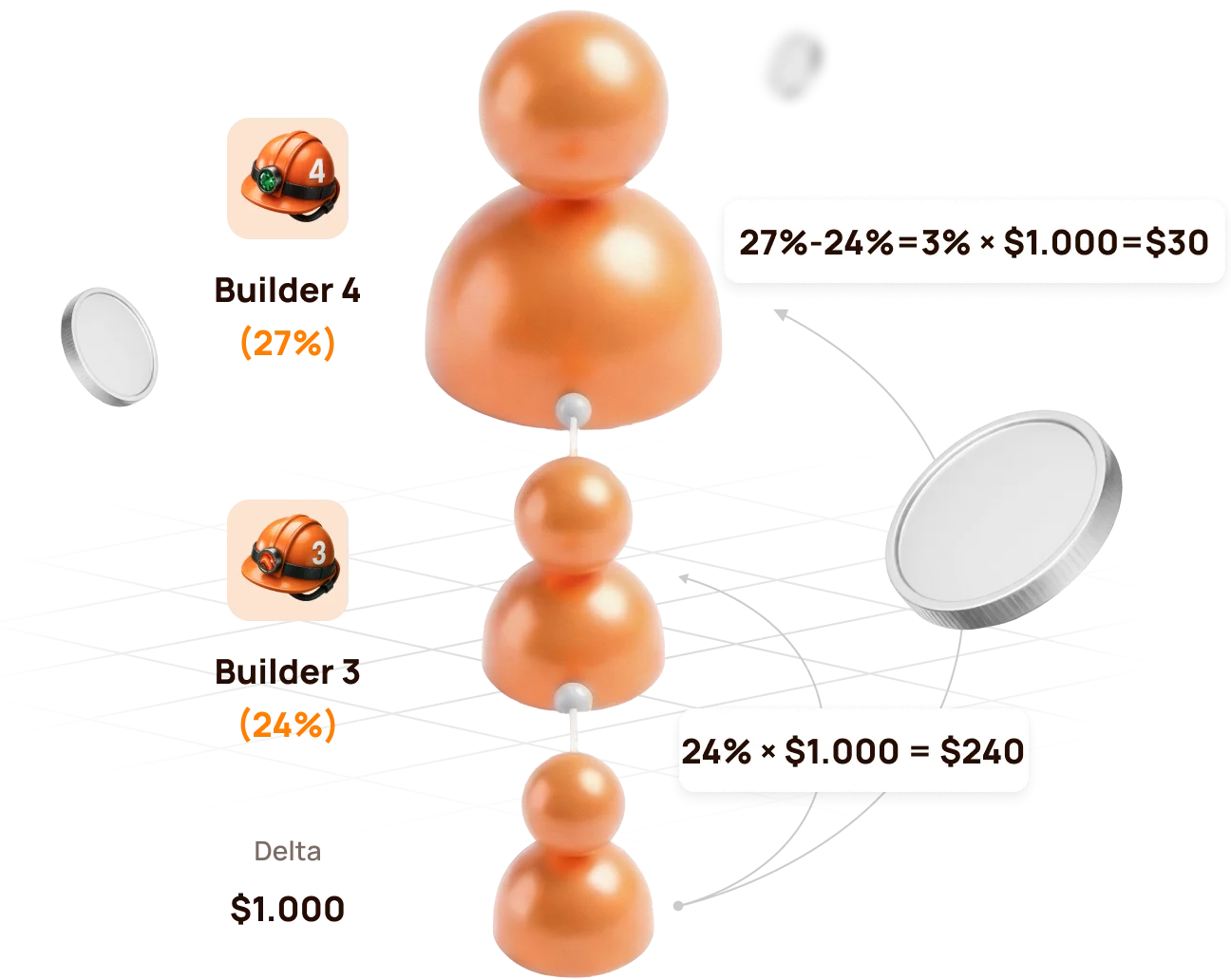
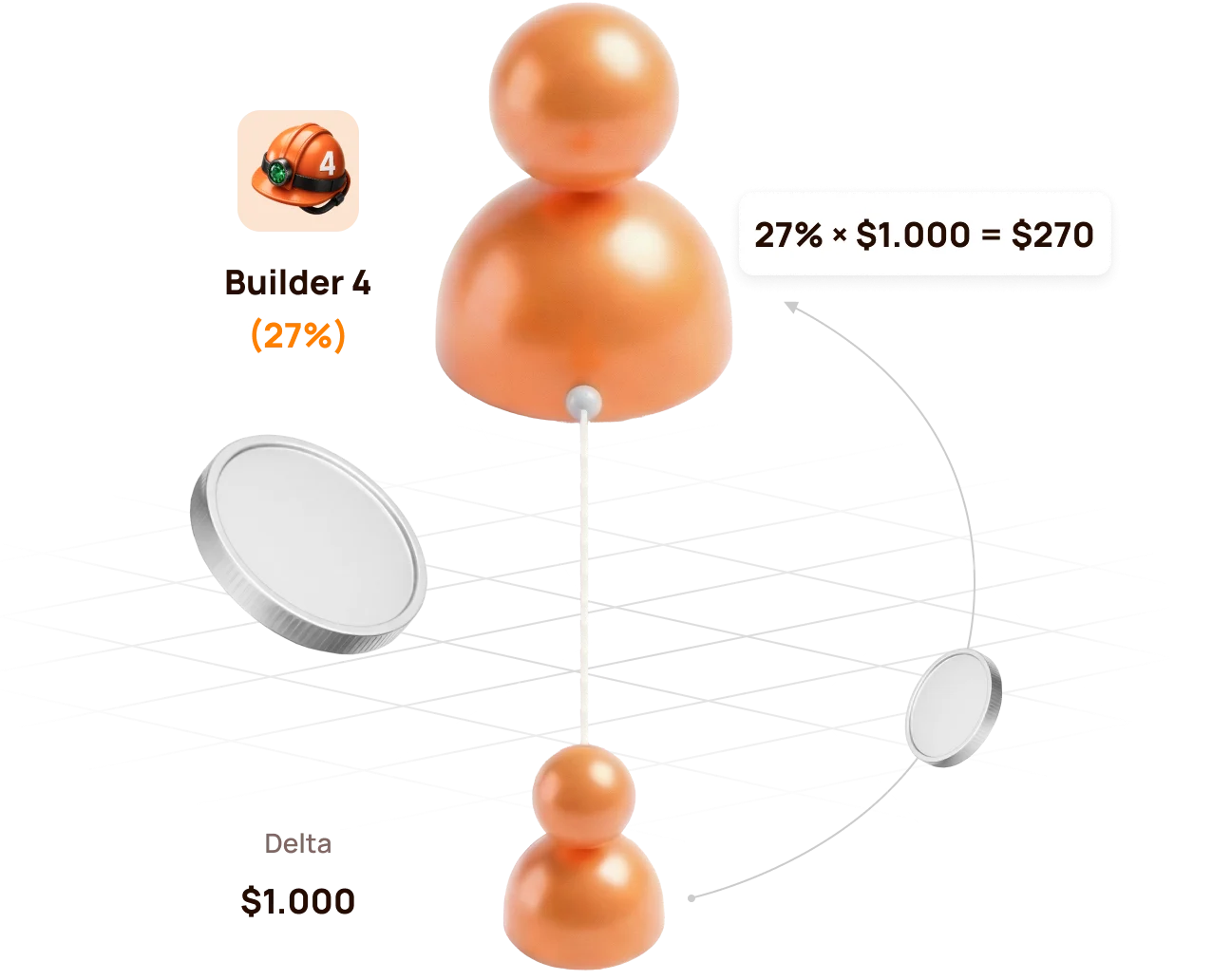
Official example: Builder 4 above Builder 3
The lower structure generates 1,000 USDT of Delta.
| Participant | Status Kemitraan | Rate | Calculation | Partner Reward |
|---|---|---|---|---|
| Lower qualified partner | Builder 3 | 24% | 24% × 1,000 | 240 USDT |
| Upline partner | Builder 4 | 27% | (27% − 24%) × 1,000 | 30 USDT |
| Total distributed by status rates | 27% | 270 USDT |
If there is no Builder 3 between the source and Builder 4
Builder 4 can realise the full eligible rate:
27% × 1,000 USDT = 270 USDT
If the lower partner reaches the same or a higher rate
If the lower partner reaches Builder 4 (27%) or a higher status, the upline Builder 4 no longer has a positive percentage difference. The structure behind that partner is compressed for the upline participant.
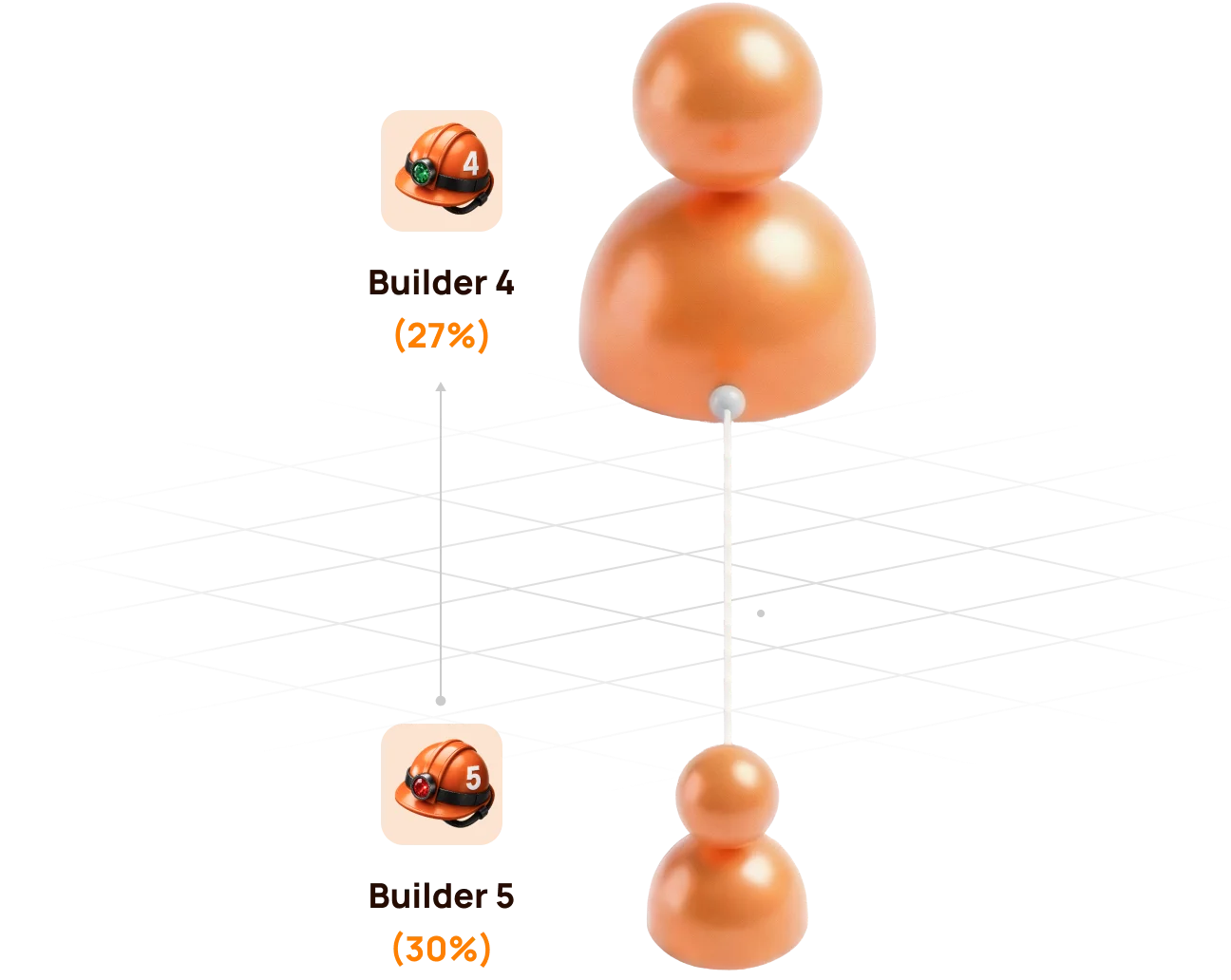
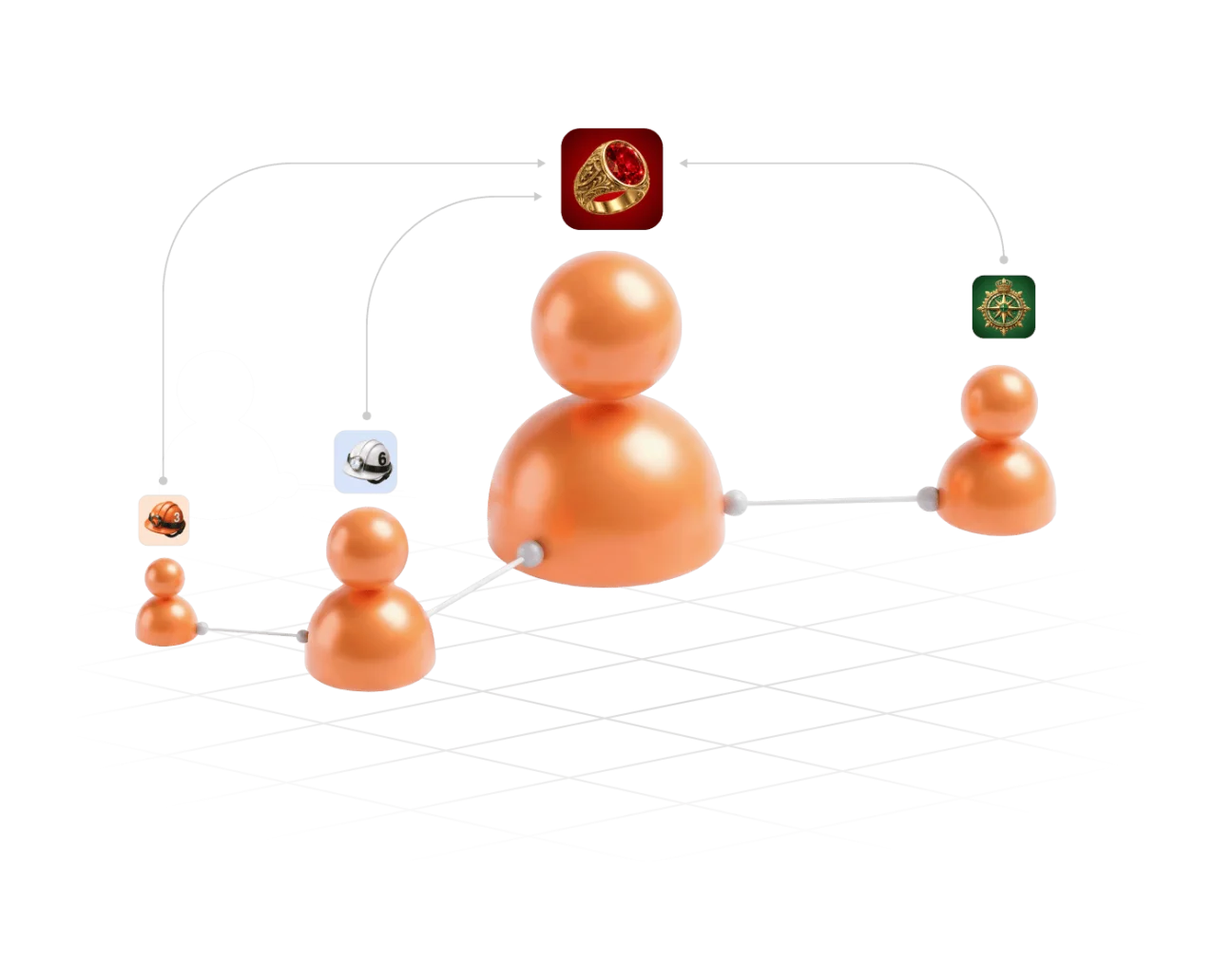
Compression does not remove a participant from the Partner Structure. It changes how the Partner Reward is distributed for the relevant Delta source.
6. Partner Rewards from Lockup Flow
For a qualifying Lockup Flow Smart Cycle, the inviter receives a Partner Reward calculated as a percentage of the invited participant's Delta.
When and how it is calculated
- The invited participant creates a Lockup Flow Smart Cycle.
- The system records the inviter's Partner Status at that moment.
- The applicable status and compression rules are applied to the cycle's Delta.
- The Partner Reward is accrued once when the Smart Cycle is created; the inviter does not wait for the invited participant to Claim.
| Question | Lockup Flow rule |
|---|---|
| What is the calculation base? | The invited participant's Delta, not the full Support Amount |
| Which status rate is used? | The inviter's applicable Partner Status when the invited participant creates the Smart Cycle |
| When is it accrued? | Once, at Smart Cycle creation |
| Where is it shown? | Partner Program → Accrual History |
| Where is the available balance shown? | Partner Program → Partner Wallet |
Automatic transfer rule
- if an accrued Lockup Flow Partner Reward is more than 10 USDT, it is automatically credited to the inviter's wallet after formation;
- an amount below 10 USDT is credited to the Partner Balance;
- when the accumulated Partner Balance reaches 10 USDT, 10 USDT is automatically transferred to the inviter's wallet.
Check the sequence in Accrual History → Partner Wallet → Withdrawal History → Tx Hash.

A Partner Reward accrual and the invited participant's Claim are separate events. The accrual does not mean that the inviter controls or initiates the invited participant's Claim.
7. Partner Rewards and qualification from Daily Flow
For Daily Flow, the inviter's applicable Partner Reward percentage is calculated from the invited participant's Delta. The percentage is determined by the inviter's Partner Status when the invited participant creates the Smart Cycle.
For Arus Harian, 20% of the Partner Reward is credited when the cycle is created, and the remaining 80% is paid in equal parts over the 200-day cycle. Use Riwayat Akrual dan Dompet Mitra to verify actual accruals and transfers.
How Daily Flow is counted for status qualification
Daily Flow contributes to the structure's qualifying volume with a coefficient of 0.5. Short-term Smart Cycle plans are counted with a coefficient of 1.0.
| Activity | Amount | Qualification coefficient | Counted volume |
|---|---|---|---|
| Short-term Smart Cycle | 100 USDT | 1.0 | 100 USDT |
| Daily Flow · 200 days | 100 USDT | 0.5 | 50 USDT |
Formula: qualifying volume = short cycles × 1.0 + Daily Flow × 0.5.
The coefficient affects status qualification volume, not the participant's 1.1% / 1.3% daily assistance calculation and not the Partner Reward percentage itself.
Atlas explains the coefficient as a way to prioritise regular short-cycle activity, prevent one large long-term cycle from disproportionately accelerating status growth, and keep qualification conditions balanced across partner teams.
Hybrid visual: use the official Daily Flow qualification graphics showing 100% short cycles dan 50% Daily Flow with the × 0.5 formula.
Daily Flow still contributes to qualification. The coefficient changes how much of its cycle volume is counted; it does not remove Daily Flow from the Partner Program.
8. Matching Reward
Matching Reward is an additional status benefit available from Master 1 onward. It allows a participant to receive the applicable Matching Reward percentage from the Partner Rewards of personally invited leaders.
Qualification condition
Matching Reward is awarded only when the personally invited participant:
- reaches the same Partner Status as the inviter; or
- reaches a higher Partner Status than the inviter.
If the personally invited participant's status is lower, Matching Reward is not awarded from that participant's Partner Rewards.
Matching Reward rates
| Status group | Matching Reward |
|---|---|
| Start and Builder 1–7 | Not available |
| Master 1–7 | 5–17% |
| Strategist | 19% |
| Ambassador | 21% |
| Director | 23% |
| Executive | 25% |
How to read the rule
Matching Reward is calculated from the Partner Reward received by the personally invited qualified participant. It is not calculated directly from that participant's Support Amount or total structure turnover.
Master 3 inviterpersonally invited→Master 3+Matching activeMaster 3 inviterpersonally invited→Master 2Not activeMatching Reward concerns personally invited participants only. The unlimited-depth Structure Reward and the personally invited leader's Matching Reward are different mechanisms.
9. How to verify an accrual and a transfer
Use the dashboard in chronological order. Each screen answers a different question.
Step 1 — find the calculation
Buka Partner Program → Accrual History and check:
- Accrual Date — when the reward was recorded;
- Bonus — which Partner Reward mechanism was applied;
- Accrued Reward Amount — the amount added by the calculation.
An entry in Accrual History confirms an accrual. It does not by itself confirm that USDT has already reached the connected wallet.
Step 2 — check the partner balance
Buka Dompet Mitra and compare:
| Lapangan | Arti |
|---|---|
| Account Balance | Amount currently available in the Partner Wallet |
| Total Accrued | Cumulative Partner Rewards recorded by the system |
| Rewards Received | Rewards already processed as received according to the dashboard records |
The Partner Wallet balance is an internal dashboard value. It is not the same as the USDT balance displayed by MetaMask.
Step 3 — verify the blockchain transfer
Buka Withdrawal History, find the relevant transfer and select its Tx Hash. BscScan should show:
- transaction status;
- date and time;
- sender and recipient addresses;
- token and amount;
- network fee and block confirmations.
Before comparing addresses, verify that the same wallet is connected in the Atlas dashboard and MetaMask.
If the numbers do not match immediately
- Check whether a Lockup Flow accrual is still below the automatic-transfer threshold.
- Check whether the record is an accrual rather than a completed withdrawal.
- Confirm the connected wallet address and BNB Smart Chain network.
- Open the Tx Hash instead of relying only on the dashboard total.
- If no Tx Hash exists, save the wallet address, Smart Cycle ID, date and screenshot before contacting support.
10. My Team and Statistics: managing the structure
My Team — qualification and people
Gunakan Tim Saya when you need to:
- copy the referral link;
- confirm the referrer;
- see the current Partner Status and rate;
- compare Current / Required / Remaining values;
- inspect Structure Lines;
- search for a wallet address;
- identify leaders within the structure.
Statistics — activity and dynamics
Gunakan Statistik to answer a different set of questions:
- how many new registrations and active partners appeared;
- whether activity came from Lockup Flow or Daily Flow;
- which period changed: Day, Week, Month, Year or All Time;
- where the activity occurred: Entire Structure, First Line, Lines 2–10 or Line 11+;
- which lines are the most active.
Statistics helps explain development of the structure, but it does not replace Accrual History. Activity can exist without producing a Partner Reward for a particular wallet because status, compression and qualification rules still apply.
11. Three worked examples
Example A — Start with no qualified partner between
| Input | Value |
|---|---|
| Participant status | Mulai |
| Eligible Structure Reward rate | 15% |
| Delta used in the example | 100 USDT |
| Qualified partner between participant and source | No |
Calculation: 15% × 100 = 15 USDT.
The result is recorded in Riwayat Akrual according to the applicable flow and accrual rules. This example assumes that no other qualification or compression condition changes the percentage.
Example B — Builder 4 above Builder 3
| Input | Value |
|---|---|
| Upline status | Builder 4 — 27% |
| Lower qualified status | Builder 3 — 24% |
| Delta | 1,000 USDT |
- Builder 3:
24% × 1,000 = 240 USDT; - Builder 4:
(27% − 24%) × 1,000 = 30 USDT.
Example C — Matching Reward for a personally invited Master
Assume a participant has Master 1 status with a 5% Matching Reward rate. Their personally invited participant also reaches Master 1 or higher and receives a Partner Reward of 100 USDT.
Calculation: 5% × 100 = 5 USDT Matching Reward.
The 5% is applied to the personally invited leader's Partner Reward, not to their Support Amount and not to their total structure turnover.
Master 1 inviter · 5%→Partner Reward 100→Matching Reward 5All three examples isolate one rule for learning purposes. Actual dashboard results can combine compression, flow-specific rules, qualification and applicable fees.
12. Why a Partner Reward may be missing
| Apa yang Anda lihat | What to verify |
|---|---|
| Referral link is Tidak Tersedia | A qualifying Smart Cycle of 10 USDT or more exists and its transaction is confirmed |
| Structure activity exists, but no reward appeared | The activity generated Delta and your rate remained positive after compression |
| Lower leader is active, but your Structure Reward is zero | Their status rate may equal or exceed yours |
| Matching Reward is missing | The participant was personally invited and has reached your status or a higher one |
| Lockup Flow amount remains in Partner Balance | The accumulated amount may be below the automatic-transfer threshold |
| Accrual exists, but MetaMask balance did not change | Check Partner Wallet, Withdrawal History and Tx Hash separately |
| Volume looks lower than expected | Compare Actual and Weighted Partner Structure Volume and the 100% / 50% / 10% depth coefficients |
| Search does not show the expected wallet | Recheck the full wallet address and whether it joined through the intended referral link |
Information to prepare for support
- connected wallet address;
- referrer or participant wallet address, if relevant;
- Smart Cycle ID and flow type;
- approximate date and time;
- screenshot of the relevant dashboard tab;
- Tx Hash, if one exists;
- short description of the expected and displayed result.
Never send a seed phrase, private key or wallet password to support.
13. Final checklist and risk warning
Before sharing the referral link
- the official Atlas dashboard is open;
- the intended wallet is connected on BNB Smart Chain;
- a qualifying Smart Cycle is active;
- Tautan Referensi Saya is available;
- the invited participant understands that wallet actions remain under their own control.
Before interpreting a reward
- identify whether it is Structure Reward or Matching Reward;
- identify whether the source is Lockup Flow or Daily Flow;
- use Delta as the reward base, not Support Amount;
- account for status-rate differences and compression;
- separate Actual and Weighted Partner Structure Volume;
- verify accrual, dashboard balance and blockchain transfer as separate stages.
Risk warning
Participation is voluntary. Delta, Partner Rewards and the return of a Support Amount are not guaranteed. Claims depend on sufficient smart-contract liquidity. Status tables, screenshots and numerical examples explain the current mechanics; they are not a promise of income or future results.

