
合作伙伴计划
这 伙伴计划(层级压缩模型,亦称为邀请赚取) 是一个线性的、基于状态的模型,允许活跃的 Atlas 系统参与者从其下级伙伴结构中产生的 Delta 获得伙伴奖励。.
该模型采用基于状态的压缩:分支中可获得的奖励取决于该分支中每个活跃合作伙伴的合格百分比。.

一览
| 激活 | 在首次符合条件且支持金额达到 10 USDT 或以上的“智能周期”结束后自动进行 |
| 状态 | 19个级别:Start、Builder 1–7、Master 1–7、Strategist、Ambassador、Director 和 Executive |
| 结构奖励 | 根据合作伙伴状态和压缩规则,范围从 Delta 的 15% 到 60% |
| 深度 | 无限深度,结合基于状态的压缩和加权结构体积系数 |
| 验证 | 应计金额会在“个人仪表盘”中显示;区块链转账记录可在 BscScan 上查询 |
伙伴奖励根据当前的伙伴计划规则由Delta计算得出。周期销量用于级别资格认证,本身并不是奖励基数。示例和屏幕截图不保证未来的奖励。.
1. 参与是如何开始的
五步激活指南
- 将钱包连接到官方的Atlas系统个人仪表盘。.
- 创建首个符合条件的“智能周期”,其支持金额为 10 USDT 或以上.
- 打开 合作伙伴计划 → 我的团队.
- 复制 我的推荐链接 并将其分享给您想要邀请的参与者。.
- 被邀请的参与者通过链接连接后,其钱包将纳入您的统一Atlas系统合作伙伴架构中。.
无需单独填写合作伙伴计划注册表。激活和结算将根据计划规则自动进行。.
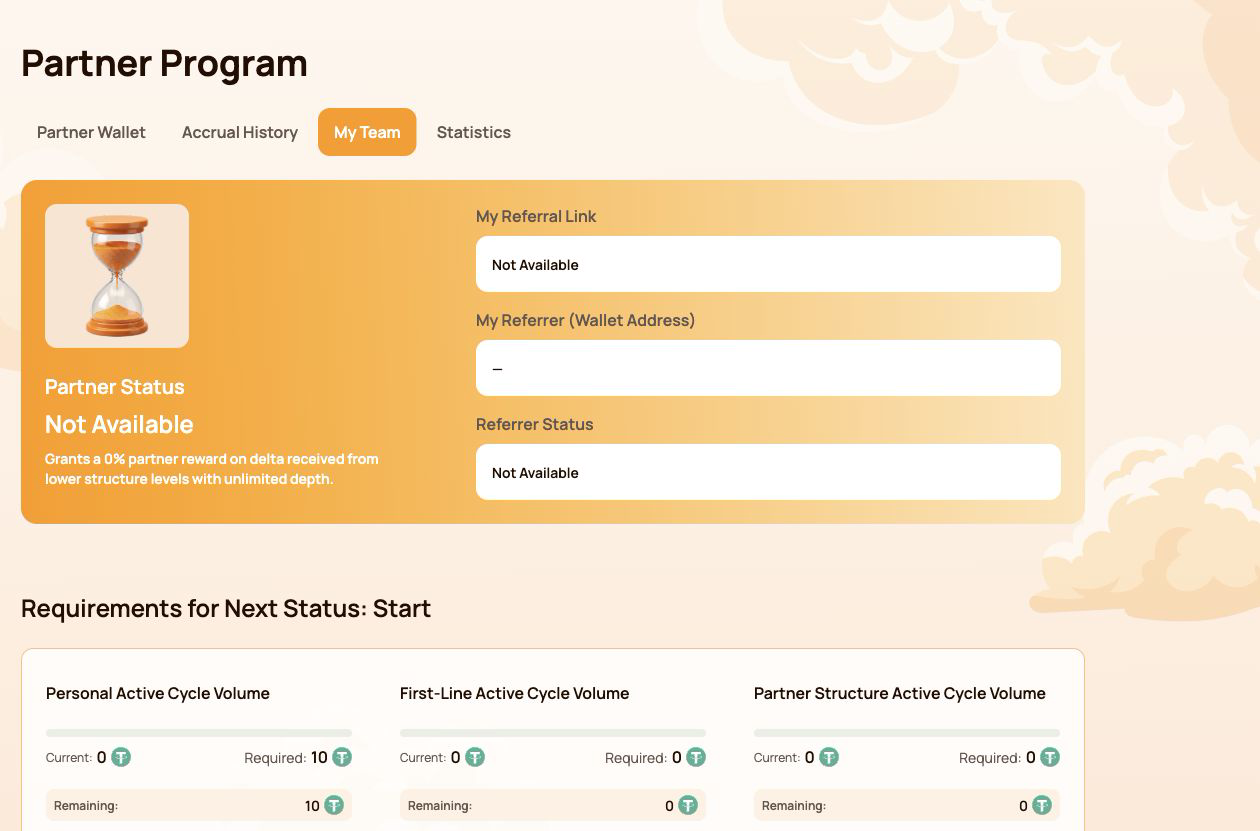
“我的团队”中显示的内容
| 字段 | 其含义 |
|---|---|
| 合作伙伴状态 | 当前状态与结构 奖励比例 |
| 我的推荐链接 | 用于邀请新参与者的个人链接 |
| 我的推荐人(钱包地址) | 注册时使用的推荐链接所属的钱包 |
| 引荐来源状态 | 推荐人的当前合作伙伴状态 |
如果 我的推荐链接 显示 暂无, 首先请确认已连接的钱包是否拥有符合条件的“智能循环”,且其区块链交易是否已确认。.
贯穿整个Atlas生态系统的单一架构
受邀参与者将永久关联到统一的Atlas系统合作伙伴架构中。随着新生态系统产品和计划的推出,这些产品和计划也可使用该架构。.
这意味着:
- 每个新 Atlas 产品都不需要重新组建团队;;
- 合作伙伴关系仍然与最初的转介结构保持连接;;
- 当前的关卡压缩模型应用其自身的资格和奖励规则;;
- 未来的合作伙伴模型可能会使用相同的基本关系,同时保持其计算、体量和奖励相互独立;;
- 同一个卷不会自动同时在多个程序中被计算。.
推荐连接并不能自动产生获得奖励的权利。推荐链接在合作伙伴结构内连接了各个钱包,而每个活跃模型都会检查自身的资格规则。它并未赋予邀请者对其他参与者钱包或资金的控制权。.
2. 合作伙伴计划界面图
“合作伙伴计划”部分包含四个选项卡。每个选项卡回答一个不同的问题。.
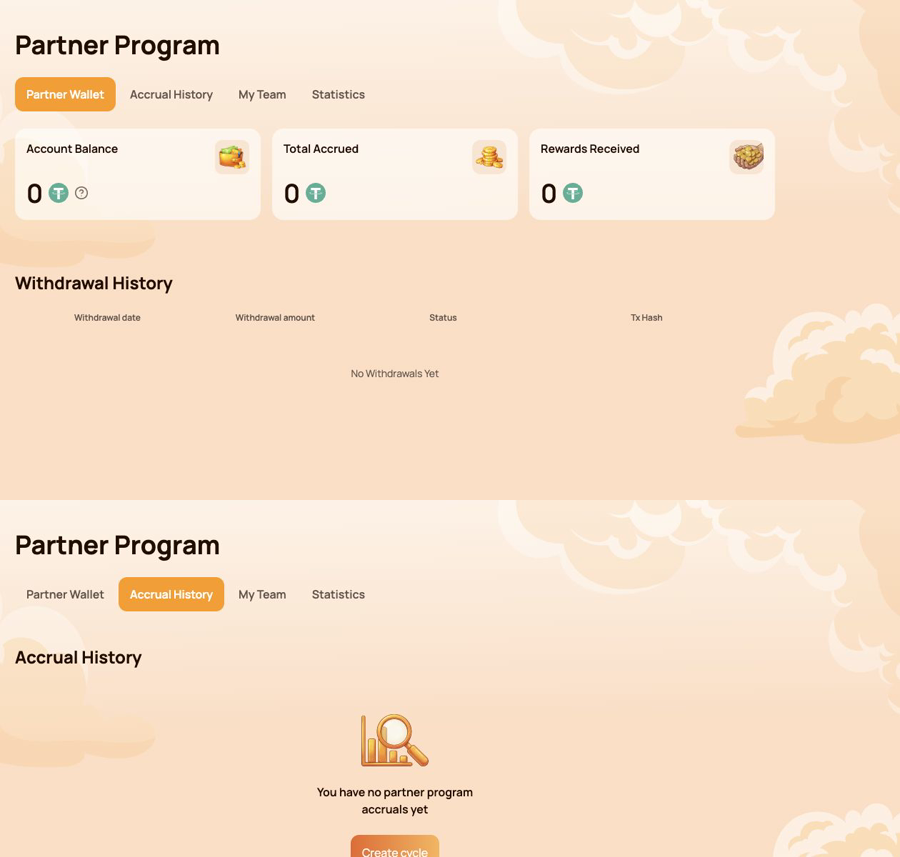
伙伴钱包 —— 可以转移什么?
使用 合作伙伴钱包 检查
- 账户余额;
- 累计应计金额;
- 已收到的奖励;;
- 提现历史;
- 链上转账的交易哈希.
权责发生历史 — 奖励来自何处?
使用 应计历史 识别
- 应计日;;
- 奖金类型;;
- 已累积奖励金额.
应计与区块链转账是不同的阶段。请先检查应计历史记录,然后检查合作方钱包和提现历史记录。.
我的团队——下次状态更新需要准备什么?
使用 我的团队 待审核
- 推荐及推荐人信息;;
- 当前合作伙伴状态;;
- 当前 / 所需 / 剩余卷数;;
- 状态要求;;
- 结构线;
- 通过钱包地址搜索;
- 结构内部的领导者和活动。.
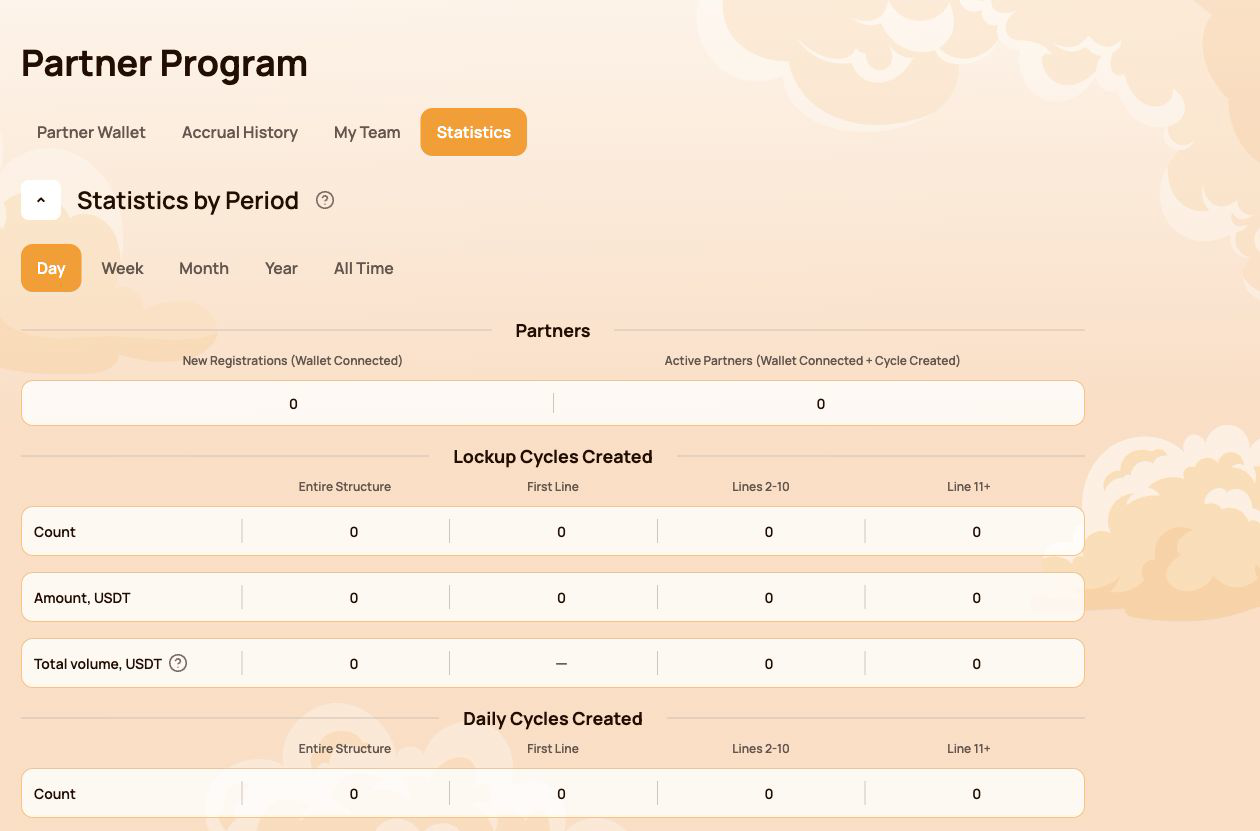
统计数据——结构是如何发展的?
使用 统计数据 进行比较
- 按天 / 按周 / 按月 / 按年 / 历史全部;
- 新注册用户与活跃合作伙伴;
- 锁定期资金流向与日常资金流向活动;;
- 整体结构,第一行,第2–10行以及第11行及以上;;
- 最活跃线路.
按任务快速导航
| 我想…… | 打开… |
|---|---|
| 复制我的推荐链接 | 我的团队 |
| 检查达到下一状态还缺少什么 | 我的团队 → 下一个状态的要求 |
| 寻找奖励来源 | 应计历史 |
| 检查自动转账 | Partner Wallet → Withdrawal History |
| Verify a transfer on-chain | Tx Hash → BscScan |
| Find a participant in the structure | My Team → Search by Wallet Address |
| Compare structure activity over time | 统计数据 |
The Personal Dashboard shows the result of the calculation. The following sections explain the status, compression, flow-specific and Matching Reward rules behind it.
3. Partner Status: how qualification works
Partner Status determines two parameters: the participant's Structure Reward rate and, from Master 1 onward, the Matching Reward rate. The system checks the qualification conditions automatically.
Three indicators are checked
| 指标 | What is counted |
|---|---|
| Personal Active Cycle Volume | The participant's own qualifying Smart Cycles |
| First-Line Active Cycle Volume | Qualifying volume created by personally invited participants |
| Partner Structure Active Cycle Volume | Qualifying volume across the lower Partner Structure, subject to the program's depth coefficients |
To receive a status, all requirements shown for that level must be met. If a requirement is marked Not required, it does not affect that status.
All 19 Partner Statuses
| 状态 | Personal Active Cycle Volume | First-Line Active Cycle Volume | Partner Structure Active Cycle Volume | 结构奖励 | Matching Reward |
|---|---|---|---|---|---|
 开始 开始 |
10 | Not required | Not required | 15% | — |
 Builder 1 Builder 1 |
50 | 100 | Not required | 18% | — |
 Builder 2 Builder 2 |
100 | 300 | 1,000 | 21% | — |
 Builder 3 Builder 3 |
200 | 700 | 2,000 | 24% | — |
 Builder 4 Builder 4 |
300 | 1,200 | 4,000 | 27% | — |
 Builder 5 Builder 5 |
500 | 2,000 | 7,000 | 30% | — |
 Builder 6 Builder 6 |
700 | 3,000 | 12,000 | 33% | — |
 Builder 7 Builder 7 |
1,000 | 4,500 | 18,000 | 36% | — |
 Master 1 Master 1 |
1,500 | 7,000 | 28,000 | 38% | 5% |
 Master 2 Master 2 |
2,000 | 10,000 | 40,000 | 40% | 7% |
 Master 3 Master 3 |
3,000 | 17,000 | 70,000 | 42% | 9% |
 Master 4 Master 4 |
4,000 | 25,000 | 120,000 | 44% | 11% |
 Master 5 Master 5 |
5,000 | 35,000 | 200,000 | 46% | 13% |
 Master 6 Master 6 |
6,000 | 45,000 | 300,000 | 48% | 15% |
 Master 7 Master 7 |
7,000 | 60,000 | 450,000 | 50% | 17% |
 Strategist Strategist |
8,000 | 80,000 | 600,000 | 52.5% | 19% |
 Ambassador Ambassador |
10,000 | 100,000 | 800,000 | 55% | 21% |
 Director Director |
12,000 | 120,000 | 1,100,000 | 57.5% | 23% |
 Executive Executive |
15,000 | 150,000 | 1,500,000 | 60% | 25% |
All amounts in the table are shown in USDT-equivalent units used by the Atlas interface.
How to read progress in My Team
- 当前 — the volume already counted toward the selected requirement;
- Required — the target for the next status;
- Remaining — the amount still needed to satisfy that requirement.
Check every requirement card, not only the total Partner Structure Active Cycle Volume. A large structure alone does not replace the Personal Active Cycle Volume or First-Line Active Cycle Volume requirement.
A status rate is a qualification parameter used by the reward algorithm. It is not a promised percentage return on a participant's Smart Cycle.
4. Qualification volume, Delta and depth
Several similar-looking values serve different purposes. Keeping them separate makes the Partner Program much easier to understand.
The short version
| Value | Purpose |
|---|---|
| 支持金额 | A participant's amount of provided aid in a Smart Cycle |
| Partner Structure Active Cycle Volume | Used to check Partner Status qualification |
| Delta generated in the lower Partner Structure | The reward calculation base for the applicable branch |
| 结构奖励 | The result calculated from Delta according to status-rate differences and compression rules |
The original Support Amount and the generated Delta are not the same value. Partner Rewards are calculated from 德尔塔, not from the full amount placed into a Smart Cycle.
Actual and Weighted Partner Structure Volume
- Actual Partner Structure Volume shows the structure's qualifying volume before depth coefficients are applied.
- Weighted Partner Structure Volume shows the volume after the coefficients are applied and is used for status qualification where the rules require it.
| Structure depth | Coefficient applied to volume |
|---|---|
| Lines 1–5 | 100% |
| Lines 6–10 | 50% |
| Line 11 and deeper | 10% |
Example of weighted volume
Suppose the structure has 1,000 USDT of qualifying volume on each of three depth groups:
| Group | Actual volume | Coefficient | Weighted volume |
|---|---|---|---|
| Lines 1–5 | 1,000 | 100% | 1,000 |
| Lines 6–10 | 1,000 | 50% | 500 |
| Line 11+ | 1,000 | 10% | 100 |
| Total | 3,000 | 1,600 |
This example explains status-volume weighting only. It does not calculate a Partner Reward.
Where to check the numbers
- open 合作伙伴计划 → 我的团队 for qualification volumes and next-status progress;
- open 统计数据 to compare structure activity by depth and period;
- open 应计历史 to see an actual calculated Partner Reward;
- use Partner Wallet → Withdrawal History to verify a completed transfer.
Do not use cycle volume, Partner Structure Volume and Delta as interchangeable terms. Cycle volume is used for status qualification; Delta is the reward calculation base.
5. Compression: who receives which part of the reward
Compression distributes the available Partner Reward according to the percentage qualifications of active partners in the branch. An upline participant receives the difference between their status rate and the rate already realised by a qualified partner below.
The rule in three situations
| Situation below you | What happens |
|---|---|
| The partner's status rate is lower than yours | You receive the positive difference between the two rates |
| There is no qualified partner between you and the Delta source | You may receive your full eligible status rate under the program rules |
| The partner's rate is equal to or higher than yours | You receive 0% from the structure compressed behind that partner |
The position of a wallet at the top of a branch does not guarantee a reward. Qualification and active status determine how the available percentage is distributed.
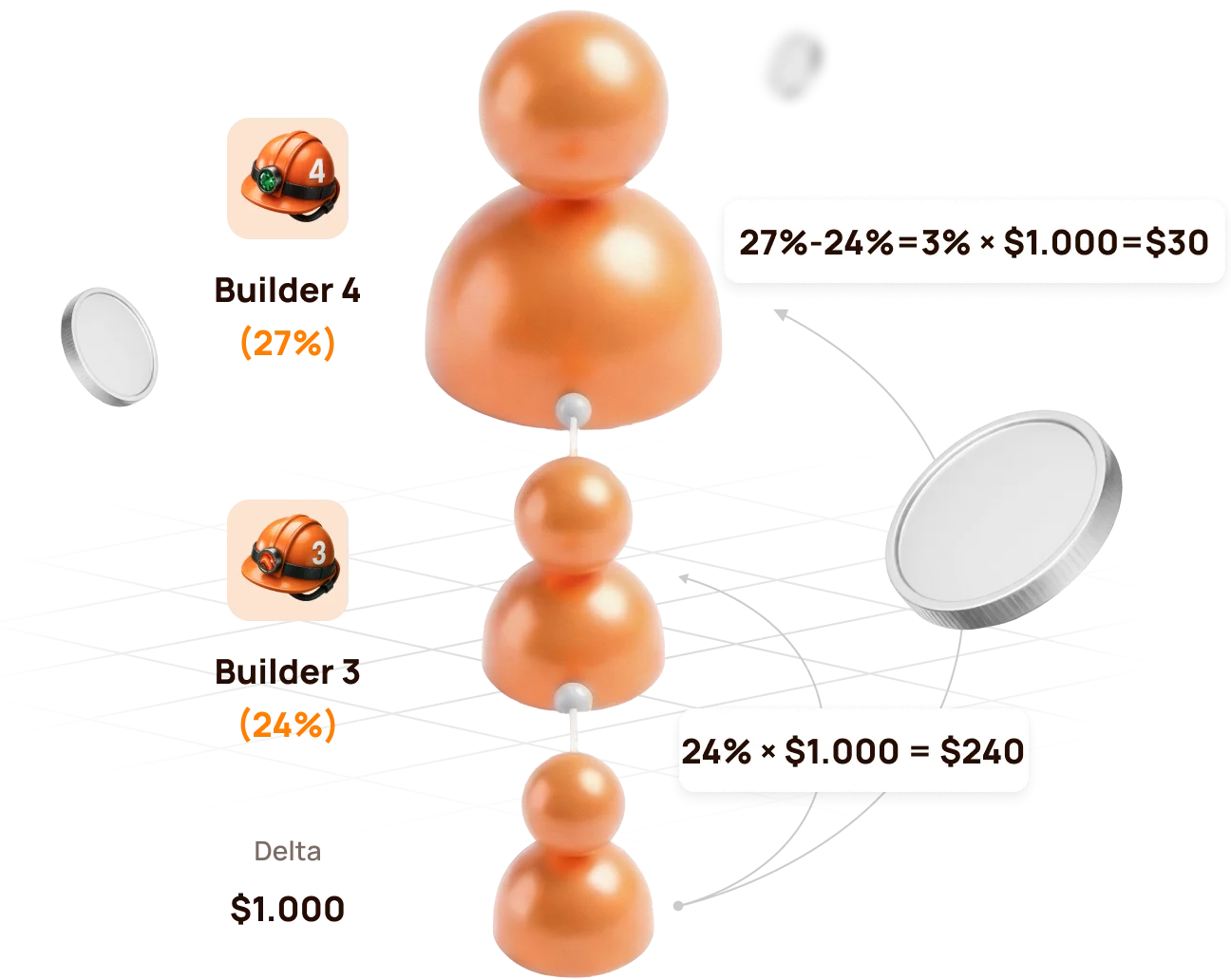
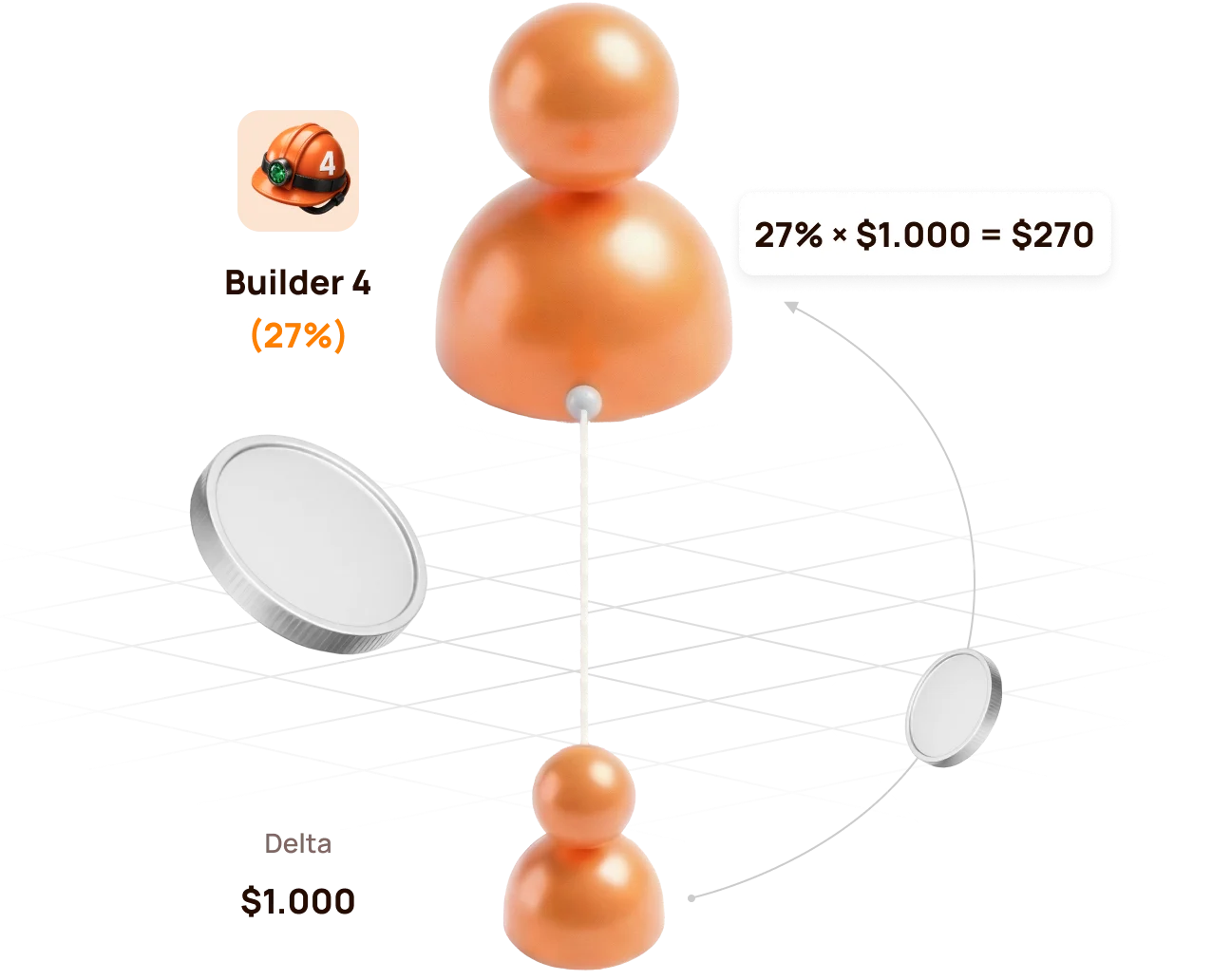
Official example: Builder 4 above Builder 3
The lower structure generates 1,000 USDT of Delta.
| Participant | 合作伙伴状态 | Rate | Calculation | Partner Reward |
|---|---|---|---|---|
| Lower qualified partner | Builder 3 | 24% | 24% × 1,000 | 240 USDT |
| Upline partner | Builder 4 | 27% | (27% − 24%) × 1,000 | 30 USDT |
| Total distributed by status rates | 27% | 270 USDT |
If there is no Builder 3 between the source and Builder 4
Builder 4 can realise the full eligible rate:
27% × 1,000 USDT = 270 USDT
If the lower partner reaches the same or a higher rate
If the lower partner reaches Builder 4 (27%) or a higher status, the upline Builder 4 no longer has a positive percentage difference. The structure behind that partner is compressed for the upline participant.
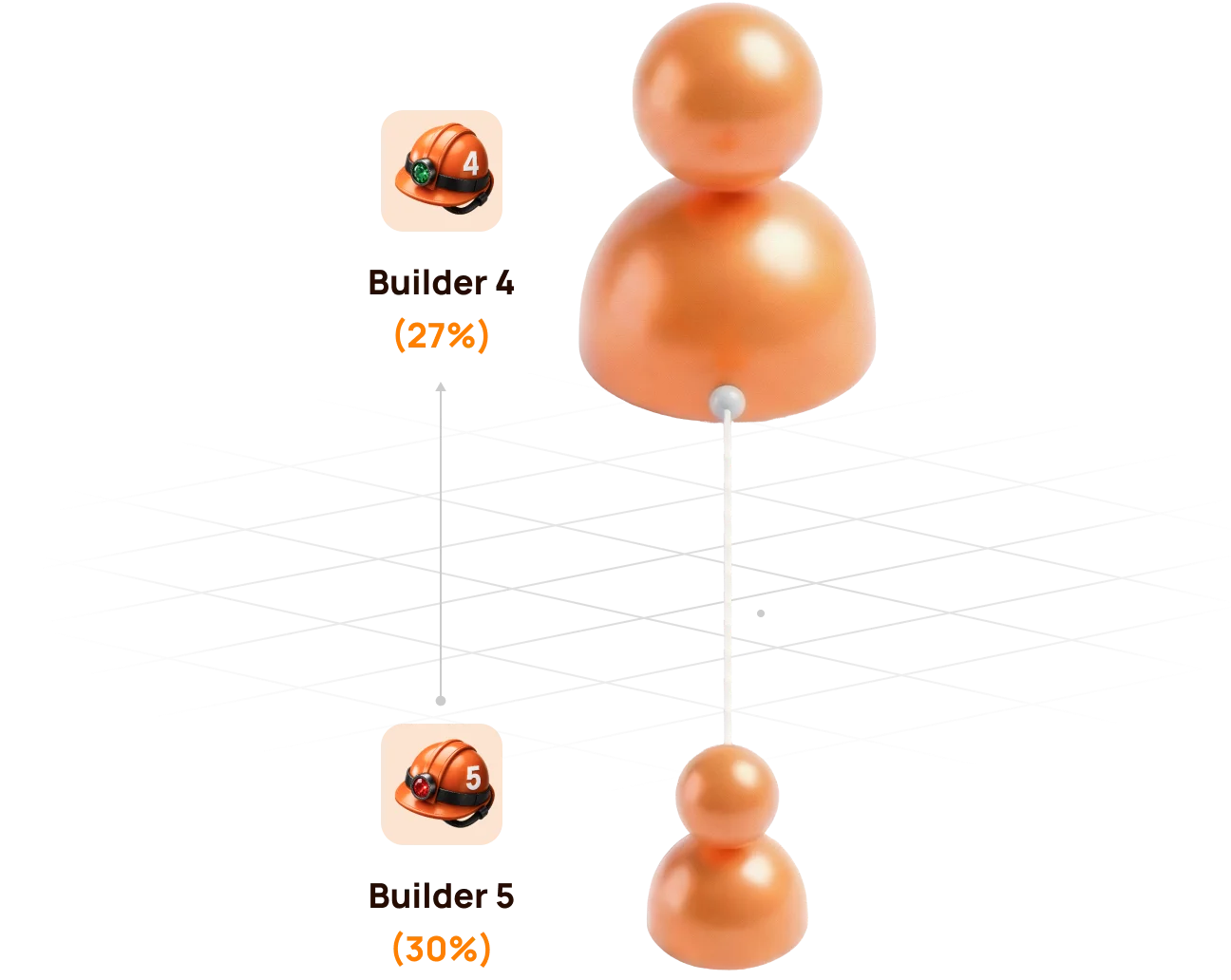
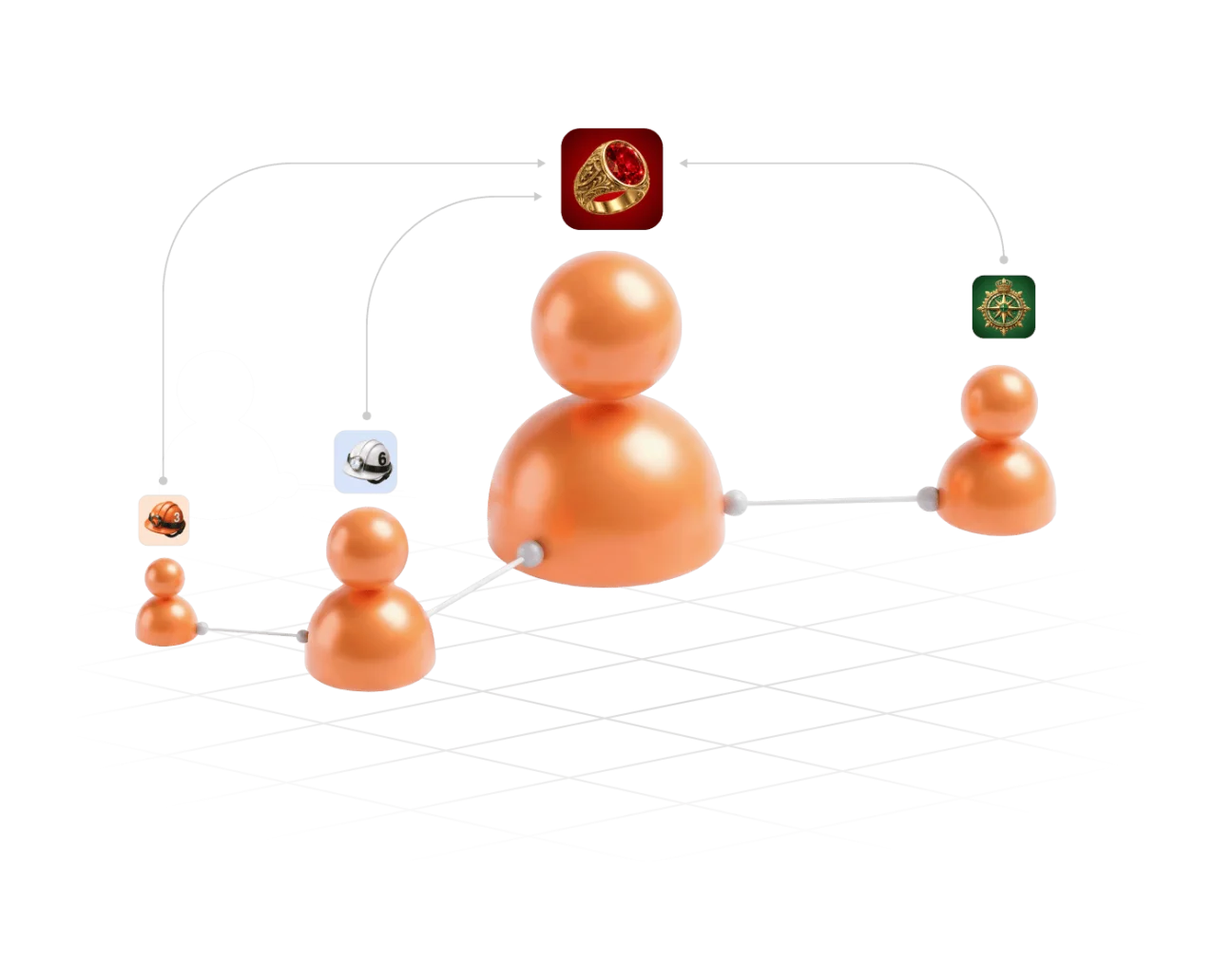
Compression does not remove a participant from the Partner Structure. It changes how the Partner Reward is distributed for the relevant Delta source.
6. Partner Rewards from Lockup Flow
For a qualifying Lockup Flow Smart Cycle, the inviter receives a Partner Reward calculated as a percentage of the invited participant's Delta.
When and how it is calculated
- The invited participant creates a Lockup Flow Smart Cycle.
- The system records the inviter's Partner Status at that moment.
- The applicable status and compression rules are applied to the cycle's Delta.
- The Partner Reward is accrued once when the Smart Cycle is created; the inviter does not wait for the invited participant to Claim.
| Question | Lockup Flow rule |
|---|---|
| What is the calculation base? | The invited participant's Delta, not the full Support Amount |
| Which status rate is used? | The inviter's applicable Partner Status when the invited participant creates the Smart Cycle |
| When is it accrued? | Once, at Smart Cycle creation |
| Where is it shown? | Partner Program → Accrual History |
| Where is the available balance shown? | Partner Program → Partner Wallet |
Automatic transfer rule
- if an accrued Lockup Flow Partner Reward is more than 10 USDT, it is automatically credited to the inviter's wallet after formation;
- an amount below 10 USDT is credited to the Partner Balance;
- when the accumulated Partner Balance reaches 10 USDT, 10 USDT is automatically transferred to the inviter's wallet.
Check the sequence in Accrual History → Partner Wallet → Withdrawal History → Tx Hash.

A Partner Reward accrual and the invited participant's Claim are separate events. The accrual does not mean that the inviter controls or initiates the invited participant's Claim.
7. Partner Rewards and qualification from Daily Flow
For Daily Flow, the inviter's applicable Partner Reward percentage is calculated from the invited participant's Delta. The percentage is determined by the inviter's Partner Status when the invited participant creates the Smart Cycle.
For 每日工作流, 20% of the Partner Reward is credited when the cycle is created, and the remaining 80% is paid in equal parts over the 200-day cycle. Use 应计历史 和 合作伙伴钱包 to verify actual accruals and transfers.
How Daily Flow is counted for status qualification
Daily Flow contributes to the structure's qualifying volume with a coefficient of 0.5. Short-term Smart Cycle plans are counted with a coefficient of 1.0.
| Activity | Amount | Qualification coefficient | Counted volume |
|---|---|---|---|
| Short-term Smart Cycle | 100 USDT | 1.0 | 100 USDT |
| Daily Flow · 200 days | 100 USDT | 0.5 | 50 USDT |
Formula: qualifying volume = short cycles × 1.0 + Daily Flow × 0.5.
The coefficient affects status qualification volume, not the participant's 1.1% / 1.3% daily assistance calculation and not the Partner Reward percentage itself.
Atlas explains the coefficient as a way to prioritise regular short-cycle activity, prevent one large long-term cycle from disproportionately accelerating status growth, and keep qualification conditions balanced across partner teams.
Hybrid visual: use the official Daily Flow qualification graphics showing 100% short cycles 和 50% Daily Flow with the × 0.5 formula.
Daily Flow still contributes to qualification. The coefficient changes how much of its cycle volume is counted; it does not remove Daily Flow from the Partner Program.
8. Matching Reward
Matching Reward is an additional status benefit available from Master 1 onward. It allows a participant to receive the applicable Matching Reward percentage from the Partner Rewards of personally invited leaders.
Qualification condition
Matching Reward is awarded only when the personally invited participant:
- reaches the same Partner Status as the inviter; or
- reaches a higher Partner Status than the inviter.
If the personally invited participant's status is lower, Matching Reward is not awarded from that participant's Partner Rewards.
Matching Reward rates
| Status group | Matching Reward |
|---|---|
| Start and Builder 1–7 | Not available |
| Master 1–7 | 5–17% |
| Strategist | 19% |
| Ambassador | 21% |
| Director | 23% |
| Executive | 25% |
How to read the rule
Matching Reward is calculated from the Partner Reward received by the personally invited qualified participant. It is not calculated directly from that participant's Support Amount or total structure turnover.
Master 3 inviterpersonally invited→Master 3+Matching activeMaster 3 inviterpersonally invited→Master 2Not activeMatching Reward concerns personally invited participants only. The unlimited-depth Structure Reward and the personally invited leader's Matching Reward are different mechanisms.
9. How to verify an accrual and a transfer
Use the dashboard in chronological order. Each screen answers a different question.
Step 1 — find the calculation
打开 Partner Program → Accrual History and check:
- Accrual Date — when the reward was recorded;
- Bonus — which Partner Reward mechanism was applied;
- Accrued Reward Amount — the amount added by the calculation.
An entry in Accrual History confirms an accrual. It does not by itself confirm that USDT has already reached the connected wallet.
Step 2 — check the partner balance
打开 合作伙伴钱包 and compare:
| 字段 | Meaning |
|---|---|
| Account Balance | Amount currently available in the Partner Wallet |
| Total Accrued | Cumulative Partner Rewards recorded by the system |
| Rewards Received | Rewards already processed as received according to the dashboard records |
The Partner Wallet balance is an internal dashboard value. It is not the same as the USDT balance displayed by MetaMask.
Step 3 — verify the blockchain transfer
打开 Withdrawal History, find the relevant transfer and select its Tx Hash. BscScan should show:
- transaction status;
- date and time;
- sender and recipient addresses;
- token and amount;
- network fee and block confirmations.
Before comparing addresses, verify that the same wallet is connected in the Atlas dashboard and MetaMask.
If the numbers do not match immediately
- Check whether a Lockup Flow accrual is still below the automatic-transfer threshold.
- Check whether the record is an accrual rather than a completed withdrawal.
- Confirm the connected wallet address and BNB Smart Chain network.
- Open the Tx Hash instead of relying only on the dashboard total.
- If no Tx Hash exists, save the wallet address, Smart Cycle ID, date and screenshot before contacting support.
10. My Team and Statistics: managing the structure
My Team — qualification and people
使用 我的团队 when you need to:
- copy the referral link;
- confirm the referrer;
- see the current Partner Status and rate;
- compare Current / Required / Remaining values;
- inspect Structure Lines;
- search for a wallet address;
- identify leaders within the structure.
Statistics — activity and dynamics
使用 统计数据 to answer a different set of questions:
- how many new registrations and active partners appeared;
- whether activity came from Lockup Flow or Daily Flow;
- which period changed: Day, Week, Month, Year or All Time;
- where the activity occurred: Entire Structure, First Line, Lines 2–10 or Line 11+;
- which lines are the most active.
Statistics helps explain development of the structure, but it does not replace Accrual History. Activity can exist without producing a Partner Reward for a particular wallet because status, compression and qualification rules still apply.
11. Three worked examples
Example A — Start with no qualified partner between
| Input | Value |
|---|---|
| Participant status | 开始 |
| Eligible Structure Reward rate | 15% |
| Delta used in the example | 100 USDT |
| Qualified partner between participant and source | No |
Calculation: 15% × 100 = 15 USDT.
The result is recorded in 应计历史 according to the applicable flow and accrual rules. This example assumes that no other qualification or compression condition changes the percentage.
Example B — Builder 4 above Builder 3
| Input | Value |
|---|---|
| Upline status | Builder 4 — 27% |
| Lower qualified status | Builder 3 — 24% |
| 德尔塔 | 1,000 USDT |
- Builder 3:
24% × 1,000 = 240 USDT; - Builder 4:
(27% − 24%) × 1,000 = 30 USDT.
Example C — Matching Reward for a personally invited Master
Assume a participant has Master 1 status with a 5% Matching Reward rate. Their personally invited participant also reaches Master 1 or higher and receives a Partner Reward of 100 USDT.
Calculation: 5% × 100 = 5 USDT Matching Reward.
The 5% is applied to the personally invited leader's Partner Reward, not to their Support Amount and not to their total structure turnover.
Master 1 inviter · 5%→Partner Reward 100→Matching Reward 5All three examples isolate one rule for learning purposes. Actual dashboard results can combine compression, flow-specific rules, qualification and applicable fees.
12. Why a Partner Reward may be missing
| What you see | What to verify |
|---|---|
| Referral link is 暂无 | A qualifying Smart Cycle of 10 USDT or more exists and its transaction is confirmed |
| Structure activity exists, but no reward appeared | The activity generated Delta and your rate remained positive after compression |
| Lower leader is active, but your Structure Reward is zero | Their status rate may equal or exceed yours |
| Matching Reward is missing | The participant was personally invited and has reached your status or a higher one |
| Lockup Flow amount remains in Partner Balance | The accumulated amount may be below the automatic-transfer threshold |
| Accrual exists, but MetaMask balance did not change | Check Partner Wallet, Withdrawal History and Tx Hash separately |
| Volume looks lower than expected | Compare Actual and Weighted Partner Structure Volume and the 100% / 50% / 10% depth coefficients |
| Search does not show the expected wallet | Recheck the full wallet address and whether it joined through the intended referral link |
Information to prepare for support
- connected wallet address;
- referrer or participant wallet address, if relevant;
- Smart Cycle ID and flow type;
- approximate date and time;
- screenshot of the relevant dashboard tab;
- Tx Hash, if one exists;
- short description of the expected and displayed result.
Never send a seed phrase, private key or wallet password to support.
13. Final checklist and risk warning
Before sharing the referral link
- the official Atlas dashboard is open;
- the intended wallet is connected on BNB Smart Chain;
- a qualifying Smart Cycle is active;
- 我的推荐链接 is available;
- the invited participant understands that wallet actions remain under their own control.
Before interpreting a reward
- identify whether it is Structure Reward or Matching Reward;
- identify whether the source is Lockup Flow or Daily Flow;
- use Delta as the reward base, not Support Amount;
- account for status-rate differences and compression;
- separate Actual and Weighted Partner Structure Volume;
- verify accrual, dashboard balance and blockchain transfer as separate stages.
Risk warning
Participation is voluntary. Delta, Partner Rewards and the return of a Support Amount are not guaranteed. Claims depend on sufficient smart-contract liquidity. Status tables, screenshots and numerical examples explain the current mechanics; they are not a promise of income or future results.

