
Programa de Parceiros
O Programa de Parceria (Modelo de Compressão de Nível, também apresentado como Convide e Ganhe) é um modelo linear baseado em status que permite aos participantes ativos do Sistema Atlas receberem Recompensas de Parceiros da Delta geradas em sua Estrutura de Parceiros inferior.
O modelo usa compressão baseada em status: a recompensa disponível em um ramo depende da porcentagem de qualificação de cada parceiro ativo nesse ramo.

Em resumo
| Ativação | Automaticamente após o primeiro Smart Cycle qualificatório com um Valor de Suporte de 10 USDT ou mais |
| Status | 19 níveis: Start, Builder 1–7, Master 1–7, Strategist, Ambassador, Director e Executive |
| Recompensa de Estrutura | De 15% a 60% do Delta, dependendo do status do parceiro e das regras de compactação |
| Profundidade | Profundidade ilimitada, com compressão baseada em status e coeficientes ponderados de estrutura-volume |
| Verificação | Os acréscimos são exibidos no Painel Pessoal; as transferências em blockchain podem ser verificadas no BscScan |
As Recompensas de Parceiros são calculadas a partir do Delta sob as regras atuais do Programa de Parceiros. O volume de ciclos é usado para qualificação de status; ele próprio não é a base de recompensa. Exemplos e capturas de tela não garantem recompensas futuras.
1. Como a participação começa
Ativação em cinco etapas
- Conecte a carteira ao Painel Pessoal Oficial do Sistema Atlas.
- Crie o primeiro Smart Cycle qualificado com um Valor de Suporte de 10 USDT ou mais.
- Abrir Programa de Parceria → Minha Equipe.
- Copiar Meu link de indicação e compartilhe-o com um participante que você deseja convidar.
- Após o participante convidado se conectar por meio do link, a carteira dele passa a fazer parte da sua Estrutura de Parceiros do Sistema Atlas unificada.
Nenhum formulário de cadastro separado para o Programa de Parceiros é necessário. A ativação e os cálculos são realizados automaticamente de acordo com as regras do programa.
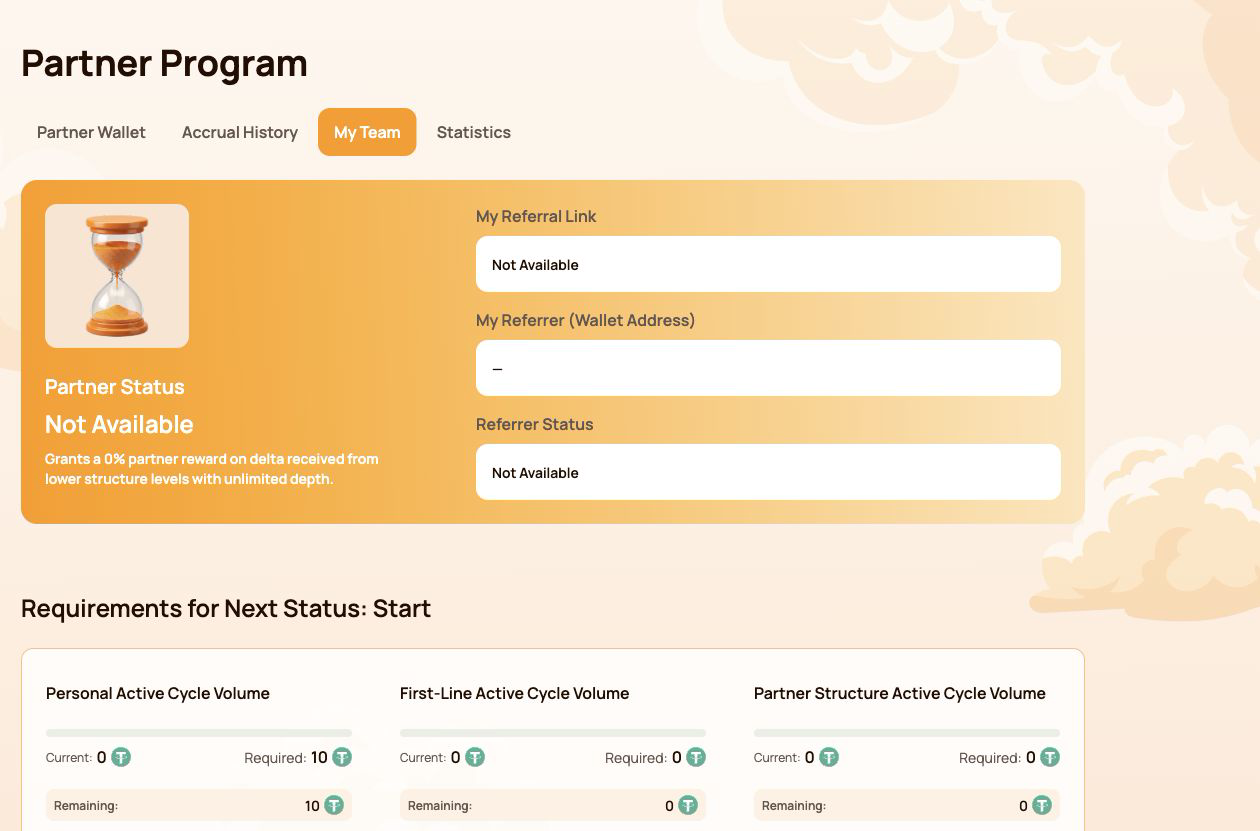
O que aparece em Minha Equipe
| Campo | O que isso significa |
|---|---|
| Status de Parceiro | Status atual e porcentagem da Recompensa de Estrutura |
| Meu link de indicação | Link pessoal usado para convidar novos participantes |
| Meu Indicador (Endereço da Carteira) | Carteira cujo link de indicação foi usado ao entrar |
| Status do Indicatedor | Status atual do parceiro do indicador |
Se Meu link de indicação mostra Não Disponível, primeiro verifique se a carteira conectada possui um Smart Cycle qualificado e se a transação na blockchain foi confirmada.
Uma estrutura em todo o ecossistema Atlas
Um participante convidado é vinculado permanentemente à Estrutura de Parceiros do Sistema Atlas unificado. A mesma estrutura pode ser usada por novos produtos e programas do ecossistema à medida que forem disponibilizados.
Isso significa:
- uma equipe não precisa ser refeita para cada novo produto da Atlas;
- os relacionamentos de parceria permanecem conectados à estrutura de indicação original;
- o atual Modelo de Compressão de Nível aplica suas próprias regras de qualificação e recompensa;
- futuros modelos de parceiros podem usar a mesma relação de base, mantendo seus cálculos, volumes e recompensas separados;
- o mesmo volume não é contado automaticamente em vários programas ao mesmo tempo.
Uma conexão de indicação não cria um direito automático a uma recompensa. Um link de indicação conecta carteiras dentro da estrutura parceira, enquanto cada modelo ativo verifica suas próprias regras de qualificação. Ele não dá ao indicador controle sobre a carteira ou os fundos de outro participante.
2. Mapa da interface do Programa de Parceiros
A seção do Programa de Parceiros contém quatro guias. Cada guia responde a uma pergunta diferente.
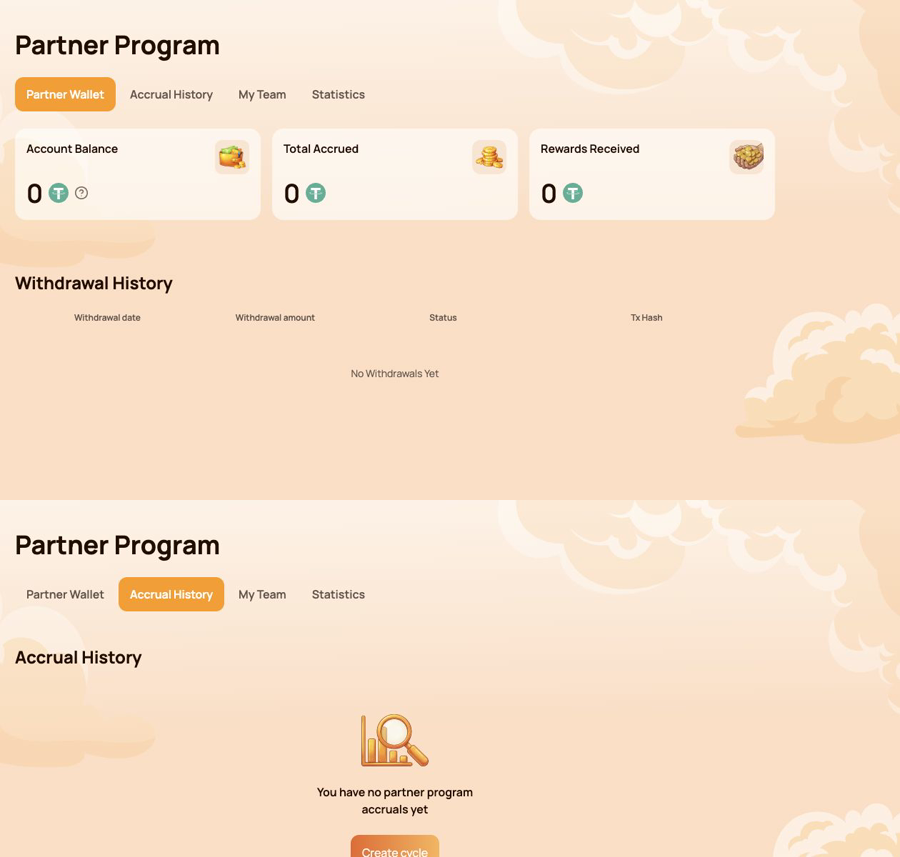
Carteira de Parceiro — o que pode ser transferido?
Use Carteira de Parceiro para verificar:
- Saldo da Conta;
- Total Acumulado;
- Recompensas Recebidas;
- Histórico de Saques;
- Hash da transação para uma transferência em rede (on-chain).
Histórico de Acumulação — de onde veio a recompensa?
Use Histórico de Acúmulo identificar
- Data de Acúmulo;
- Tipo de bônus;
- Valor da Recompensa Acumulada.
Uma acumulação e uma transferência em blockchain são estágios diferentes. Verifique o Histórico de Acumulação primeiro, depois a Carteira de Parceiro e o Histórico de Saques.
Minha Equipe — o que é necessário para o próximo status?
Use Minha Equipe revisar:
- informações de indicação e do indicador;
- Status de Parceiro Atual;
- Volumes atual / necessário / restante;
- Requisitos de Status;
- Linhas de Estrutura;
- Pesquisar por Endereço de Carteira;
- líderes e atividade dentro da estrutura.
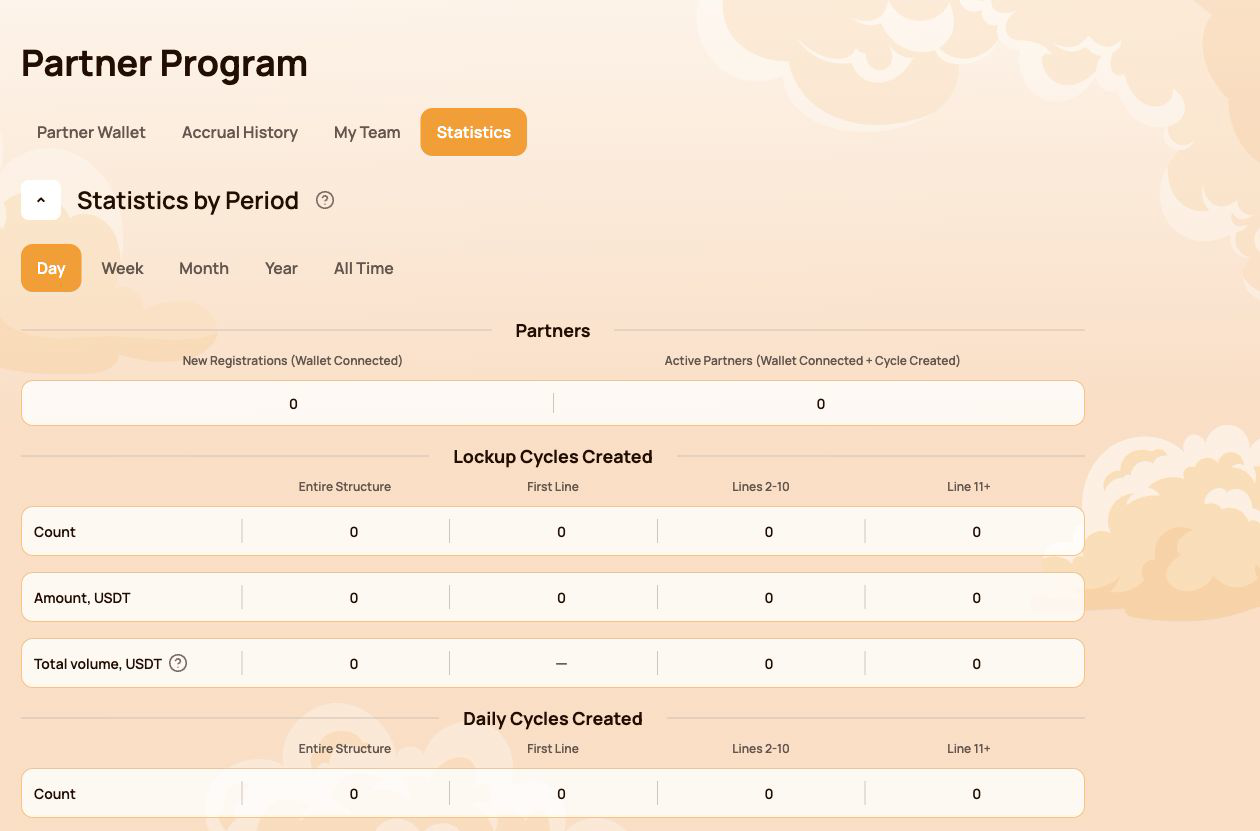
Estatísticas — como a estrutura está se desenvolvendo?
Use Estatísticas comparar:
- Dia / Semana / Mês / Ano / Todo o Período;
- Novos Cadastros e Parceiros Ativos;
- Atividade de Lockup Flow e Daily Flow;
- Estrutura Inteira, Primeira Linha, Linhas 2–10 e Linha 11+;
- Linhas Mais Ativas.
Rota rápida por tarefa
| Eu quero... | Abrir... |
|---|---|
| Copiar meu link de indicação | Minha Equipe |
| Verifique o que está faltando para o próximo status | Minha Equipe → Requisitos para o Próximo Status |
| Encontre a origem de uma recompensa | Histórico de Acúmulo |
| Verificar uma transferência automática | Carteira de Parceiro → Histórico de Saques |
| Verificar uma transferência na rede | Tx Hash → BscScan |
| Find a participant in the structure | My Team → Search by Wallet Address |
| Compare structure activity over time | Estatísticas |
The Personal Dashboard shows the result of the calculation. The following sections explain the status, compression, flow-specific and Matching Reward rules behind it.
3. Partner Status: how qualification works
Partner Status determines two parameters: the participant's Structure Reward rate and, from Master 1 onward, the Matching Reward rate. The system checks the qualification conditions automatically.
Three indicators are checked
| Indicador | What is counted |
|---|---|
| Personal Active Cycle Volume | The participant's own qualifying Smart Cycles |
| First-Line Active Cycle Volume | Qualifying volume created by personally invited participants |
| Partner Structure Active Cycle Volume | Qualifying volume across the lower Partner Structure, subject to the program's depth coefficients |
To receive a status, all requirements shown for that level must be met. If a requirement is marked Not required, it does not affect that status.
All 19 Partner Statuses
| Status | Personal Active Cycle Volume | First-Line Active Cycle Volume | Partner Structure Active Cycle Volume | Recompensa de Estrutura | Matching Reward |
|---|---|---|---|---|---|
 Iniciar Iniciar |
10 | Not required | Not required | 15% | — |
 Builder 1 Builder 1 |
50 | 100 | Not required | 18% | — |
 Builder 2 Builder 2 |
100 | 300 | 1,000 | 21% | — |
 Builder 3 Builder 3 |
200 | 700 | 2,000 | 24% | — |
 Builder 4 Builder 4 |
300 | 1,200 | 4,000 | 27% | — |
 Builder 5 Builder 5 |
500 | 2,000 | 7,000 | 30% | — |
 Builder 6 Builder 6 |
700 | 3,000 | 12,000 | 33% | — |
 Builder 7 Builder 7 |
1,000 | 4,500 | 18,000 | 36% | — |
 Master 1 Master 1 |
1,500 | 7,000 | 28,000 | 38% | 5% |
 Master 2 Master 2 |
2,000 | 10,000 | 40,000 | 40% | 7% |
 Master 3 Master 3 |
3,000 | 17,000 | 70,000 | 42% | 9% |
 Master 4 Master 4 |
4,000 | 25,000 | 120,000 | 44% | 11% |
 Master 5 Master 5 |
5,000 | 35,000 | 200,000 | 46% | 13% |
 Master 6 Master 6 |
6,000 | 45,000 | 300,000 | 48% | 15% |
 Master 7 Master 7 |
7,000 | 60,000 | 450,000 | 50% | 17% |
 Strategist Strategist |
8,000 | 80,000 | 600,000 | 52.5% | 19% |
 Ambassador Ambassador |
10,000 | 100,000 | 800,000 | 55% | 21% |
 Director Director |
12,000 | 120,000 | 1,100,000 | 57.5% | 23% |
 Executive Executive |
15,000 | 150,000 | 1,500,000 | 60% | 25% |
All amounts in the table are shown in USDT-equivalent units used by the Atlas interface.
How to read progress in My Team
- Atual — the volume already counted toward the selected requirement;
- Required — the target for the next status;
- Remaining — the amount still needed to satisfy that requirement.
Check every requirement card, not only the total Partner Structure Active Cycle Volume. A large structure alone does not replace the Personal Active Cycle Volume or First-Line Active Cycle Volume requirement.
A status rate is a qualification parameter used by the reward algorithm. It is not a promised percentage return on a participant's Smart Cycle.
4. Qualification volume, Delta and depth
Several similar-looking values serve different purposes. Keeping them separate makes the Partner Program much easier to understand.
The short version
| Value | Purpose |
|---|---|
| Valor do Suporte | A participant's amount of provided aid in a Smart Cycle |
| Partner Structure Active Cycle Volume | Used to check Partner Status qualification |
| Delta generated in the lower Partner Structure | The reward calculation base for the applicable branch |
| Recompensa de Estrutura | The result calculated from Delta according to status-rate differences and compression rules |
The original Support Amount and the generated Delta are not the same value. Partner Rewards are calculated from Delta, not from the full amount placed into a Smart Cycle.
Actual and Weighted Partner Structure Volume
- Actual Partner Structure Volume shows the structure's qualifying volume before depth coefficients are applied.
- Weighted Partner Structure Volume shows the volume after the coefficients are applied and is used for status qualification where the rules require it.
| Structure depth | Coefficient applied to volume |
|---|---|
| Lines 1–5 | 100% |
| Lines 6–10 | 50% |
| Line 11 and deeper | 10% |
Example of weighted volume
Suppose the structure has 1,000 USDT of qualifying volume on each of three depth groups:
| Group | Actual volume | Coefficient | Weighted volume |
|---|---|---|---|
| Lines 1–5 | 1,000 | 100% | 1,000 |
| Lines 6–10 | 1,000 | 50% | 500 |
| Line 11+ | 1,000 | 10% | 100 |
| Total | 3,000 | 1,600 |
This example explains status-volume weighting only. It does not calculate a Partner Reward.
Where to check the numbers
- open Programa de Parceria → Minha Equipe for qualification volumes and next-status progress;
- open Estatísticas to compare structure activity by depth and period;
- open Histórico de Acúmulo to see an actual calculated Partner Reward;
- use Carteira de Parceiro → Histórico de Saques to verify a completed transfer.
Do not use cycle volume, Partner Structure Volume and Delta as interchangeable terms. Cycle volume is used for status qualification; Delta is the reward calculation base.
5. Compression: who receives which part of the reward
Compression distributes the available Partner Reward according to the percentage qualifications of active partners in the branch. An upline participant receives the difference between their status rate and the rate already realised by a qualified partner below.
The rule in three situations
| Situation below you | What happens |
|---|---|
| The partner's status rate is lower than yours | You receive the positive difference between the two rates |
| There is no qualified partner between you and the Delta source | You may receive your full eligible status rate under the program rules |
| The partner's rate is equal to or higher than yours | You receive 0% from the structure compressed behind that partner |
The position of a wallet at the top of a branch does not guarantee a reward. Qualification and active status determine how the available percentage is distributed.
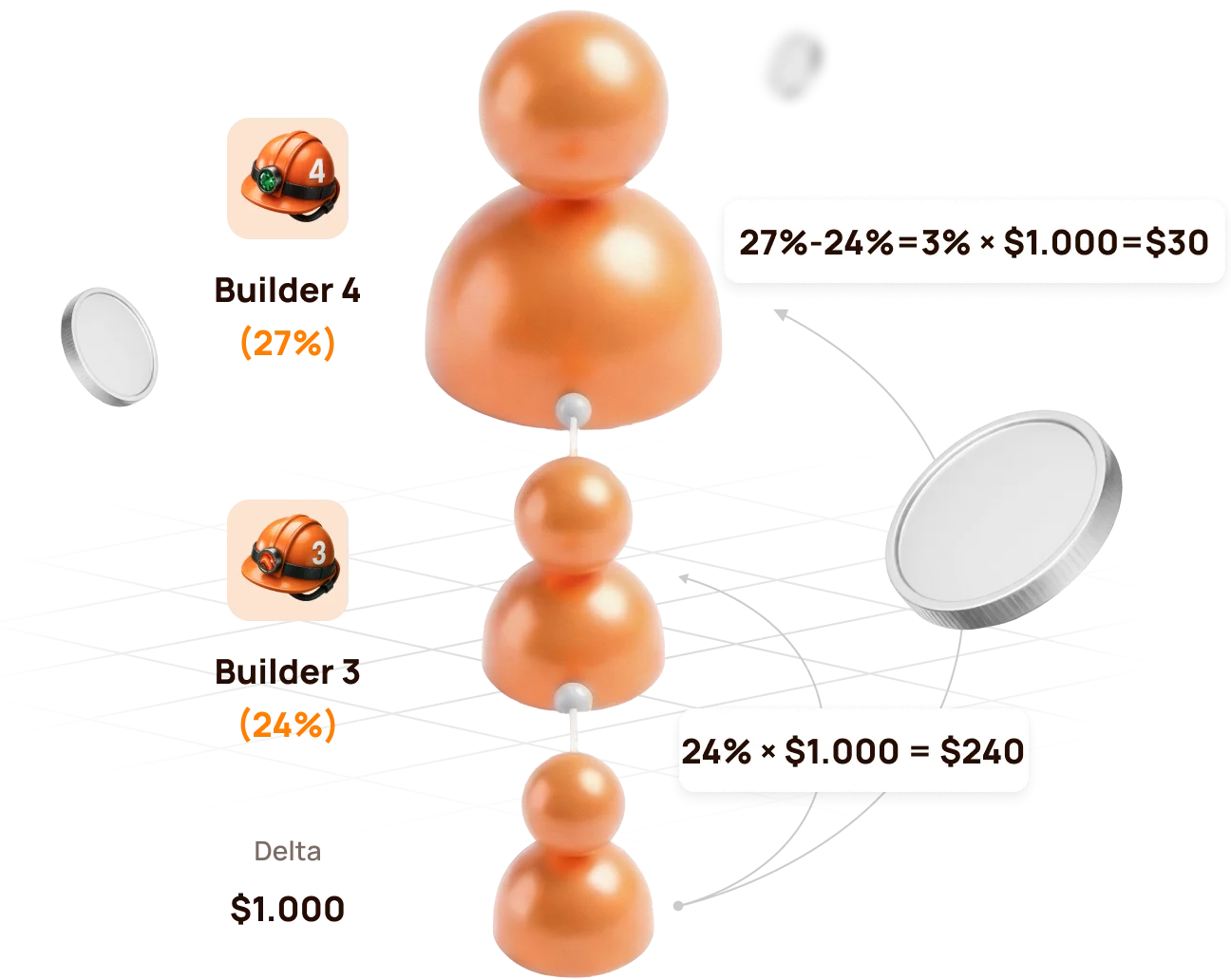
Official example: Builder 4 above Builder 3
The lower structure generates 1,000 USDT of Delta.
| Participant | Status de Parceiro | Rate | Calculation | Partner Reward |
|---|---|---|---|---|
| Lower qualified partner | Builder 3 | 24% | 24% × 1,000 | 240 USDT |
| Upline partner | Builder 4 | 27% | (27% − 24%) × 1,000 | 30 USDT |
| Total distributed by status rates | 27% | 270 USDT |
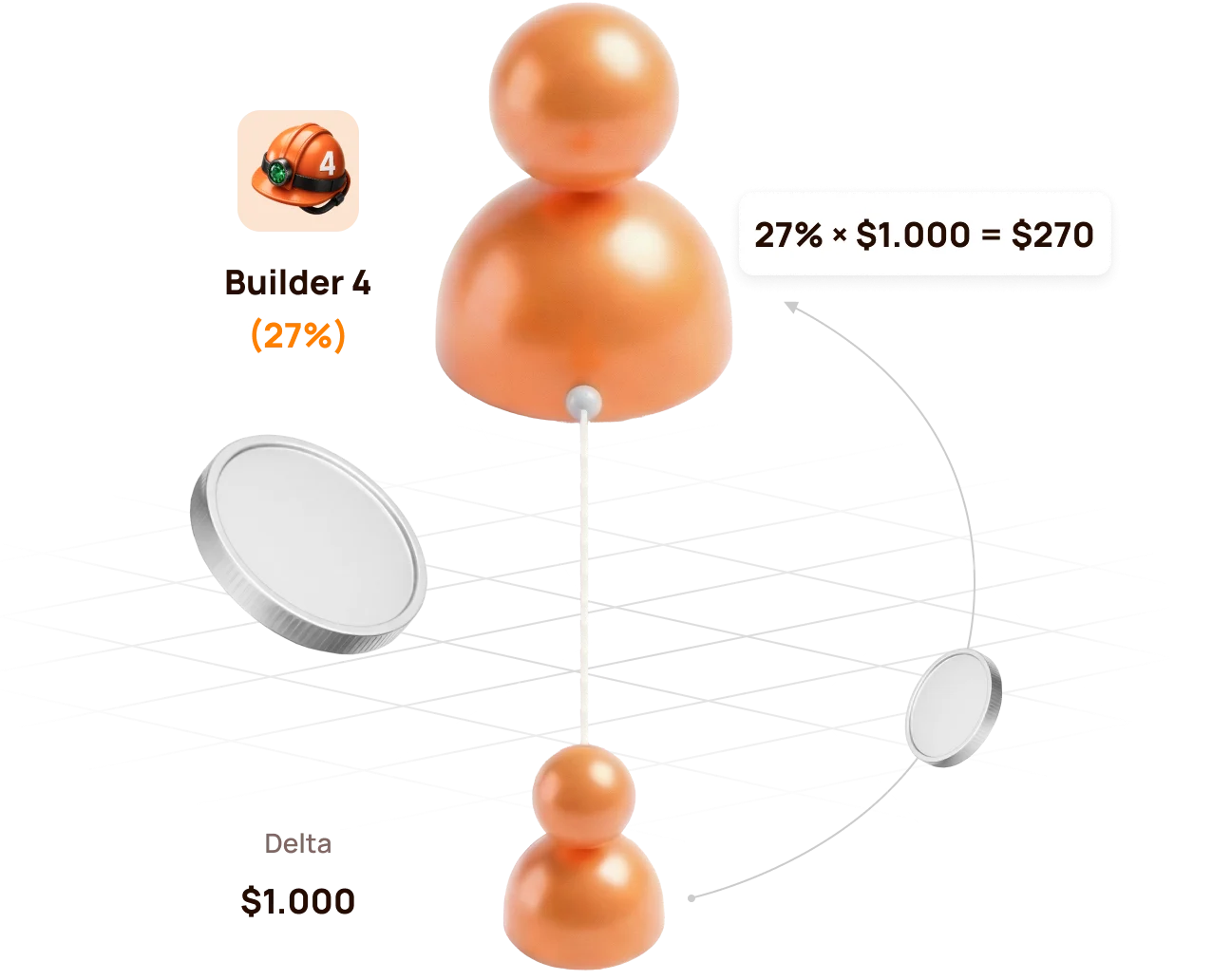
If there is no Builder 3 between the source and Builder 4
Builder 4 can realise the full eligible rate:
27% × 1,000 USDT = 270 USDT
If the lower partner reaches the same or a higher rate
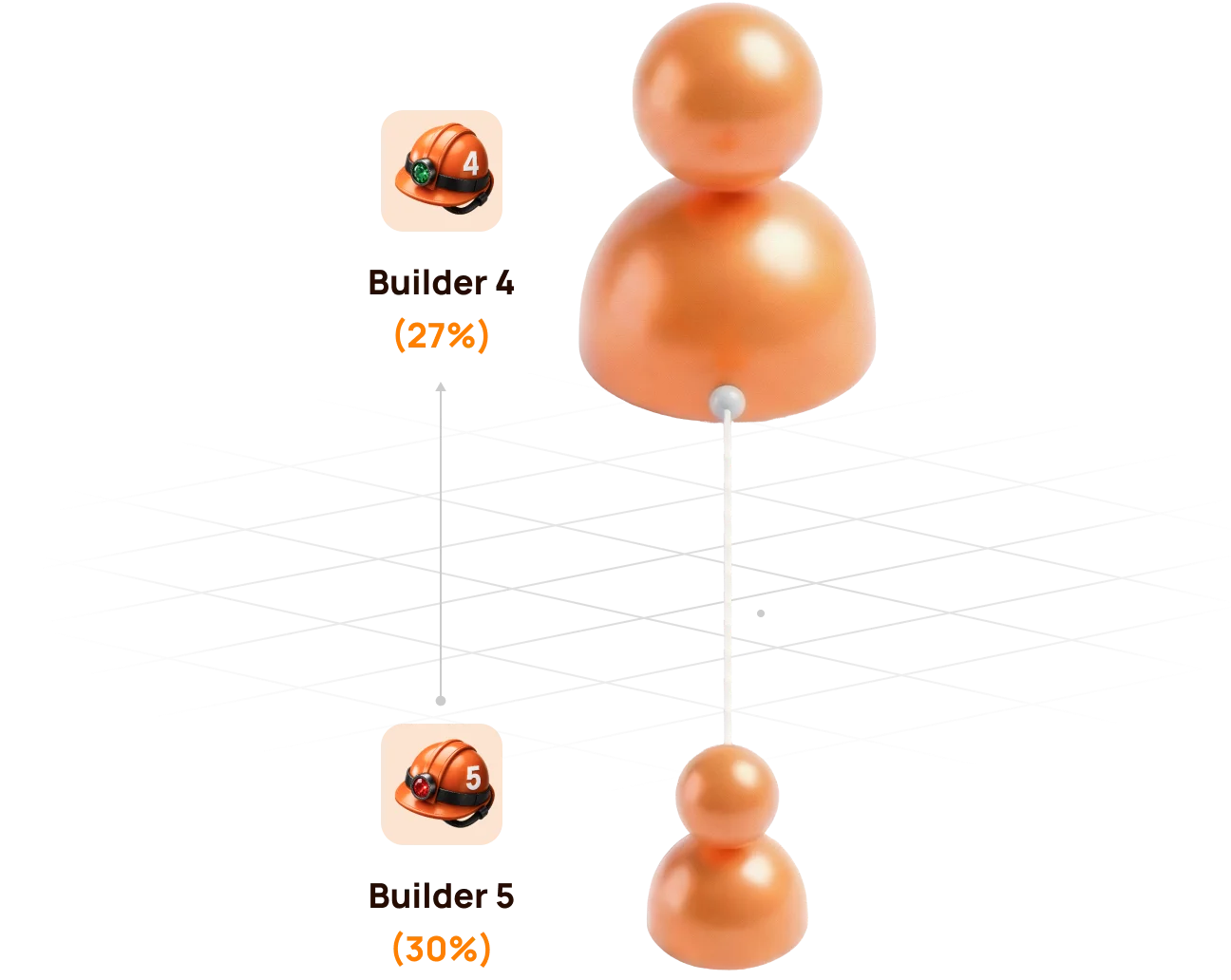
If the lower partner reaches Builder 4 (27%) or a higher status, the upline Builder 4 no longer has a positive percentage difference. The structure behind that partner is compressed for the upline participant.
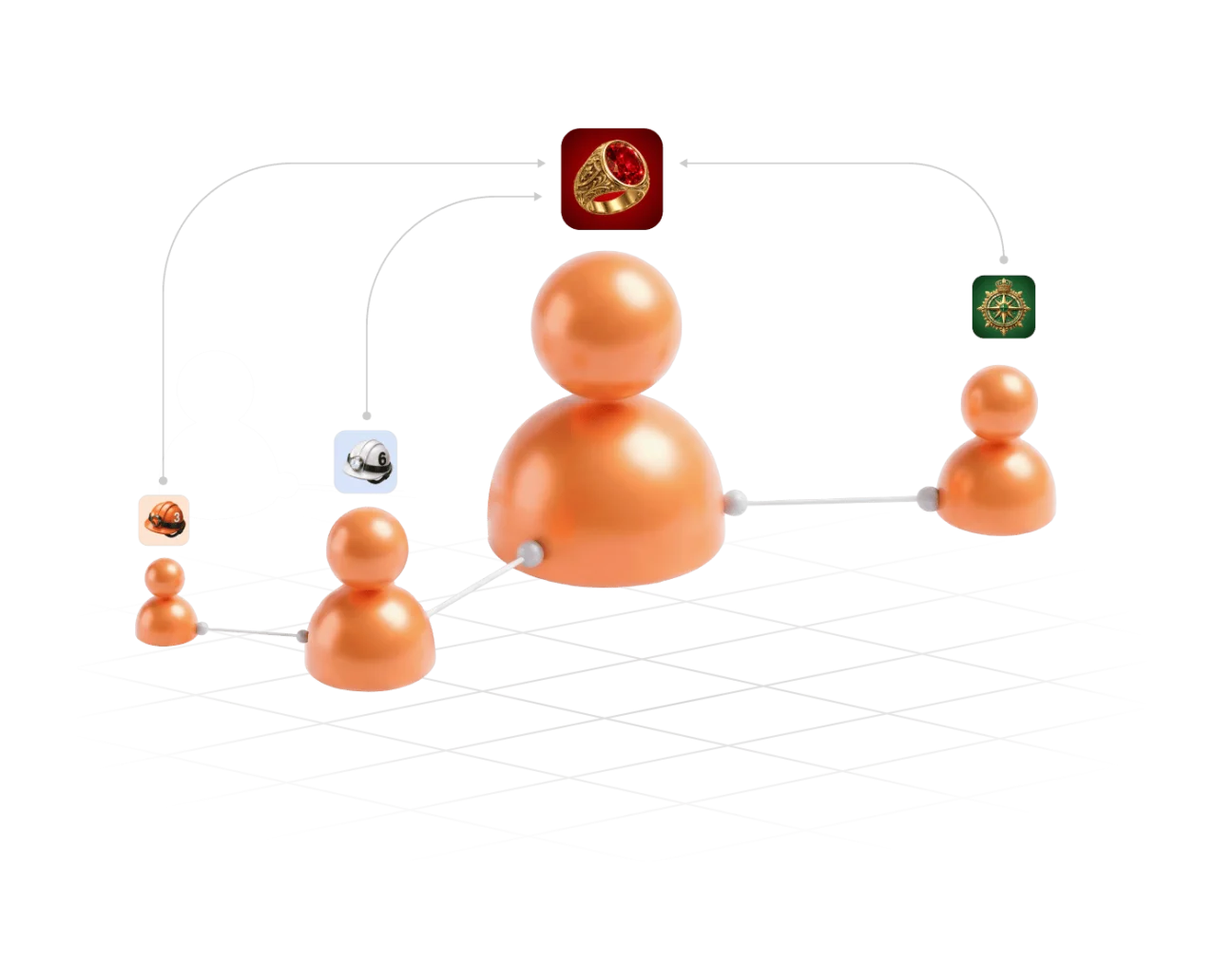
Compression does not remove a participant from the Partner Structure. It changes how the Partner Reward is distributed for the relevant Delta source.
6. Partner Rewards from Lockup Flow
For a qualifying Lockup Flow Smart Cycle, the inviter receives a Partner Reward calculated as a percentage of the invited participant's Delta.
When and how it is calculated
- The invited participant creates a Lockup Flow Smart Cycle.
- The system records the inviter's Partner Status at that moment.
- The applicable status and compression rules are applied to the cycle's Delta.
- The Partner Reward is accrued once when the Smart Cycle is created; the inviter does not wait for the invited participant to Claim.
| Question | Lockup Flow rule |
|---|---|
| What is the calculation base? | The invited participant's Delta, not the full Support Amount |
| Which status rate is used? | The inviter's applicable Partner Status when the invited participant creates the Smart Cycle |
| When is it accrued? | Once, at Smart Cycle creation |
| Where is it shown? | Partner Program → Accrual History |
| Where is the available balance shown? | Partner Program → Partner Wallet |
Automatic transfer rule
- if an accrued Lockup Flow Partner Reward is more than 10 USDT, it is automatically credited to the inviter's wallet after formation;
- an amount below 10 USDT is credited to the Partner Balance;
- when the accumulated Partner Balance reaches 10 USDT, 10 USDT is automatically transferred to the inviter's wallet.
Check the sequence in Accrual History → Partner Wallet → Withdrawal History → Tx Hash.

A Partner Reward accrual and the invited participant's Claim are separate events. The accrual does not mean that the inviter controls or initiates the invited participant's Claim.
7. Partner Rewards and qualification from Daily Flow
For Daily Flow, the inviter's applicable Partner Reward percentage is calculated from the invited participant's Delta. The percentage is determined by the inviter's Partner Status when the invited participant creates the Smart Cycle.
For Fluxo Diário, 20% of the Partner Reward is credited when the cycle is created, and the remaining 80% is paid in equal parts over the 200-day cycle. Use Histórico de Acúmulo e Carteira de Parceiro to verify actual accruals and transfers.
How Daily Flow is counted for status qualification
Daily Flow contributes to the structure's qualifying volume with a coefficient of 0.5. Short-term Smart Cycle plans are counted with a coefficient of 1.0.
| Activity | Amount | Qualification coefficient | Counted volume |
|---|---|---|---|
| Short-term Smart Cycle | 100 USDT | 1.0 | 100 USDT |
| Daily Flow · 200 days | 100 USDT | 0.5 | 50 USDT |
Formula: qualifying volume = short cycles × 1.0 + Daily Flow × 0.5.
The coefficient affects status qualification volume, not the participant's 1.1% / 1.3% daily assistance calculation and not the Partner Reward percentage itself.
Atlas explains the coefficient as a way to prioritise regular short-cycle activity, prevent one large long-term cycle from disproportionately accelerating status growth, and keep qualification conditions balanced across partner teams.
Hybrid visual: use the official Daily Flow qualification graphics showing 100% short cycles e 50% Daily Flow with the × 0.5 formula.
Daily Flow still contributes to qualification. The coefficient changes how much of its cycle volume is counted; it does not remove Daily Flow from the Partner Program.
8. Matching Reward
Matching Reward is an additional status benefit available from Master 1 onward. It allows a participant to receive the applicable Matching Reward percentage from the Partner Rewards of personally invited leaders.
Qualification condition
Matching Reward is awarded only when the personally invited participant:
- reaches the same Partner Status as the inviter; or
- reaches a higher Partner Status than the inviter.
If the personally invited participant's status is lower, Matching Reward is not awarded from that participant's Partner Rewards.
Matching Reward rates
| Status group | Matching Reward |
|---|---|
| Start and Builder 1–7 | Not available |
| Master 1–7 | 5–17% |
| Strategist | 19% |
| Ambassador | 21% |
| Director | 23% |
| Executive | 25% |
How to read the rule
Matching Reward is calculated from the Partner Reward received by the personally invited qualified participant. It is not calculated directly from that participant's Support Amount or total structure turnover.
Master 3 inviterpersonally invited→Master 3+Matching activeMaster 3 inviterpersonally invited→Master 2Not activeMatching Reward concerns personally invited participants only. The unlimited-depth Structure Reward and the personally invited leader's Matching Reward are different mechanisms.
9. How to verify an accrual and a transfer
Use the dashboard in chronological order. Each screen answers a different question.
Step 1 — find the calculation
Abrir Partner Program → Accrual History and check:
- Accrual Date — when the reward was recorded;
- Bonus — which Partner Reward mechanism was applied;
- Accrued Reward Amount — the amount added by the calculation.
An entry in Accrual History confirms an accrual. It does not by itself confirm that USDT has already reached the connected wallet.
Step 2 — check the partner balance
Abrir Carteira de Parceiro and compare:
| Campo | Meaning |
|---|---|
| Account Balance | Amount currently available in the Partner Wallet |
| Total Accrued | Cumulative Partner Rewards recorded by the system |
| Rewards Received | Rewards already processed as received according to the dashboard records |
The Partner Wallet balance is an internal dashboard value. It is not the same as the USDT balance displayed by MetaMask.
Step 3 — verify the blockchain transfer
Abrir Withdrawal History, find the relevant transfer and select its Tx Hash. BscScan should show:
- transaction status;
- date and time;
- sender and recipient addresses;
- token and amount;
- network fee and block confirmations.
Before comparing addresses, verify that the same wallet is connected in the Atlas dashboard and MetaMask.
If the numbers do not match immediately
- Check whether a Lockup Flow accrual is still below the automatic-transfer threshold.
- Check whether the record is an accrual rather than a completed withdrawal.
- Confirm the connected wallet address and BNB Smart Chain network.
- Open the Tx Hash instead of relying only on the dashboard total.
- If no Tx Hash exists, save the wallet address, Smart Cycle ID, date and screenshot before contacting support.
10. My Team and Statistics: managing the structure
My Team — qualification and people
Use Minha Equipe when you need to:
- copy the referral link;
- confirm the referrer;
- see the current Partner Status and rate;
- compare Current / Required / Remaining values;
- inspect Structure Lines;
- search for a wallet address;
- identify leaders within the structure.
Statistics — activity and dynamics
Use Estatísticas to answer a different set of questions:
- how many new registrations and active partners appeared;
- whether activity came from Lockup Flow or Daily Flow;
- which period changed: Day, Week, Month, Year or All Time;
- where the activity occurred: Entire Structure, First Line, Lines 2–10 or Line 11+;
- which lines are the most active.
Statistics helps explain development of the structure, but it does not replace Accrual History. Activity can exist without producing a Partner Reward for a particular wallet because status, compression and qualification rules still apply.
11. Three worked examples
Example A — Start with no qualified partner between
| Input | Value |
|---|---|
| Participant status | Iniciar |
| Eligible Structure Reward rate | 15% |
| Delta used in the example | 100 USDT |
| Qualified partner between participant and source | No |
Calculation: 15% × 100 = 15 USDT.
The result is recorded in Histórico de Acúmulo according to the applicable flow and accrual rules. This example assumes that no other qualification or compression condition changes the percentage.
Example B — Builder 4 above Builder 3
| Input | Value |
|---|---|
| Upline status | Builder 4 — 27% |
| Lower qualified status | Builder 3 — 24% |
| Delta | 1,000 USDT |
- Builder 3:
24% × 1,000 = 240 USDT; - Builder 4:
(27% − 24%) × 1,000 = 30 USDT.
Example C — Matching Reward for a personally invited Master
Assume a participant has Master 1 status with a 5% Matching Reward rate. Their personally invited participant also reaches Master 1 or higher and receives a Partner Reward of 100 USDT.
Calculation: 5% × 100 = 5 USDT Matching Reward.
The 5% is applied to the personally invited leader's Partner Reward, not to their Support Amount and not to their total structure turnover.
Master 1 inviter · 5%→Partner Reward 100→Matching Reward 5All three examples isolate one rule for learning purposes. Actual dashboard results can combine compression, flow-specific rules, qualification and applicable fees.
12. Why a Partner Reward may be missing
| What you see | What to verify |
|---|---|
| Referral link is Não Disponível | A qualifying Smart Cycle of 10 USDT or more exists and its transaction is confirmed |
| Structure activity exists, but no reward appeared | The activity generated Delta and your rate remained positive after compression |
| Lower leader is active, but your Structure Reward is zero | Their status rate may equal or exceed yours |
| Matching Reward is missing | The participant was personally invited and has reached your status or a higher one |
| Lockup Flow amount remains in Partner Balance | The accumulated amount may be below the automatic-transfer threshold |
| Accrual exists, but MetaMask balance did not change | Check Partner Wallet, Withdrawal History and Tx Hash separately |
| Volume looks lower than expected | Compare Actual and Weighted Partner Structure Volume and the 100% / 50% / 10% depth coefficients |
| Search does not show the expected wallet | Recheck the full wallet address and whether it joined through the intended referral link |
Information to prepare for support
- connected wallet address;
- referrer or participant wallet address, if relevant;
- Smart Cycle ID and flow type;
- approximate date and time;
- screenshot of the relevant dashboard tab;
- Tx Hash, if one exists;
- short description of the expected and displayed result.
Never send a seed phrase, private key or wallet password to support.
13. Final checklist and risk warning
Before sharing the referral link
- the official Atlas dashboard is open;
- the intended wallet is connected on BNB Smart Chain;
- a qualifying Smart Cycle is active;
- Meu link de indicação is available;
- the invited participant understands that wallet actions remain under their own control.
Before interpreting a reward
- identify whether it is Structure Reward or Matching Reward;
- identify whether the source is Lockup Flow or Daily Flow;
- use Delta as the reward base, not Support Amount;
- account for status-rate differences and compression;
- separate Actual and Weighted Partner Structure Volume;
- verify accrual, dashboard balance and blockchain transfer as separate stages.
Risk warning
Participation is voluntary. Delta, Partner Rewards and the return of a Support Amount are not guaranteed. Claims depend on sufficient smart-contract liquidity. Status tables, screenshots and numerical examples explain the current mechanics; they are not a promise of income or future results.

