
Chương trình Đối tác
Cái Chương trình Đối tác (Mô hình nén cấp độ, còn được giới thiệu là Mời & Kiếm tiền) là một mô hình tuyến tính, dựa trên trạng thái, cho phép những người tham gia Hệ thống Atlas tích cực nhận Phần thưởng Đối tác từ Delta được tạo ra trong Cấu trúc Đối tác cấp dưới của họ.
Mô hình sử dụng phương pháp nén dựa trên trạng thái: phần thưởng có sẵn từ một nhánh phụ thuộc vào tỷ lệ phần trăm đạt chuẩn của mỗi đối tác hoạt động trong nhánh đó.

Tổng quan
| Kích hoạt | Tự động sau Smart Cycle đủ điều kiện đầu tiên với Khoản Hỗ trợ từ 10 USDT trở lên |
| Trạng thái | 19 cấp độ: Khởi đầu, Người xây dựng 1–7, Bậc thầy 1–7, Nhà chiến lược, Đại sứ, Giám đốc và Điều hành |
| Phần thưởng theo cấu trúc | Từ 15% đến 60% của Delta, tùy thuộc vào trạng thái đối tác và các quy tắc nén |
| Độ sâu | Độ sâu không giới hạn, với nén dựa trên trạng thái và hệ số thể tích-cấu trúc có trọng số |
| Xác minh | Khoản tích lũy được hiển thị trên Bảng điều khiển cá nhân; các giao dịch chuyển tiền trên blockchain có thể được kiểm tra trên BscScan |
Phần thưởng Đối tác được tính từ Delta theo các quy tắc Chương trình Đối tác hiện hành. Khối lượng chu kỳ được sử dụng để đủ điều kiện đạt cấp độ trạng thái; bản thân nó không phải là cơ sở phần thưởng. Các ví dụ và ảnh chụp màn hình không đảm bảo phần thưởng trong tương lai.
1. Quá trình tham gia bắt đầu như thế nào
Kích hoạt trong năm bước
- Kết nối ví với Trang tổng quan cá nhân Hệ thống Atlas chính thức.
- Tạo Smart Cycle đủ điều kiện đầu tiên với Số tiền Hỗ trợ là 10 USDT trở lên.
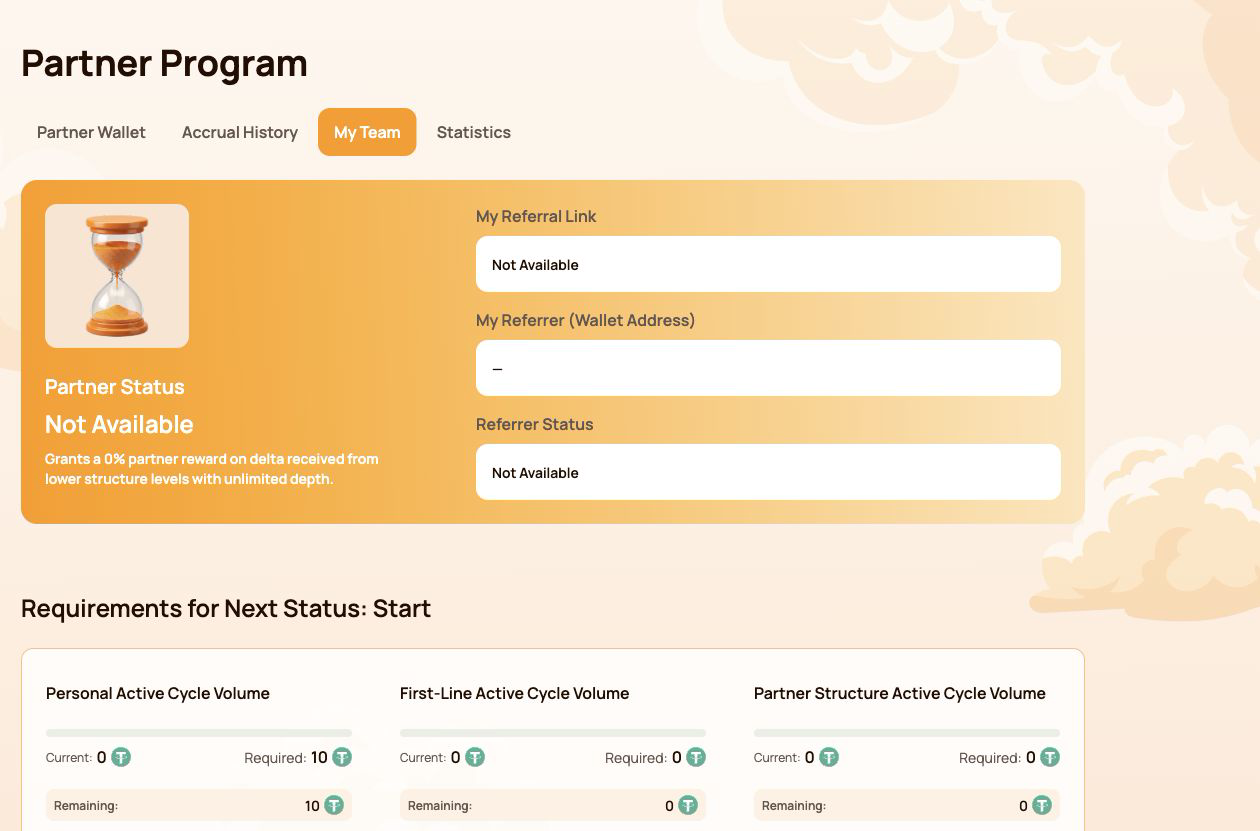
- Mở Chương trình Đối tác → Đội ngũ của tôi.
- Sao chép Liên kết giới thiệu của tôi và chia sẻ nó với một người tham gia bạn muốn mời.
- Sau khi người tham gia được mời kết nối qua liên kết, ví của họ sẽ trở thành một phần trong Cấu trúc Đối tác Hệ thống Atlas thống nhất của bạn.
Không cần điền mẫu đăng ký Chương trình Đối tác riêng. Việc kích hoạt và tính toán được thực hiện tự động theo các quy tắc của chương trình.
Những gì xuất hiện trong Đội của tôi
| Lĩnh vực | Nó có nghĩa là gì |
|---|---|
| Trạng thái đối tác | Trạng thái hiện tại và Tỷ lệ phần trăm Phần thưởng Cấu trúc |
| Liên kết giới thiệu của tôi | Liên kết cá nhân được sử dụng để mời người tham gia mới |
| Người giới thiệu của tôi (Địa chỉ ví) | Ví của người có liên kết giới thiệu đã được sử dụng khi tham gia |
| Trạng thái người giới thiệu | Tình trạng đối tác hiện tại của người giới thiệu |
Nếu Liên kết giới thiệu của tôi hiển thị Không có sẵn, Đầu tiên, hãy kiểm tra xem ví đã kết nối có Smart Cycle hợp lệ không và giao dịch blockchain của nó đã được xác nhận chưa.
Một cấu trúc trong toàn bộ hệ sinh thái Atlas
Một thành viên được mời sẽ được liên kết vĩnh viễn với Cơ cấu Đối tác Hệ thống Atlas thống nhất. Cơ cấu này cũng có thể được các sản phẩm và chương trình mới trong hệ sinh thái sử dụng khi chúng được ra mắt.
Điều này có nghĩa là:
- một đội ngũ không cần phải được xây dựng lại cho mỗi sản phẩm Atlas mới;
- mối quan hệ đối tác vẫn duy trì kết nối với cấu trúc giới thiệu ban đầu;
- Mô hình Nén Cấp độ hiện tại áp dụng các quy tắc đủ điều kiện và phần thưởng của riêng nó;
- các mô hình đối tác trong tương lai có thể sử dụng cùng một mối quan hệ cơ sở trong khi vẫn giữ các tính toán, khối lượng và phần thưởng của họ tách biệt;
- cùng một khối lượng không tự động được tính trong nhiều chương trình cùng một lúc.
Kết nối giới thiệu không tạo ra quyền tự động nhận thưởng. Liên kết giới thiệu liên kết các ví trong cấu trúc đối tác, trong khi mỗi mô hình hoạt động sẽ kiểm tra các quy tắc đủ điều kiện của riêng mình. Nó không cấp cho người giới thiệu quyền kiểm soát đối với ví hoặc tiền của người tham gia khác.
2. Sơ đồ giao diện Chương trình Đối tác
Phần Chương trình Đối tác chứa bốn tab. Mỗi tab trả lời một câu hỏi khác nhau.
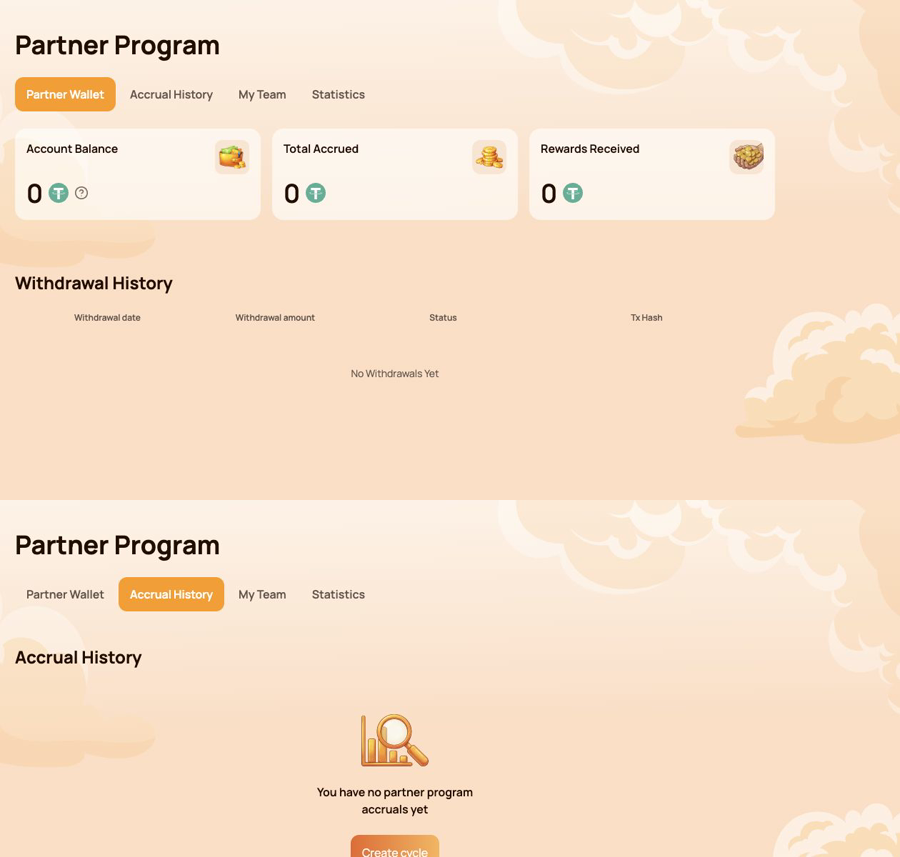
Ví Đối tác — những gì có thể được chuyển?
Sử dụng Ví đối tác để kiểm tra:
- Số dư tài khoản;
- Tổng số tiền tích lũy;
- Phần thưởng đã nhận;
- Lịch sử rút tiền;
- Mã giao dịch (Tx Hash) cho một chuyển khoản trên chuỗi (on-chain).
Lịch sử tích lũy — phần thưởng đến từ đâu?
Sử dụng Lịch sử tích lũy để nhận dạng
- Ngày phát sinh dồn tích;
- Loại tiền thưởng;
- Số tiền thưởng đã tích lũy.
Khoản dồn tích và chuyển khoản blockchain là các giai đoạn khác nhau. Hãy kiểm tra Lịch sử Dồn tích trước, sau đó đến Ví Đối tác và Lịch sử Rút tiền.
Nhóm của tôi — cần những gì cho báo cáo tiến độ tiếp theo?
Sử dụng Đội của tôi để xem xét:
- thông tin giới thiệu và người giới thiệu;
- Tình trạng Đối tác Hiện tại;
- Khối lượng Hiện tại / Yêu cầu / Còn lại;
- Yêu cầu trạng thái;
- Đường kết cấu;
- Tìm kiếm theo Địa chỉ Ví;
- các nhà lãnh đạo và hoạt động bên trong cấu trúc.
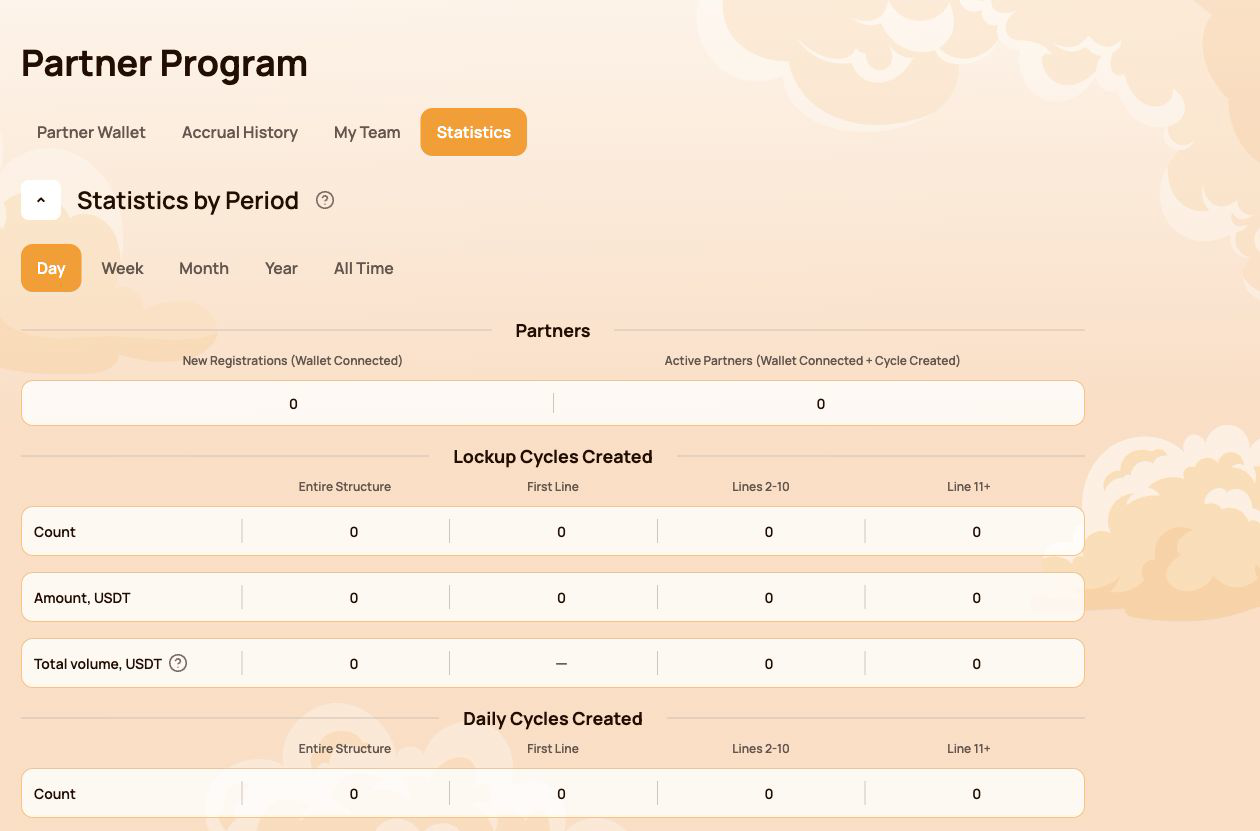
Thống kê — cấu trúc đang phát triển như thế nào?
Sử dụng Thống kê để so sánh:
- Ngày / Tuần / Tháng / Năm / Mọi thời đại;
- Đăng ký mới và Đối tác hoạt động;
- Hoạt động dòng tiền khóa và dòng tiền hàng ngày;
- Toàn bộ Cấu trúc, Dòng Đầu tiên, Các dòng 2–10 và Dòng 11+;
- Các tuyến hoạt động mạnh nhất.
Đường đi nhanh theo tác vụ
| Tôi muốn… | Mở... |
|---|---|
| Sao chép liên kết giới thiệu của tôi | Đội của tôi |
| Kiểm tra xem còn thiếu gì cho trạng thái tiếp theo | Nhóm của tôi → Yêu cầu cho Trạng thái Tiếp theo |
| Tìm nguồn của phần thưởng | Lịch sử tích lũy |
| Kiểm tra chuyển tiền tự động | Partner Wallet → Withdrawal History |
| Verify a transfer on-chain | Tx Hash → BscScan |
| Find a participant in the structure | My Team → Search by Wallet Address |
| Compare structure activity over time | Thống kê |
The Personal Dashboard shows the result of the calculation. The following sections explain the status, compression, flow-specific and Matching Reward rules behind it.
3. Partner Status: how qualification works
Partner Status determines two parameters: the participant's Structure Reward rate and, from Master 1 onward, the Matching Reward rate. The system checks the qualification conditions automatically.
Three indicators are checked
| Chỉ báo | What is counted |
|---|---|
| Personal Active Cycle Volume | The participant's own qualifying Smart Cycles |
| First-Line Active Cycle Volume | Qualifying volume created by personally invited participants |
| Partner Structure Active Cycle Volume | Qualifying volume across the lower Partner Structure, subject to the program's depth coefficients |
To receive a status, all requirements shown for that level must be met. If a requirement is marked Not required, it does not affect that status.
All 19 Partner Statuses
| Trạng thái | Personal Active Cycle Volume | First-Line Active Cycle Volume | Partner Structure Active Cycle Volume | Phần thưởng theo cấu trúc | Matching Reward |
|---|---|---|---|---|---|
 Bắt đầu Bắt đầu |
10 | Not required | Not required | 15% | — |
 Builder 1 Builder 1 |
50 | 100 | Not required | 18% | — |
 Builder 2 Builder 2 |
100 | 300 | 1,000 | 21% | — |
 Builder 3 Builder 3 |
200 | 700 | 2,000 | 24% | — |
 Builder 4 Builder 4 |
300 | 1,200 | 4,000 | 27% | — |
 Builder 5 Builder 5 |
500 | 2,000 | 7,000 | 30% | — |
 Builder 6 Builder 6 |
700 | 3,000 | 12,000 | 33% | — |
 Builder 7 Builder 7 |
1,000 | 4,500 | 18,000 | 36% | — |
 Master 1 Master 1 |
1,500 | 7,000 | 28,000 | 38% | 5% |
 Master 2 Master 2 |
2,000 | 10,000 | 40,000 | 40% | 7% |
 Master 3 Master 3 |
3,000 | 17,000 | 70,000 | 42% | 9% |
 Master 4 Master 4 |
4,000 | 25,000 | 120,000 | 44% | 11% |
 Master 5 Master 5 |
5,000 | 35,000 | 200,000 | 46% | 13% |
 Master 6 Master 6 |
6,000 | 45,000 | 300,000 | 48% | 15% |
 Master 7 Master 7 |
7,000 | 60,000 | 450,000 | 50% | 17% |
 Strategist Strategist |
8,000 | 80,000 | 600,000 | 52.5% | 19% |
 Ambassador Ambassador |
10,000 | 100,000 | 800,000 | 55% | 21% |
 Director Director |
12,000 | 120,000 | 1,100,000 | 57.5% | 23% |
 Executive Executive |
15,000 | 150,000 | 1,500,000 | 60% | 25% |
All amounts in the table are shown in USDT-equivalent units used by the Atlas interface.
How to read progress in My Team
- Hiện tại — the volume already counted toward the selected requirement;
- Required — the target for the next status;
- Remaining — the amount still needed to satisfy that requirement.
Check every requirement card, not only the total Partner Structure Active Cycle Volume. A large structure alone does not replace the Personal Active Cycle Volume or First-Line Active Cycle Volume requirement.
A status rate is a qualification parameter used by the reward algorithm. It is not a promised percentage return on a participant's Smart Cycle.
4. Qualification volume, Delta and depth
Several similar-looking values serve different purposes. Keeping them separate makes the Partner Program much easier to understand.
The short version
| Value | Purpose |
|---|---|
| Số tiền hỗ trợ | A participant's amount of provided aid in a Smart Cycle |
| Partner Structure Active Cycle Volume | Used to check Partner Status qualification |
| Delta generated in the lower Partner Structure | The reward calculation base for the applicable branch |
| Phần thưởng theo cấu trúc | The result calculated from Delta according to status-rate differences and compression rules |
The original Support Amount and the generated Delta are not the same value. Partner Rewards are calculated from Delta, not from the full amount placed into a Smart Cycle.
Actual and Weighted Partner Structure Volume
- Actual Partner Structure Volume shows the structure's qualifying volume before depth coefficients are applied.
- Weighted Partner Structure Volume shows the volume after the coefficients are applied and is used for status qualification where the rules require it.
| Structure depth | Coefficient applied to volume |
|---|---|
| Lines 1–5 | 100% |
| Lines 6–10 | 50% |
| Line 11 and deeper | 10% |
Example of weighted volume
Suppose the structure has 1,000 USDT of qualifying volume on each of three depth groups:
| Group | Actual volume | Coefficient | Weighted volume |
|---|---|---|---|
| Lines 1–5 | 1,000 | 100% | 1,000 |
| Lines 6–10 | 1,000 | 50% | 500 |
| Line 11+ | 1,000 | 10% | 100 |
| Total | 3,000 | 1,600 |
This example explains status-volume weighting only. It does not calculate a Partner Reward.
Where to check the numbers
- open Chương trình Đối tác → Đội ngũ của tôi for qualification volumes and next-status progress;
- open Thống kê to compare structure activity by depth and period;
- open Lịch sử tích lũy to see an actual calculated Partner Reward;
- use Partner Wallet → Withdrawal History to verify a completed transfer.
Do not use cycle volume, Partner Structure Volume and Delta as interchangeable terms. Cycle volume is used for status qualification; Delta is the reward calculation base.
5. Compression: who receives which part of the reward
Compression distributes the available Partner Reward according to the percentage qualifications of active partners in the branch. An upline participant receives the difference between their status rate and the rate already realised by a qualified partner below.
The rule in three situations
| Situation below you | What happens |
|---|---|
| The partner's status rate is lower than yours | You receive the positive difference between the two rates |
| There is no qualified partner between you and the Delta source | You may receive your full eligible status rate under the program rules |
| The partner's rate is equal to or higher than yours | You receive 0% from the structure compressed behind that partner |
The position of a wallet at the top of a branch does not guarantee a reward. Qualification and active status determine how the available percentage is distributed.
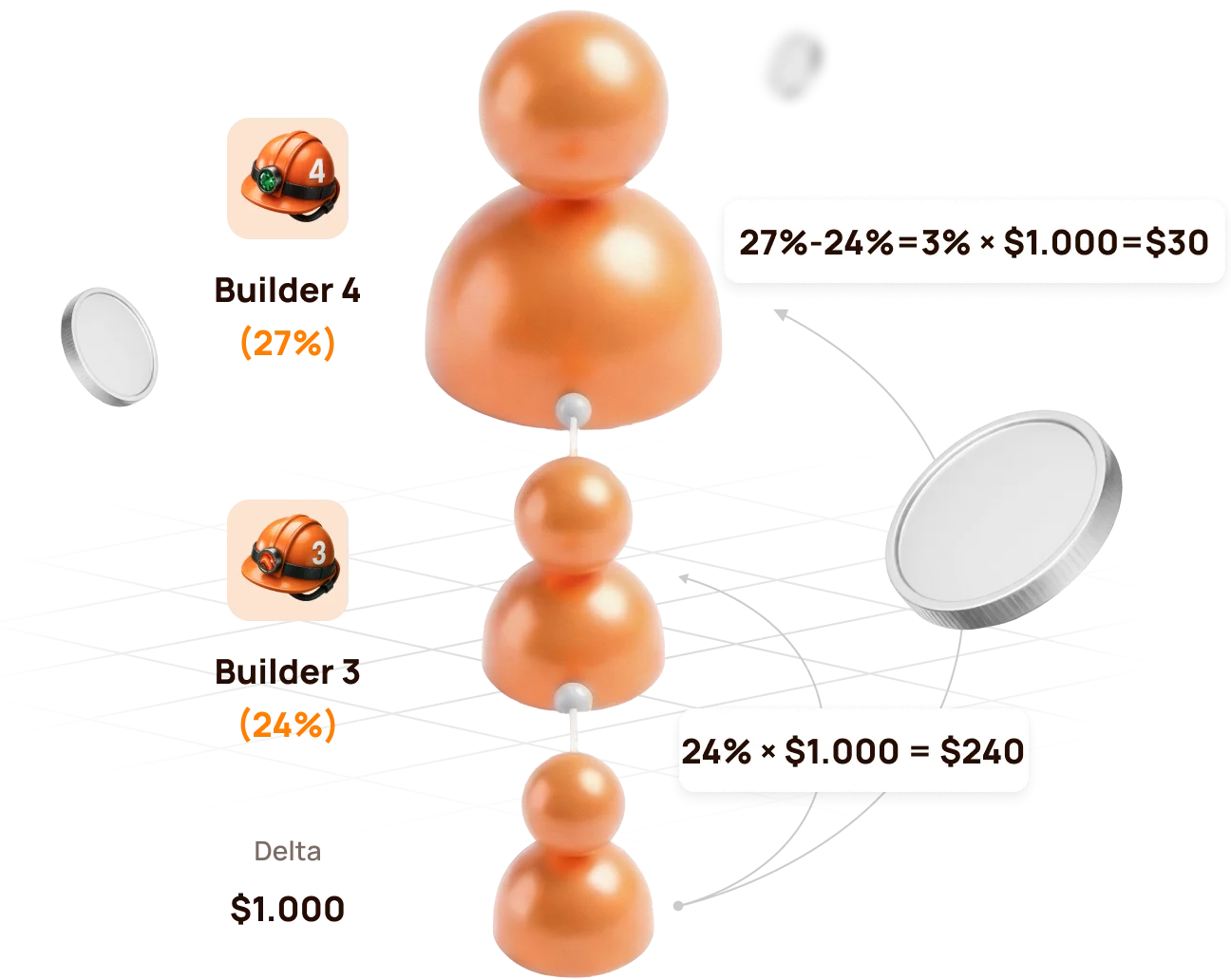
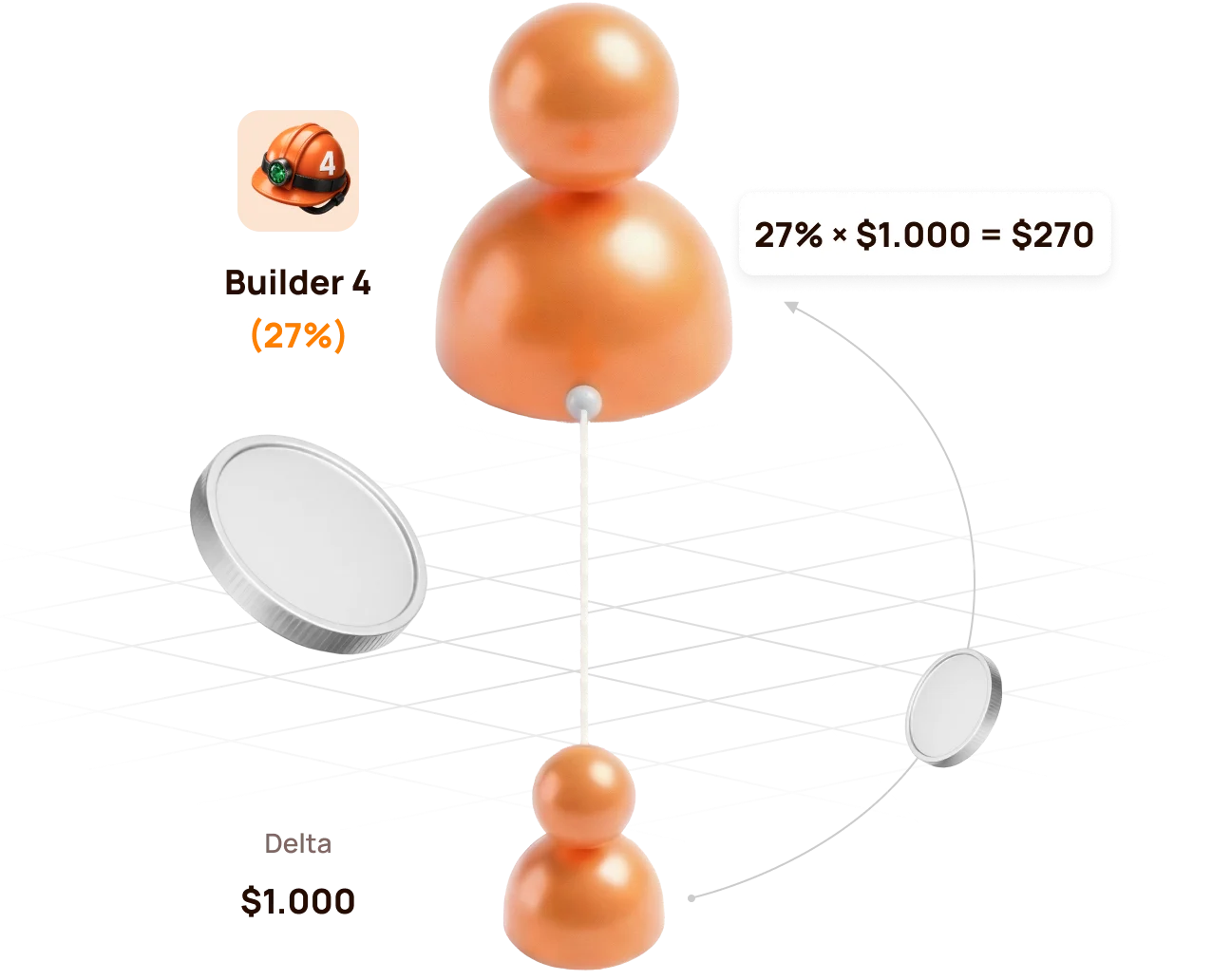
Official example: Builder 4 above Builder 3
The lower structure generates 1,000 USDT of Delta.
| Participant | Trạng thái đối tác | Rate | Calculation | Partner Reward |
|---|---|---|---|---|
| Lower qualified partner | Builder 3 | 24% | 24% × 1,000 | 240 USDT |
| Upline partner | Builder 4 | 27% | (27% − 24%) × 1,000 | 30 USDT |
| Total distributed by status rates | 27% | 270 USDT |
If there is no Builder 3 between the source and Builder 4
Builder 4 can realise the full eligible rate:
27% × 1,000 USDT = 270 USDT
If the lower partner reaches the same or a higher rate
If the lower partner reaches Builder 4 (27%) or a higher status, the upline Builder 4 no longer has a positive percentage difference. The structure behind that partner is compressed for the upline participant.
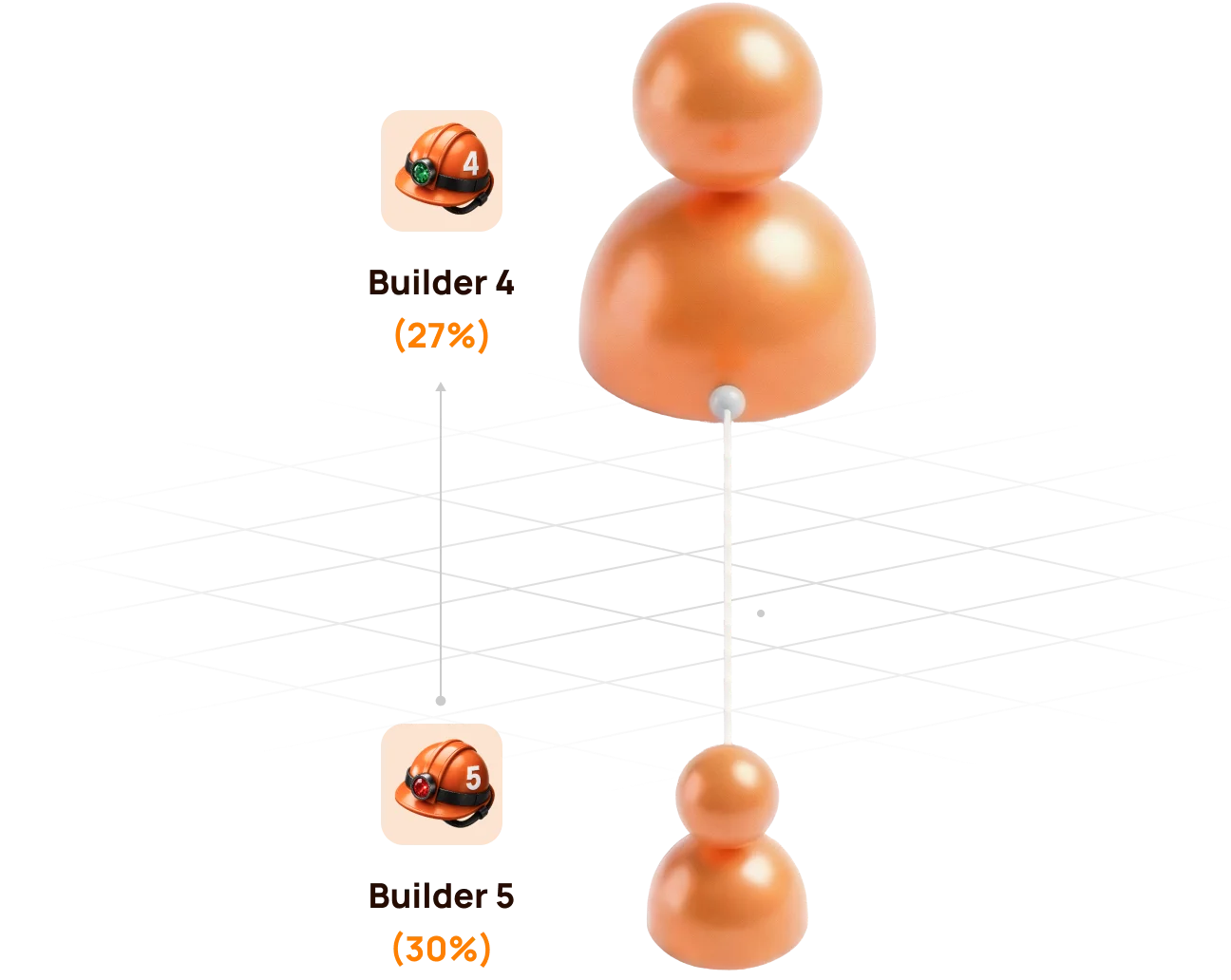
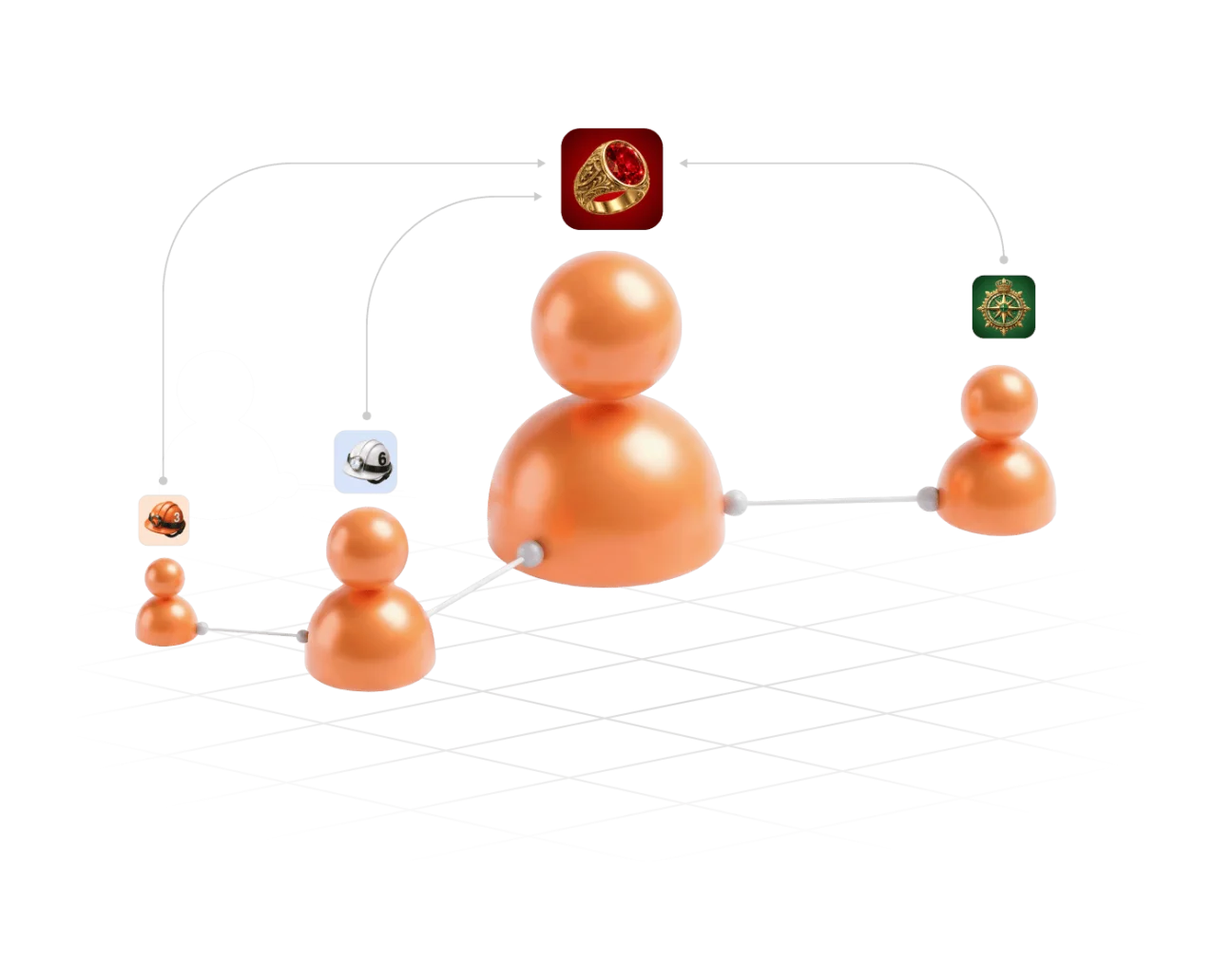
Compression does not remove a participant from the Partner Structure. It changes how the Partner Reward is distributed for the relevant Delta source.
6. Partner Rewards from Lockup Flow
For a qualifying Lockup Flow Smart Cycle, the inviter receives a Partner Reward calculated as a percentage of the invited participant's Delta.
When and how it is calculated
- The invited participant creates a Lockup Flow Smart Cycle.
- The system records the inviter's Partner Status at that moment.
- The applicable status and compression rules are applied to the cycle's Delta.
- The Partner Reward is accrued once when the Smart Cycle is created; the inviter does not wait for the invited participant to Claim.
| Question | Lockup Flow rule |
|---|---|
| What is the calculation base? | The invited participant's Delta, not the full Support Amount |
| Which status rate is used? | The inviter's applicable Partner Status when the invited participant creates the Smart Cycle |
| When is it accrued? | Once, at Smart Cycle creation |
| Where is it shown? | Partner Program → Accrual History |
| Where is the available balance shown? | Partner Program → Partner Wallet |
Automatic transfer rule
- if an accrued Lockup Flow Partner Reward is more than 10 USDT, it is automatically credited to the inviter's wallet after formation;
- an amount below 10 USDT is credited to the Partner Balance;
- when the accumulated Partner Balance reaches 10 USDT, 10 USDT is automatically transferred to the inviter's wallet.
Check the sequence in Accrual History → Partner Wallet → Withdrawal History → Tx Hash.

A Partner Reward accrual and the invited participant's Claim are separate events. The accrual does not mean that the inviter controls or initiates the invited participant's Claim.
7. Partner Rewards and qualification from Daily Flow
For Daily Flow, the inviter's applicable Partner Reward percentage is calculated from the invited participant's Delta. The percentage is determined by the inviter's Partner Status when the invited participant creates the Smart Cycle.
For Dòng chảy hàng ngày, 20% of the Partner Reward is credited when the cycle is created, and the remaining 80% is paid in equal parts over the 200-day cycle. Use Lịch sử tích lũy và Ví đối tác to verify actual accruals and transfers.
How Daily Flow is counted for status qualification
Daily Flow contributes to the structure's qualifying volume with a coefficient of 0.5. Short-term Smart Cycle plans are counted with a coefficient of 1.0.
| Activity | Amount | Qualification coefficient | Counted volume |
|---|---|---|---|
| Short-term Smart Cycle | 100 USDT | 1.0 | 100 USDT |
| Daily Flow · 200 days | 100 USDT | 0.5 | 50 USDT |
Formula: qualifying volume = short cycles × 1.0 + Daily Flow × 0.5.
The coefficient affects status qualification volume, not the participant's 1.1% / 1.3% daily assistance calculation and not the Partner Reward percentage itself.
Atlas explains the coefficient as a way to prioritise regular short-cycle activity, prevent one large long-term cycle from disproportionately accelerating status growth, and keep qualification conditions balanced across partner teams.
Hybrid visual: use the official Daily Flow qualification graphics showing 100% short cycles và 50% Daily Flow with the × 0.5 formula.
Daily Flow still contributes to qualification. The coefficient changes how much of its cycle volume is counted; it does not remove Daily Flow from the Partner Program.
8. Matching Reward
Matching Reward is an additional status benefit available from Master 1 onward. It allows a participant to receive the applicable Matching Reward percentage from the Partner Rewards of personally invited leaders.
Qualification condition
Matching Reward is awarded only when the personally invited participant:
- reaches the same Partner Status as the inviter; or
- reaches a higher Partner Status than the inviter.
If the personally invited participant's status is lower, Matching Reward is not awarded from that participant's Partner Rewards.
Matching Reward rates
| Status group | Matching Reward |
|---|---|
| Start and Builder 1–7 | Not available |
| Master 1–7 | 5–17% |
| Strategist | 19% |
| Ambassador | 21% |
| Director | 23% |
| Executive | 25% |
How to read the rule
Matching Reward is calculated from the Partner Reward received by the personally invited qualified participant. It is not calculated directly from that participant's Support Amount or total structure turnover.
Master 3 inviterpersonally invited→Master 3+Matching activeMaster 3 inviterpersonally invited→Master 2Not activeMatching Reward concerns personally invited participants only. The unlimited-depth Structure Reward and the personally invited leader's Matching Reward are different mechanisms.
9. How to verify an accrual and a transfer
Use the dashboard in chronological order. Each screen answers a different question.
Step 1 — find the calculation
Mở Partner Program → Accrual History and check:
- Accrual Date — when the reward was recorded;
- Bonus — which Partner Reward mechanism was applied;
- Accrued Reward Amount — the amount added by the calculation.
An entry in Accrual History confirms an accrual. It does not by itself confirm that USDT has already reached the connected wallet.
Step 2 — check the partner balance
Mở Ví đối tác and compare:
| Lĩnh vực | Meaning |
|---|---|
| Account Balance | Amount currently available in the Partner Wallet |
| Total Accrued | Cumulative Partner Rewards recorded by the system |
| Rewards Received | Rewards already processed as received according to the dashboard records |
The Partner Wallet balance is an internal dashboard value. It is not the same as the USDT balance displayed by MetaMask.
Step 3 — verify the blockchain transfer
Mở Withdrawal History, find the relevant transfer and select its Tx Hash. BscScan should show:
- transaction status;
- date and time;
- sender and recipient addresses;
- token and amount;
- network fee and block confirmations.
Before comparing addresses, verify that the same wallet is connected in the Atlas dashboard and MetaMask.
If the numbers do not match immediately
- Check whether a Lockup Flow accrual is still below the automatic-transfer threshold.
- Check whether the record is an accrual rather than a completed withdrawal.
- Confirm the connected wallet address and BNB Smart Chain network.
- Open the Tx Hash instead of relying only on the dashboard total.
- If no Tx Hash exists, save the wallet address, Smart Cycle ID, date and screenshot before contacting support.
10. My Team and Statistics: managing the structure
My Team — qualification and people
Sử dụng Đội của tôi when you need to:
- copy the referral link;
- confirm the referrer;
- see the current Partner Status and rate;
- compare Current / Required / Remaining values;
- inspect Structure Lines;
- search for a wallet address;
- identify leaders within the structure.
Statistics — activity and dynamics
Sử dụng Thống kê to answer a different set of questions:
- how many new registrations and active partners appeared;
- whether activity came from Lockup Flow or Daily Flow;
- which period changed: Day, Week, Month, Year or All Time;
- where the activity occurred: Entire Structure, First Line, Lines 2–10 or Line 11+;
- which lines are the most active.
Statistics helps explain development of the structure, but it does not replace Accrual History. Activity can exist without producing a Partner Reward for a particular wallet because status, compression and qualification rules still apply.
11. Three worked examples
Example A — Start with no qualified partner between
| Input | Value |
|---|---|
| Participant status | Bắt đầu |
| Eligible Structure Reward rate | 15% |
| Delta used in the example | 100 USDT |
| Qualified partner between participant and source | No |
Calculation: 15% × 100 = 15 USDT.
The result is recorded in Lịch sử tích lũy according to the applicable flow and accrual rules. This example assumes that no other qualification or compression condition changes the percentage.
Example B — Builder 4 above Builder 3
| Input | Value |
|---|---|
| Upline status | Builder 4 — 27% |
| Lower qualified status | Builder 3 — 24% |
| Delta | 1,000 USDT |
- Builder 3:
24% × 1,000 = 240 USDT; - Builder 4:
(27% − 24%) × 1,000 = 30 USDT.
Example C — Matching Reward for a personally invited Master
Assume a participant has Master 1 status with a 5% Matching Reward rate. Their personally invited participant also reaches Master 1 or higher and receives a Partner Reward of 100 USDT.
Calculation: 5% × 100 = 5 USDT Matching Reward.
The 5% is applied to the personally invited leader's Partner Reward, not to their Support Amount and not to their total structure turnover.
Master 1 inviter · 5%→Partner Reward 100→Matching Reward 5All three examples isolate one rule for learning purposes. Actual dashboard results can combine compression, flow-specific rules, qualification and applicable fees.
12. Why a Partner Reward may be missing
| What you see | What to verify |
|---|---|
| Referral link is Không có sẵn | A qualifying Smart Cycle of 10 USDT or more exists and its transaction is confirmed |
| Structure activity exists, but no reward appeared | The activity generated Delta and your rate remained positive after compression |
| Lower leader is active, but your Structure Reward is zero | Their status rate may equal or exceed yours |
| Matching Reward is missing | The participant was personally invited and has reached your status or a higher one |
| Lockup Flow amount remains in Partner Balance | The accumulated amount may be below the automatic-transfer threshold |
| Accrual exists, but MetaMask balance did not change | Check Partner Wallet, Withdrawal History and Tx Hash separately |
| Volume looks lower than expected | Compare Actual and Weighted Partner Structure Volume and the 100% / 50% / 10% depth coefficients |
| Search does not show the expected wallet | Recheck the full wallet address and whether it joined through the intended referral link |
Information to prepare for support
- connected wallet address;
- referrer or participant wallet address, if relevant;
- Smart Cycle ID and flow type;
- approximate date and time;
- screenshot of the relevant dashboard tab;
- Tx Hash, if one exists;
- short description of the expected and displayed result.
Never send a seed phrase, private key or wallet password to support.
13. Final checklist and risk warning
Before sharing the referral link
- the official Atlas dashboard is open;
- the intended wallet is connected on BNB Smart Chain;
- a qualifying Smart Cycle is active;
- Liên kết giới thiệu của tôi is available;
- the invited participant understands that wallet actions remain under their own control.
Before interpreting a reward
- identify whether it is Structure Reward or Matching Reward;
- identify whether the source is Lockup Flow or Daily Flow;
- use Delta as the reward base, not Support Amount;
- account for status-rate differences and compression;
- separate Actual and Weighted Partner Structure Volume;
- verify accrual, dashboard balance and blockchain transfer as separate stages.
Risk warning
Participation is voluntary. Delta, Partner Rewards and the return of a Support Amount are not guaranteed. Claims depend on sufficient smart-contract liquidity. Status tables, screenshots and numerical examples explain the current mechanics; they are not a promise of income or future results.

