
Partnerprogramm
Die Partnerprogramm (Level-Kompressionsmodell, auch präsentiert als Einladen & Verdienen) ist ein lineares, statusbasiertes Modell, das aktiven Teilnehmern des Atlas-Systems ermöglicht, Partner-Belohnungen von Delta zu erhalten, die innerhalb ihrer tieferen Partnerstruktur generiert werden.
Das Modell verwendet eine statusbasierte Komprimierung: Die Belohnung, die von einem Zweig verfügbar ist, hängt von der prozentualen Qualifikation jedes aktiven Partners in diesem Zweig ab.

Auf einen Blick
| Aktivierung | Automatisch nach dem ersten qualifizierenden Smart Cycle mit einem Unterstützungsbetrag von 10 USDT oder mehr |
| Statusse | 19 Stufen: Start, Builder 1–7, Master 1–7, Strategist, Ambassador, Director und Executive |
| Strukturvergütung | Von 15% bis 60% bei Delta, abhängig vom Partnerstatus und den Komprimierungsregeln |
| Tiefe | Unendliche Tiefe, mit statusbasierter Komprimierung und gewichteten Struktur-Volumen-Koeffizienten |
| Verifizierung | Rückstellungen werden im persönlichen Dashboard angezeigt; Blockchain-Transaktionen können auf BscScan überprüft werden. |
Partner-Prämien werden gemäß den geltenden Regeln des Partnerprogramms auf Basis von Delta berechnet. Das Zyklusvolumen wird für die Statusqualifizierung verwendet; es ist nicht selbst die Prämienbasis. Beispiele und Screenshots garantieren keine zukünftigen Prämien.
1. Wie die Teilnahme beginnt
Aktivierung in fünf Schritten
- Verbinden Sie die Wallet mit dem offiziellen persönlichen Dashboard des Atlas-Systems.
- Erstelle den ersten qualifizierenden Smart Cycle mit einem Förderbetrag von 10 USDT oder mehr.
- Öffnen Partnerprogramm → Mein Team.
- Kopieren Mein Empfehlungslink und teilen Sie ihn mit einem Teilnehmer, den Sie einladen möchten.
- Nachdem sich der eingeladene Teilnehmer über den Link verbunden hat, wird dessen Wallet Teil Ihrer einheitlichen Atlas-System-Partnerstruktur.
Es ist kein separates Registrierungsformular für das Partnerprogramm erforderlich. Die Aktivierung und die Berechnungen erfolgen automatisch gemäß den Programmregeln.
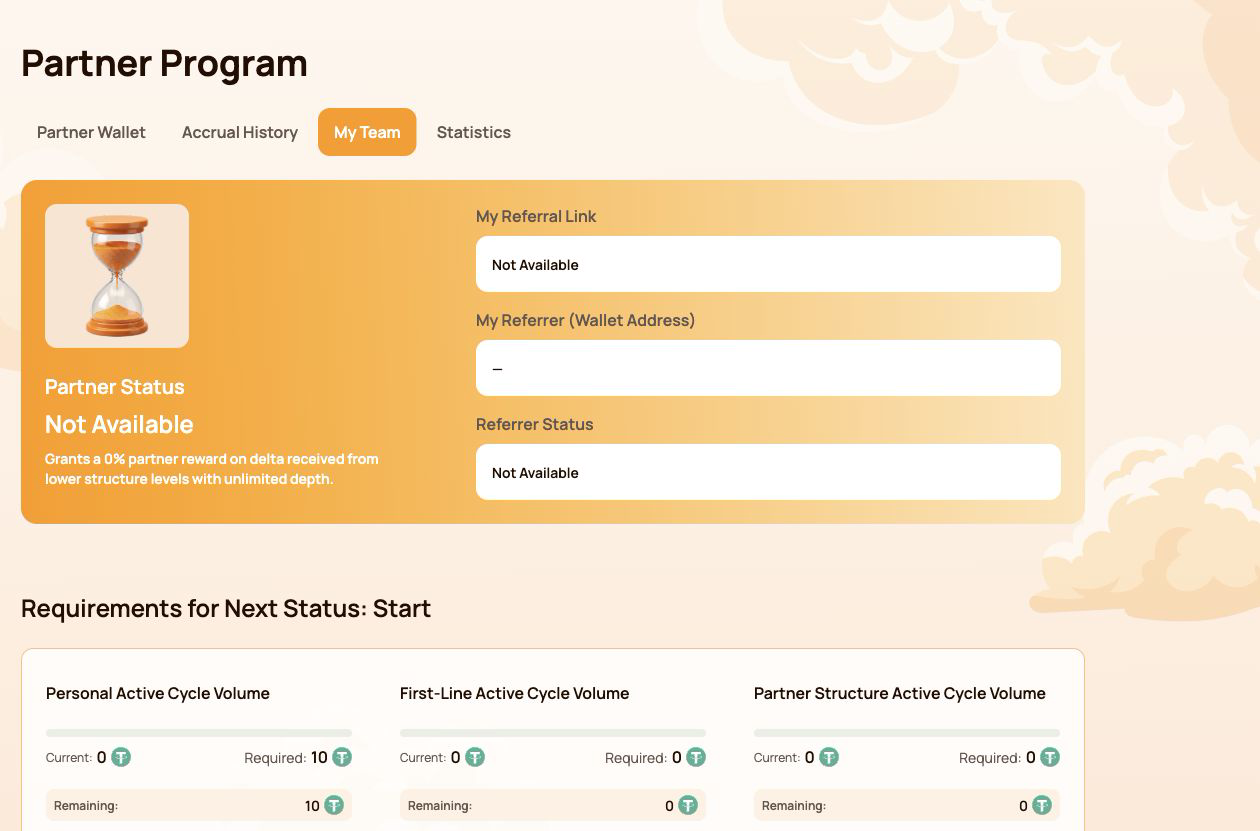
Was unter „Mein Team“ angezeigt wird
| Feld | Was das bedeutet |
|---|---|
| Partnerstatus | Aktueller Status und Struktur-Belohnungsprozentsatz |
| Mein Empfehlungslink | Persönlicher Link zur Einladung neuer Teilnehmer |
| Mein Empfehlender (Wallet-Adresse) | Wallet, deren Empfehlungslink bei der Registrierung verwendet wurde |
| Empfehlungsstatus | Aktueller Partnerstatus des Empfehlers |
Falls Mein Empfehlungslink zeigt Nicht verfügbar, Prüfen Sie zunächst, ob das verbundene Wallet über einen qualifizierenden Smart Cycle verfügt und dessen Blockchain-Transaktion bestätigt wurde.
Eine Struktur im gesamten Atlas-Ökosystem
Ein eingeladener Teilnehmer ist dauerhaft mit der einheitlichen Atlas-System-Partnerstruktur verknüpft. Dieselbe Struktur kann von neuen Ökosystemprodukten und -programmen genutzt werden, sobald diese verfügbar sind.
Das bedeutet:
- ein Team muss nicht für jedes neue Atlas-Produkt neu aufgestellt werden;
- Partnerschaftsbeziehungen bleiben mit der ursprünglichen Empfehlungsstruktur verbunden;
- Das aktuelle Level-Kompressionsmodell wendet seine eigenen Qualifizierungs- und Belohnungsregeln an;
- Zünftige Partner-Modelle können dieselbe Basisbeziehung nutzen und dabei ihre Berechnungen, Volumina und Belohnungen getrennt halten;
- Dasselbe Volumen wird nicht automatisch in mehreren Programmen gleichzeitig gezählt.
Eine Empfehlungsverbindung begründet keinen automatischen Anspruch auf eine Prämie. Ein Empfehlungslink verknüpft Wallets innerhalb der Partnerstruktur, während jedes aktive Modell seine eigenen Qualifikationsregeln überprüft. Sie gibt dem Einladenden keine Kontrolle über die Wallet oder die Mittel eines anderen Teilnehmers.
2. Schnittstellenübersicht des Partnerprogramms
Der Abschnitt „Partnerprogramm“ enthält vier Registerkarten. Jede Registerkarte beantwortet eine andere Frage.
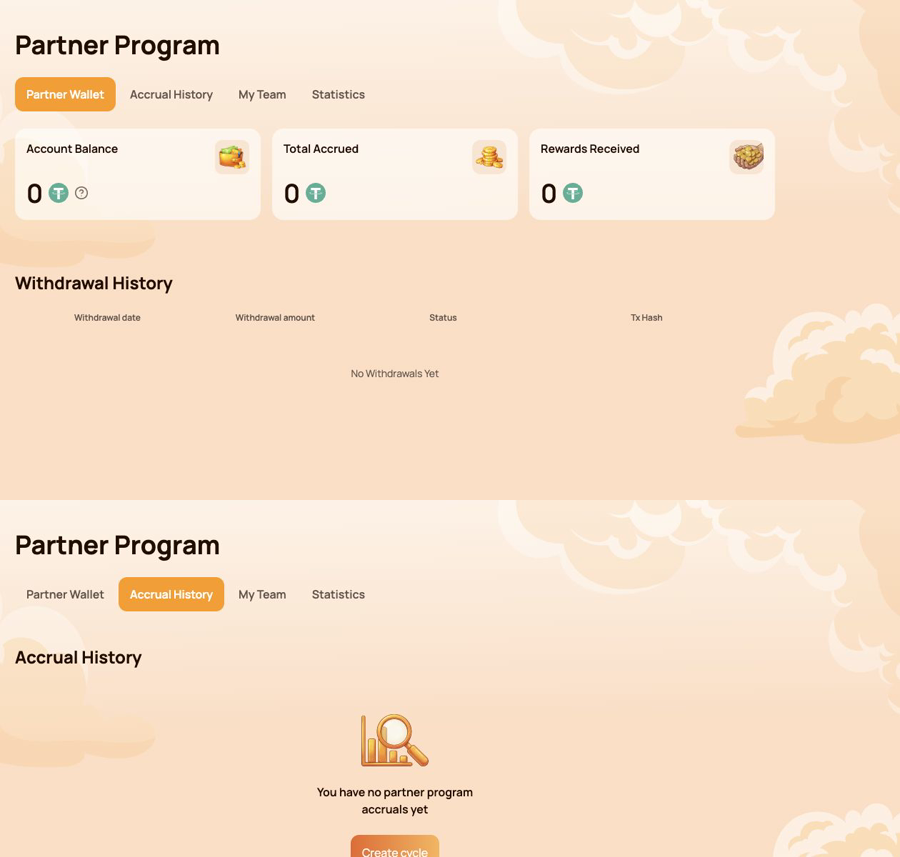
Partner-Wallet — was kann übertragen werden?
Benutzen Partner-Wallet überprüfen
- Kontostand;
- Gesamtrückstellungen;
- Erhaltene Belohnungen;
- Abhebungsverlauf;
- Tx-Hash für eine On-Chain-Übertragung.
Rückstellungsverlauf – woher kam die Belohnung?
Benutzen Rückstellungshistorie identifizieren
- Abgrenzungsdatum;
- Bonustyp;
- Aufgelaufener Prämienbetrag.
Ein Rückstellungsbetrag und eine Blockchain-Überweisung sind verschiedene Phasen. Überprüfen Sie zuerst den Rückstellungsverlauf, dann das Partner-Wallet und den Auszahlungsverlauf.
Mein Team — was wird für den nächsten Status benötigt?
Benutzen Mein Team zu überprüfen:
- Empfehlungs- und Empfehlungsgeberinformationen;
- Aktueller Partnerstatus;
- Aktuelle / Erforderliche / Verbleibende Mengen;
- Statusanforderungen;
- Strukturlinien;
- Nach Wallet-Adresse suchen;
- Führungskräfte und Aktivitäten innerhalb der Struktur.
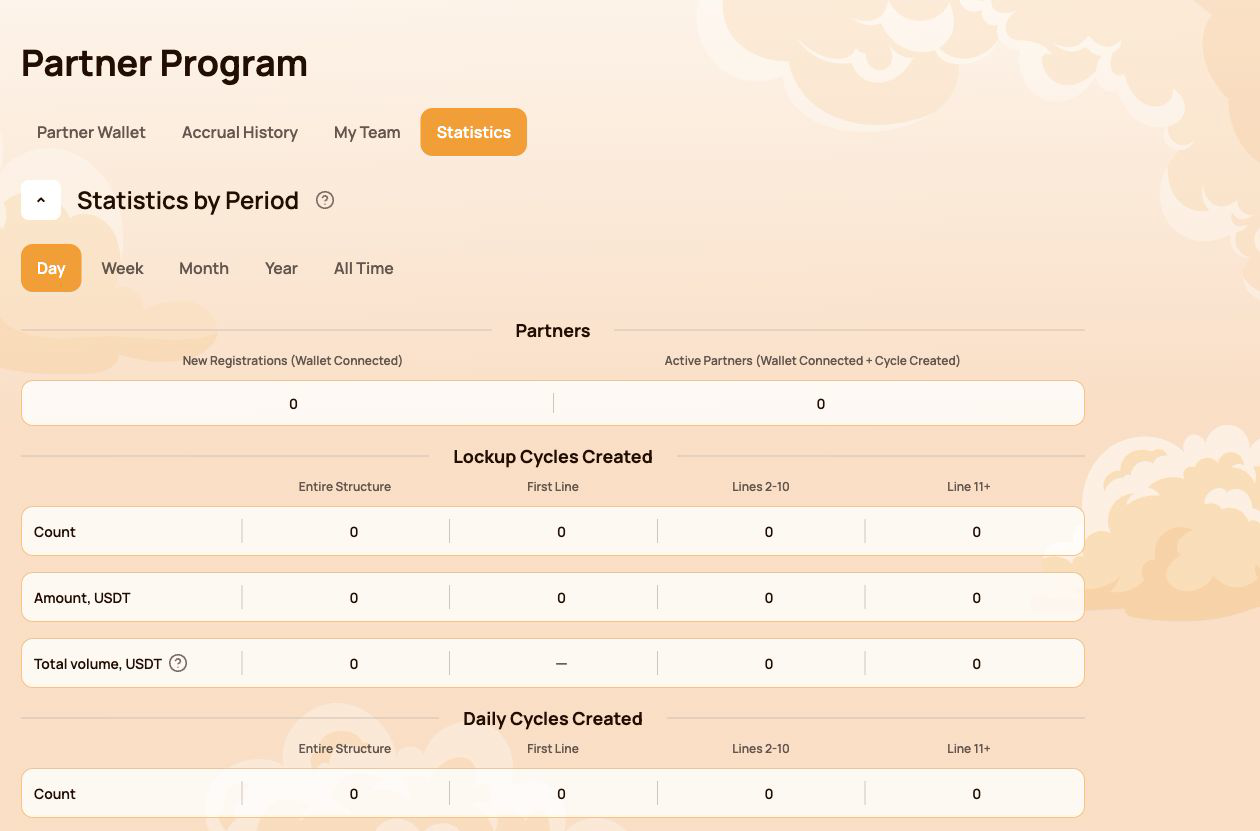
Statistik — wie entwickelt sich die Struktur?
Benutzen Statistiken vergleichen
- Tag / Woche / Monat / Jahr / Gesamte Zeit;
- Neue Registrierungen und aktive Partner;
- Sperrfrist-Aktivität und tägliche Transaktionsaktivität;
- Gesamte Struktur, Erste Zeile, Zeilen 2–10 und Zeile 11+;
- Aktivste Linien.
Schnellroute nach Aufgabe
| Ich möchte… | Öffnen… |
|---|---|
| Empfehlungslink kopieren | Mein Team |
| Prüfen Sie, was für den nächsten Status fehlt | Mein Team → Anforderungen für den nächsten Status |
| Die Quelle einer Belohnung finden | Rückstellungshistorie |
| Überprüfen Sie eine automatische Überweisung | Partner-Wallet → Auszahlungsverlauf |
| Eine Überweisung on-chain verifizieren | Tx-Hash → BscScan |
| Einen Teilnehmer in der Struktur finden | Mein Team → Nach Wallet-Adresse suchen |
| Strukturaktivität im Zeitverlauf vergleichen | Statistiken |
Das persönliche Dashboard zeigt das Ergebnis der Berechnung. Die folgenden Abschnitte erklären den Status, die Komprimierung sowie die flussspezifischen und Matching-Reward-Regeln dahinter.
3. Partner-Status: Wie die Qualifizierung funktioniert
Der Partner-Status bestimmt zwei Parameter: den des Teilnehmers Struktur-Belohnungsrate und ab dem Master 1 Matching-Prämienrate. Das System prüft die Qualifikationsbedingungen automatisch.
Drei Indikatoren werden überprüft
| Indikator | Was wird gezählt |
|---|---|
| Persönliches aktives Zyklusvolumen | Die eigenen qualifizierenden Smart Cycles des Teilnehmers |
| First-Line Active Cycle Volume | Durch persönlich eingeladene Teilnehmer generiertes Qualifizierungsvolumen |
| Partner-Struktur Aktives Zyklusvolumen | Qualifizierendes Volumen in der gesamten untergeordneten Partnerstruktur, vorbehaltlich der Tiefenkoeffizienten des Programms |
Um einen Status zu erhalten, müssen alle für diese Stufe angezeigten Anforderungen erfüllt sein. Wenn eine Anforderung markiert ist Nicht erforderlich, das berührt diesen Status nicht.
Alle 19 Partner-Status
| Status | Persönliches aktives Zyklusvolumen | First-Line Active Cycle Volume | Partner-Struktur Aktives Zyklusvolumen | Strukturvergütung | Matching-Bonus |
|---|---|---|---|---|---|
 Starten Starten |
10 | Nicht erforderlich | Nicht erforderlich | 15% | — |
 Bauarbeiter 1 Bauarbeiter 1 |
50 | 100 | Nicht erforderlich | 18% | — |
 Erbauer 2 Erbauer 2 |
100 | 300 | 1,000 | 21% | — |
 Erbauer 3 Erbauer 3 |
200 | 700 | 2,000 | 24% | — |
 Erbauer 4 Erbauer 4 |
300 | 1,200 | 4,000 | 27% | — |
 Builder 5 Builder 5 |
500 | 2,000 | 7,000 | 30% | — |
 Baumeister 6 Baumeister 6 |
700 | 3,000 | 12,000 | 33% | — |
 Erbauer 7 Erbauer 7 |
1,000 | 4,500 | 18,000 | 36% | — |
 Master 1 Master 1 |
1,500 | 7,000 | 28,000 | 38% | 5% |
 Master 2 Master 2 |
2,000 | 10,000 | 40,000 | 40% | 7% |
 Meister 3 Meister 3 |
3,000 | 17,000 | 70,000 | 42% | 9% |
 Master 4 Master 4 |
4,000 | 25,000 | 120,000 | 44% | 11% |
 Meister 5 Meister 5 |
5,000 | 35,000 | 200,000 | 46% | 13% |
 Master 6 Master 6 |
6,000 | 45,000 | 300,000 | 48% | 15% |
 Master 7 Master 7 |
7,000 | 60,000 | 450,000 | 50% | 17% |
 Stratege Stratege |
8,000 | 80,000 | 600,000 | 52.5% | 19% |
 Botschafter Botschafter |
10,000 | 100,000 | 800,000 | 55% | 21% |
 Direktor Direktor |
12,000 | 120,000 | 1,100,000 | 57.5% | 23% |
 Führungskraft Führungskraft |
15,000 | 150,000 | 1,500,000 | 60% | 25% |
Alle Beträge in der Tabelle werden in USDT-äquivalenten Einheiten angezeigt, die von der Atlas-Schnittstelle verwendet werden.
Wie man den Fortschritt in Mein Team liest
- Aktuell — das Volumen wurde bereits auf die ausgewählte Anforderung angerechnet;
- Erforderlich — das Ziel für den nächsten Status;
- Verbleibend — der Betrag, der noch zur Erfüllung dieser Anforderung benötigt wird.
Überprüfen Sie jede Anforderungskarte, nicht nur das gesamte aktive Partnerstruktur-Zyklusvolumen. Eine große Struktur allein ersetzt nicht die Anforderungen an das persönliche aktive Zyklusvolumen oder das aktive Zyklusvolumen der ersten Linie.
Eine Statusrate ist ein Qualifikationsparameter, der vom Belohnungsalgorithmus verwendet wird. Sie ist keine zugesicherte prozentuale Rendite auf den Smart Cycle eines Teilnehmers.
4. Qualifizierungsvolumen, Delta und Tiefe
Mehrere ähnlich aussehende Werte erfüllen unterschiedliche Zwecke. Wenn man sie getrennt hält, wird das Partnerprogramm viel verständlicher.
Die Kurzfassung
| Wert | Zweck |
|---|---|
| Unterstützungsbetrag | Die Menge der von einem Teilnehmer bereitgestellten Hilfe in einem Smart Cycle |
| Partner-Struktur Aktives Zyklusvolumen | Dient zur Überprüfung der Qualifikation für den Partnerstatus |
| Delta im unteren Partner-Gefüge | Die Prämienberechnungsgrundlage für die jeweilige Branche |
| Strukturvergütung | Das aus Delta entsprechend den Statusraten-Differenzen und Komprimierungsregeln berechnete Ergebnis |
Der ursprüngliche Unterstützungsbetrag und der generierte Delta-Wert sind nicht identisch. Partner-Belohnungen werden berechnet aus Delta, nicht von dem gesamten in einen Smart Cycle eingezahlten Betrag.
Tatsächliches und gewichtetes Partnerstrukturvolumen
- Tatsächliches Partnerstruktur-Volumen zeigt das anrechenbare Volumen des Bauwerks, bevor Tiefenkoeffizienten angewendet werden.
- Gewichtetes Partnervolumen der Struktur zeigt das Volumen an, nachdem die Koeffizienten angewendet wurden, und wird für die Statusqualifizierung verwendet, wo die Regeln dies erfordern.
| Strukturtiefe | Koeffizient, der auf das Volumen angewendet wird |
|---|---|
| Zeilen 1–5 | 100% |
| Zeilen 6–10 | 50% |
| Zeile 11 und tiefer | 10% |
Beispiel für gewichtetes Volumen
Angenommen, die Struktur hat in jeder von drei Tiefengruppen ein qualifizierendes Volumen von 1.000 USDT:
| Gruppe | Tatsächliches Volumen | Koeffizient | Gewichtetes Volumen |
|---|---|---|---|
| Zeilen 1–5 | 1,000 | 100% | 1,000 |
| Zeilen 6–10 | 1,000 | 50% | 500 |
| Zeile 11+ | 1,000 | 10% | 100 |
| Gesamt | 3,000 | 1,600 |
Dieses Beispiel erklärt nur die Status-Volumen-Gewichtung. Es berechnet keine Partner-Prämie.
Wo man die Nummern nachschauen kann
- öffnen Partnerprogramm → Mein Team für Qualifizierungsvolumen und Fortschritt zum nächsten Status;
- öffnen Statistiken Struktur-Aktivität nach Tiefe und Periode zu vergleichen;
- öffnen Rückstellungshistorie einen tatsächlichen berechneten Partner-Bonus zu sehen;
- Verwenden Partner-Wallet → Auszahlungsverlauf um eine abgeschlossene Überweisung zu verifizieren.
Verwenden Sie Zyklusvolumen, Partnerstrukturvolumen und Delta nicht als austauschbare Begriffe. Das Zyklusvolumen wird für die Statusqualifizierung verwendet; Delta ist die Berechnungsgrundlage für die Vergütung.
5. Kompression: Wer erhält welchen Teil der Belohnung
Die Kompression verteilt den verfügbaren Partner-Reward entsprechend den Prozentqualifikationen der aktiven Partner im Zweig. Ein Upline-Teilnehmer erhält den Unterschied zwischen ihrem Status-Tarif und dem Tarif, der bereits von einem qualifizierten Partner unten realisiert wurde.
Die Regel in drei Situationen
| Situation unten | Was passiert |
|---|---|
| The partner's status rate is lower than yours | You receive the positive difference between the two rates |
| There is no qualified partner between you and the Delta source | You may receive your full eligible status rate under the program rules |
| The partner's rate is equal to or higher than yours | You receive 0% from the structure compressed behind that partner |
The position of a wallet at the top of a branch does not guarantee a reward. Qualification and active status determine how the available percentage is distributed.
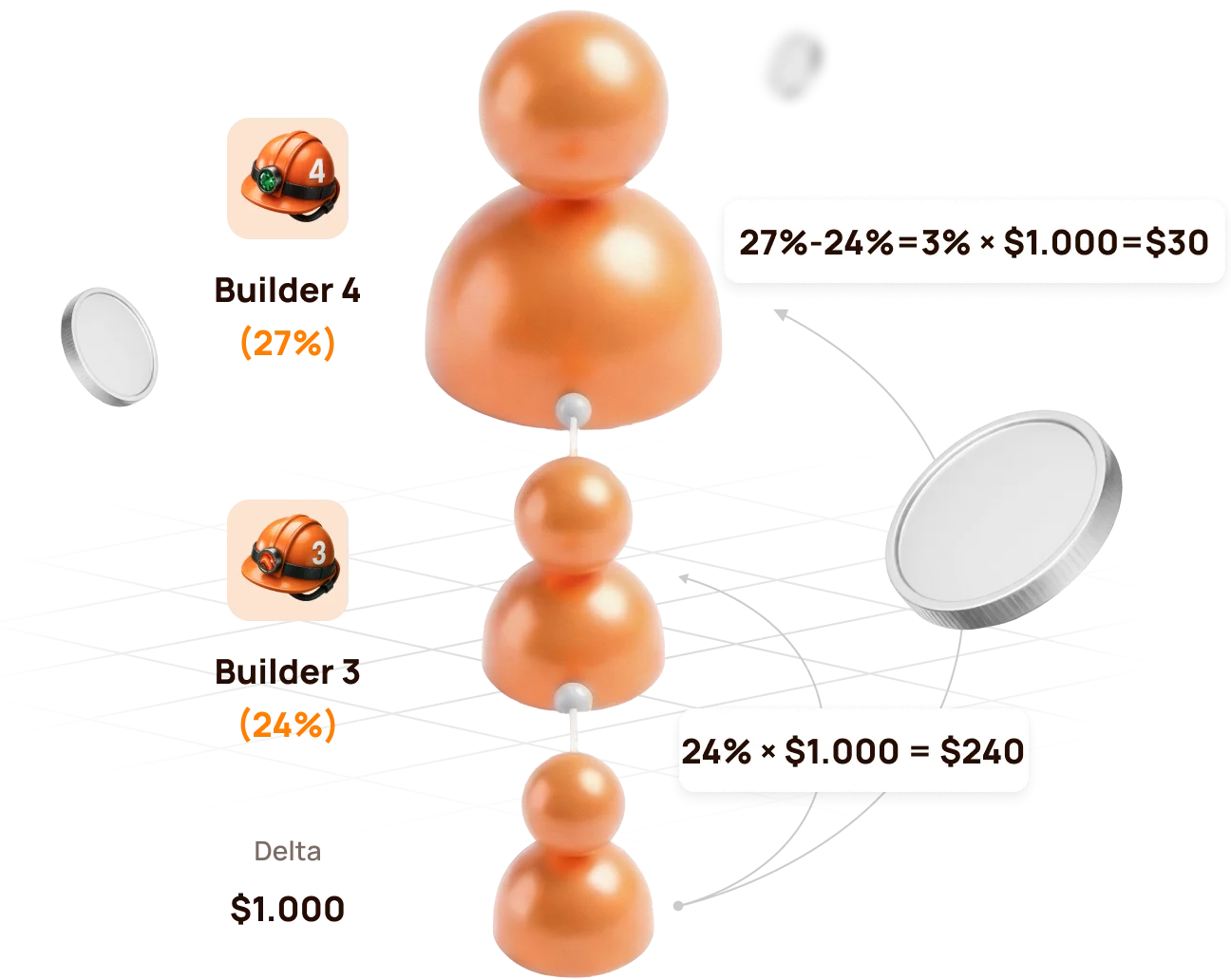
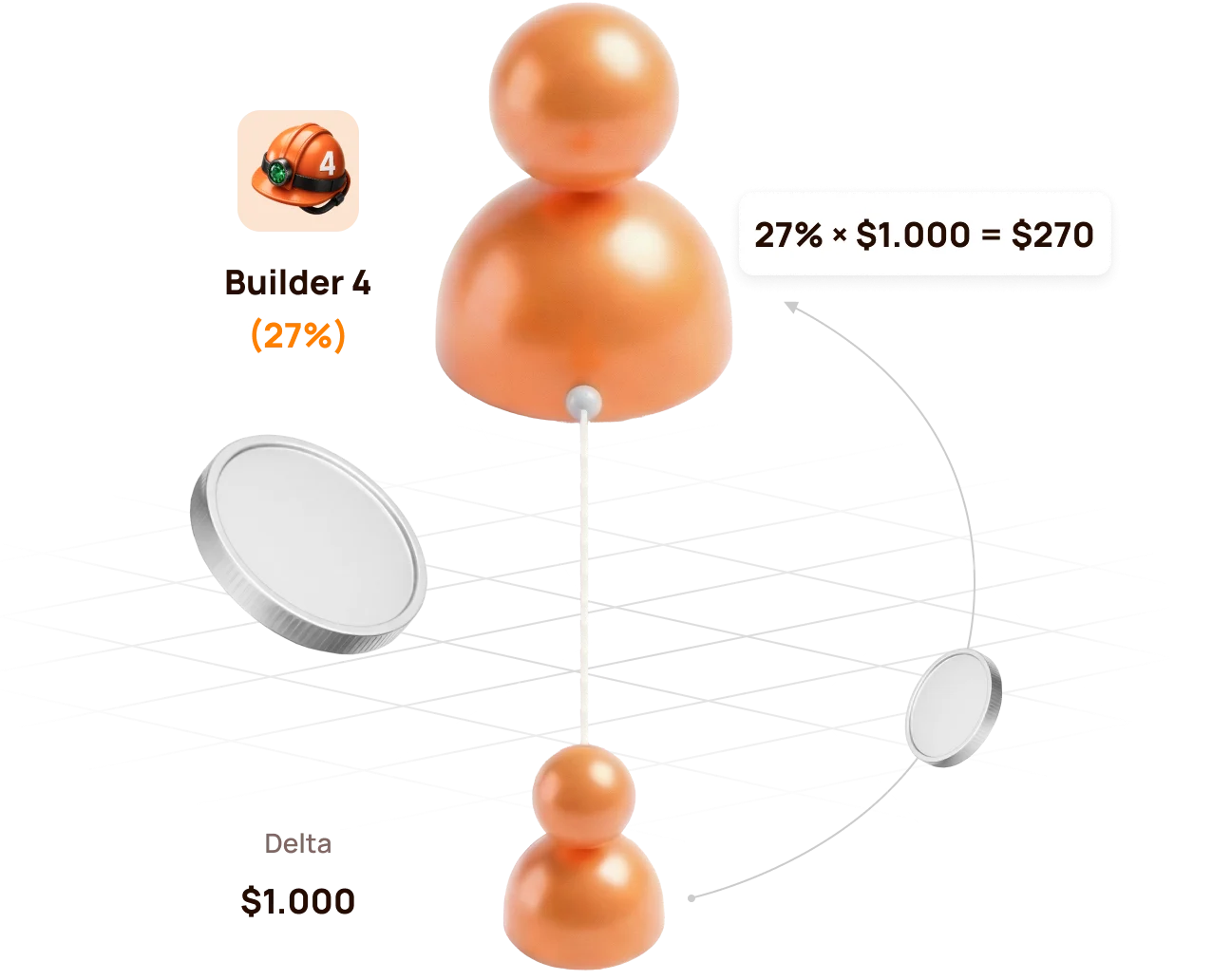
Official example: Builder 4 above Builder 3
The lower structure generates 1,000 USDT of Delta.
| Participant | Partnerstatus | Rate | Calculation | Partner Reward |
|---|---|---|---|---|
| Lower qualified partner | Erbauer 3 | 24% | 24% × 1,000 | 240 USDT |
| Upline partner | Erbauer 4 | 27% | (27% − 24%) × 1,000 | 30 USDT |
| Total distributed by status rates | 27% | 270 USDT |
If there is no Builder 3 between the source and Builder 4
Builder 4 can realise the full eligible rate:
27% × 1,000 USDT = 270 USDT
If the lower partner reaches the same or a higher rate
If the lower partner reaches Builder 4 (27%) or a higher status, the upline Builder 4 no longer has a positive percentage difference. The structure behind that partner is compressed for the upline participant.
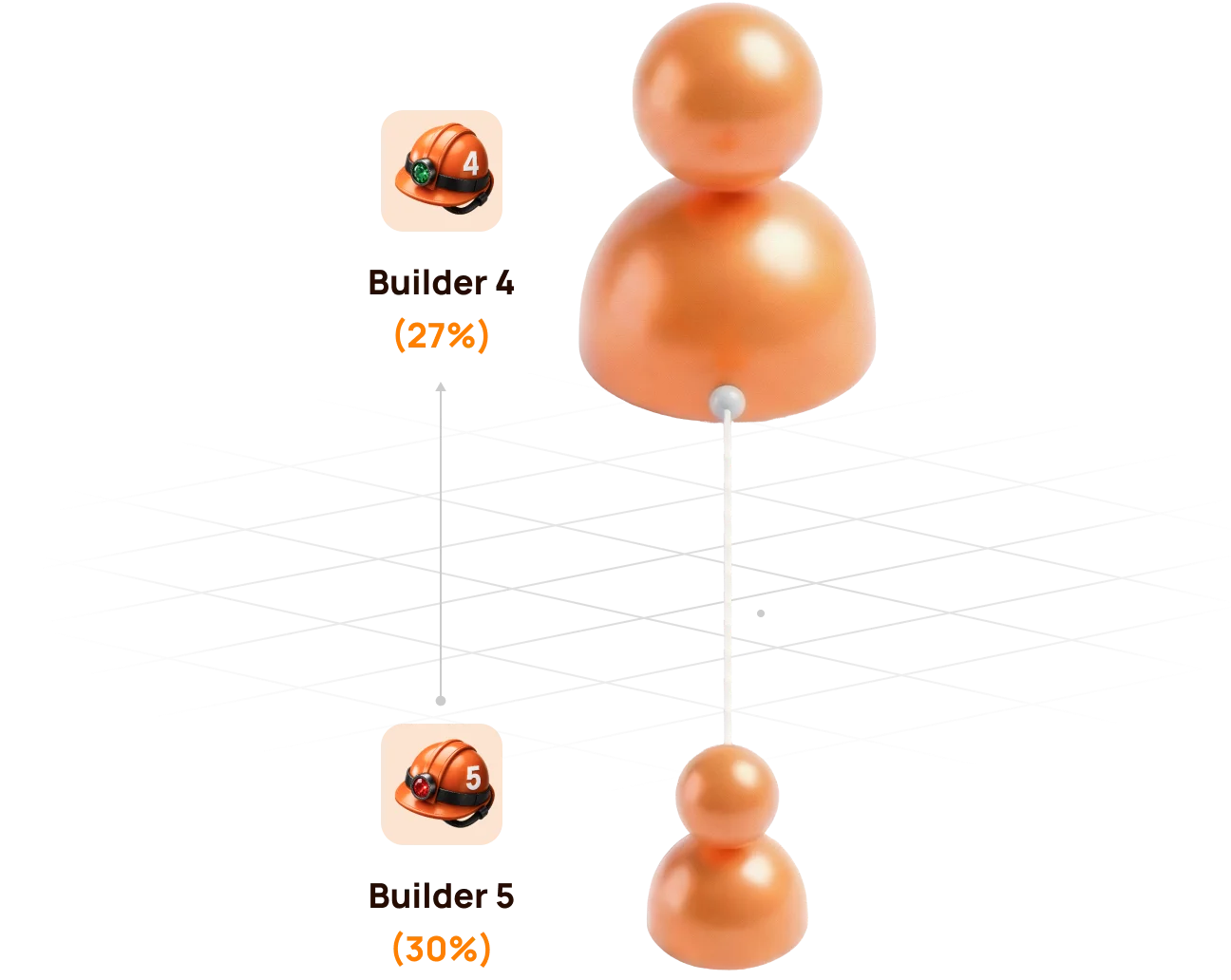
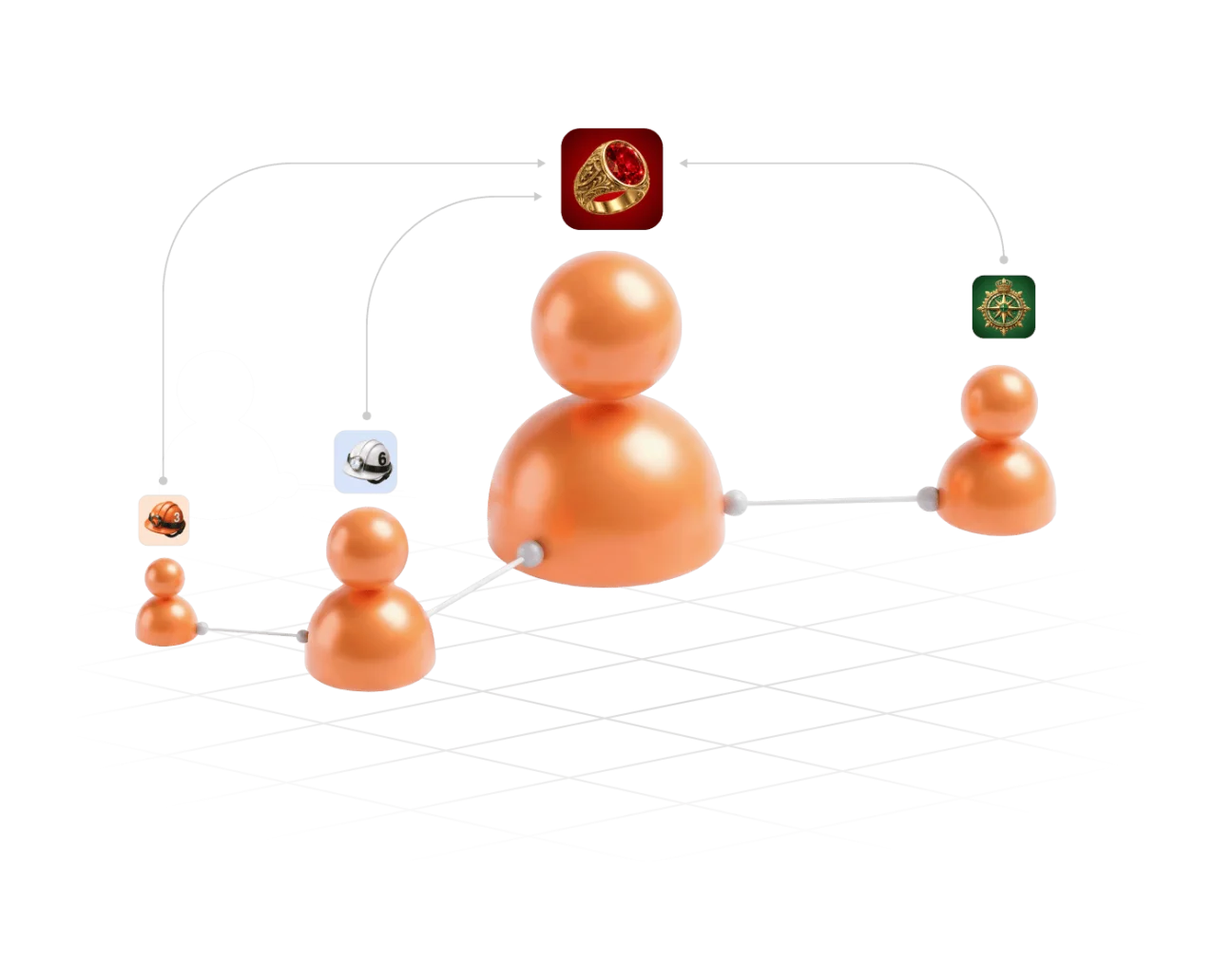
Compression does not remove a participant from the Partner Structure. It changes how the Partner Reward is distributed for the relevant Delta source.
6. Partner Rewards from Lockup Flow
For a qualifying Lockup Flow Smart Cycle, the inviter receives a Partner Reward calculated as a percentage of the invited participant's Delta.
When and how it is calculated
- The invited participant creates a Lockup Flow Smart Cycle.
- The system records the inviter's Partner Status at that moment.
- The applicable status and compression rules are applied to the cycle's Delta.
- The Partner Reward is accrued once when the Smart Cycle is created; the inviter does not wait for the invited participant to Claim.
| Question | Lockup Flow rule |
|---|---|
| What is the calculation base? | The invited participant's Delta, not the full Support Amount |
| Which status rate is used? | The inviter's applicable Partner Status when the invited participant creates the Smart Cycle |
| When is it accrued? | Once, at Smart Cycle creation |
| Where is it shown? | Partner Program → Accrual History |
| Where is the available balance shown? | Partner Program → Partner Wallet |
Automatic transfer rule
- if an accrued Lockup Flow Partner Reward is more than 10 USDT, it is automatically credited to the inviter's wallet after formation;
- an amount below 10 USDT is credited to the Partner Balance;
- when the accumulated Partner Balance reaches 10 USDT, 10 USDT is automatically transferred to the inviter's wallet.
Check the sequence in Accrual History → Partner Wallet → Withdrawal History → Tx Hash.


A Partner Reward accrual and the invited participant's Claim are separate events. The accrual does not mean that the inviter controls or initiates the invited participant's Claim.
7. Partner Rewards and qualification from Daily Flow
For Daily Flow, the inviter's applicable Partner Reward percentage is calculated from the invited participant's Delta. The percentage is determined by the inviter's Partner Status when the invited participant creates the Smart Cycle.
For Täglicher Ablauf, 20% of the Partner Reward is credited when the cycle is created, and the remaining 80% is paid in equal parts over the 200-day cycle. Use Rückstellungshistorie und Partner-Wallet to verify actual accruals and transfers.
How Daily Flow is counted for status qualification
Daily Flow contributes to the structure's qualifying volume with a coefficient of 0.5. Short-term Smart Cycle plans are counted with a coefficient of 1.0.
| Activity | Amount | Qualification coefficient | Counted volume |
|---|---|---|---|
| Short-term Smart Cycle | 100 USDT | 1.0 | 100 USDT |
| Daily Flow · 200 days | 100 USDT | 0.5 | 50 USDT |
Formula: qualifying volume = short cycles × 1.0 + Daily Flow × 0.5.
The coefficient affects status qualification volume, not the participant's 1.1% / 1.3% daily assistance calculation and not the Partner Reward percentage itself.
Atlas explains the coefficient as a way to prioritise regular short-cycle activity, prevent one large long-term cycle from disproportionately accelerating status growth, and keep qualification conditions balanced across partner teams.
Hybrid visual: use the official Daily Flow qualification graphics showing 100% short cycles und 50% Daily Flow with the × 0.5 formula.
Daily Flow still contributes to qualification. The coefficient changes how much of its cycle volume is counted; it does not remove Daily Flow from the Partner Program.
8. Matching Reward
Matching Reward is an additional status benefit available from Master 1 onward. It allows a participant to receive the applicable Matching Reward percentage from the Partner Rewards of personally invited leaders.
Qualification condition
Matching Reward is awarded only when the personally invited participant:
- reaches the same Partner Status as the inviter; or
- reaches a higher Partner Status than the inviter.
If the personally invited participant's status is lower, Matching Reward is not awarded from that participant's Partner Rewards.
Matching Reward rates
| Status group | Matching-Bonus |
|---|---|
| Start and Builder 1–7 | Not available |
| Master 1–7 | 5–17% |
| Stratege | 19% |
| Botschafter | 21% |
| Direktor | 23% |
| Führungskraft | 25% |
How to read the rule
Matching Reward is calculated from the Partner Reward received by the personally invited qualified participant. It is not calculated directly from that participant's Support Amount or total structure turnover.
Master 3 inviterpersonally invited→Master 3+Matching activeMaster 3 inviterpersonally invited→Master 2Not activeMatching Reward concerns personally invited participants only. The unlimited-depth Structure Reward and the personally invited leader's Matching Reward are different mechanisms.
9. How to verify an accrual and a transfer
Use the dashboard in chronological order. Each screen answers a different question.
Step 1 — find the calculation
Öffnen Partner Program → Accrual History and check:
- Accrual Date — when the reward was recorded;
- Bonus — which Partner Reward mechanism was applied;
- Accrued Reward Amount — the amount added by the calculation.
An entry in Accrual History confirms an accrual. It does not by itself confirm that USDT has already reached the connected wallet.
Step 2 — check the partner balance
Öffnen Partner-Wallet and compare:
| Feld | Bedeutung |
|---|---|
| Account Balance | Amount currently available in the Partner Wallet |
| Total Accrued | Cumulative Partner Rewards recorded by the system |
| Rewards Received | Rewards already processed as received according to the dashboard records |
The Partner Wallet balance is an internal dashboard value. It is not the same as the USDT balance displayed by MetaMask.
Step 3 — verify the blockchain transfer
Öffnen Withdrawal History, find the relevant transfer and select its Tx Hash. BscScan should show:
- transaction status;
- date and time;
- sender and recipient addresses;
- token and amount;
- network fee and block confirmations.
Before comparing addresses, verify that the same wallet is connected in the Atlas dashboard and MetaMask.
If the numbers do not match immediately
- Check whether a Lockup Flow accrual is still below the automatic-transfer threshold.
- Check whether the record is an accrual rather than a completed withdrawal.
- Confirm the connected wallet address and BNB Smart Chain network.
- Open the Tx Hash instead of relying only on the dashboard total.
- If no Tx Hash exists, save the wallet address, Smart Cycle ID, date and screenshot before contacting support.
10. My Team and Statistics: managing the structure
My Team — qualification and people
Benutzen Mein Team when you need to:
- copy the referral link;
- confirm the referrer;
- see the current Partner Status and rate;
- compare Current / Required / Remaining values;
- inspect Structure Lines;
- search for a wallet address;
- identify leaders within the structure.
Statistics — activity and dynamics
Benutzen Statistiken to answer a different set of questions:
- how many new registrations and active partners appeared;
- whether activity came from Lockup Flow or Daily Flow;
- which period changed: Day, Week, Month, Year or All Time;
- where the activity occurred: Entire Structure, First Line, Lines 2–10 or Line 11+;
- which lines are the most active.
Statistics helps explain development of the structure, but it does not replace Accrual History. Activity can exist without producing a Partner Reward for a particular wallet because status, compression and qualification rules still apply.
11. Three worked examples
Example A — Start with no qualified partner between
| Input | Wert |
|---|---|
| Participant status | Starten |
| Eligible Structure Reward rate | 15% |
| Delta used in the example | 100 USDT |
| Qualified partner between participant and source | No |
Calculation: 15% × 100 = 15 USDT.
The result is recorded in Rückstellungshistorie according to the applicable flow and accrual rules. This example assumes that no other qualification or compression condition changes the percentage.
Example B — Builder 4 above Builder 3
| Input | Wert |
|---|---|
| Upline status | Builder 4 — 27% |
| Lower qualified status | Builder 3 — 24% |
| Delta | 1,000 USDT |
- Builder 3:
24% × 1,000 = 240 USDT; - Builder 4:
(27% − 24%) × 1,000 = 30 USDT.
Example C — Matching Reward for a personally invited Master
Assume a participant has Master 1 status with a 5% Matching Reward rate. Their personally invited participant also reaches Master 1 or higher and receives a Partner Reward of 100 USDT.
Calculation: 5% × 100 = 5 USDT Matching Reward.
The 5% is applied to the personally invited leader's Partner Reward, not to their Support Amount and not to their total structure turnover.
Master 1 inviter · 5%→Partner Reward 100→Matching Reward 5All three examples isolate one rule for learning purposes. Actual dashboard results can combine compression, flow-specific rules, qualification and applicable fees.
12. Why a Partner Reward may be missing
| Was Sie sehen | What to verify |
|---|---|
| Referral link is Nicht verfügbar | A qualifying Smart Cycle of 10 USDT or more exists and its transaction is confirmed |
| Structure activity exists, but no reward appeared | The activity generated Delta and your rate remained positive after compression |
| Lower leader is active, but your Structure Reward is zero | Their status rate may equal or exceed yours |
| Matching Reward is missing | The participant was personally invited and has reached your status or a higher one |
| Lockup Flow amount remains in Partner Balance | The accumulated amount may be below the automatic-transfer threshold |
| Accrual exists, but MetaMask balance did not change | Check Partner Wallet, Withdrawal History and Tx Hash separately |
| Volume looks lower than expected | Compare Actual and Weighted Partner Structure Volume and the 100% / 50% / 10% depth coefficients |
| Search does not show the expected wallet | Recheck the full wallet address and whether it joined through the intended referral link |
Information to prepare for support
- connected wallet address;
- referrer or participant wallet address, if relevant;
- Smart Cycle ID and flow type;
- approximate date and time;
- screenshot of the relevant dashboard tab;
- Tx Hash, if one exists;
- short description of the expected and displayed result.
Never send a seed phrase, private key or wallet password to support.
13. Final checklist and risk warning
Before sharing the referral link
- the official Atlas dashboard is open;
- the intended wallet is connected on BNB Smart Chain;
- a qualifying Smart Cycle is active;
- Mein Empfehlungslink is available;
- the invited participant understands that wallet actions remain under their own control.
Before interpreting a reward
- identify whether it is Structure Reward or Matching Reward;
- identify whether the source is Lockup Flow or Daily Flow;
- use Delta as the reward base, not Support Amount;
- account for status-rate differences and compression;
- separate Actual and Weighted Partner Structure Volume;
- verify accrual, dashboard balance and blockchain transfer as separate stages.
Risk warning
Participation is voluntary. Delta, Partner Rewards and the return of a Support Amount are not guaranteed. Claims depend on sufficient smart-contract liquidity. Status tables, screenshots and numerical examples explain the current mechanics; they are not a promise of income or future results.

