
Partner Programı
The Ortaklık Programı (Seviye Sıkıştırma Modeli, Davet Et & Kazan olarak da sunulur) etkin Atlas Sistemi katılımcılarının, alt ortaklık yapılarında üretilen Delta'dan Ortak Ödülleri almasını sağlayan doğrusal, statü tabanlı bir modeldir.
Model, durum tabanlı sıkıştırma kullanır: bir daldan elde edilebilecek ödül, o daldaki her bir aktif ortağın yüzde yeterlilik derecesine bağlıdır.

Bir bakışta
| Aktivasyon | 10 USDT veya daha fazla Destek Tutarına sahip ilk başarılı Akıllı Döngüden sonra otomatik olarak |
| Durumlar | 19 seviye: Başlangıç, Yapıcı 1–7, Uzman 1–7, Stratejist, Büyükelçi, Direktör ve Yönetici |
| Yapı Ödülü | Delta’nın 15%’den 60%’ye kadar, İş Ortağı Durumuna ve sıkıştırma kurallarına bağlı olarak |
| Derinlik | Durum tabanlı sıkıştırma ve ağırlıklı yapı-hacim katsayıları ile sınırsız derinlik |
| Doğrulama | Tahakkuklar Kişisel Kontrol Panelinde görüntülenir; blok zinciri transferleri BscScan üzerinden kontrol edilebilir |
Ortak Ödülleri, mevcut Ortak Programı kuralları uyarınca Delta üzerinden hesaplanır. Döngü hacmi statü hak kazanımı için kullanılır; kendi başına ödül tabanı değildir. Örnekler ve ekran görüntüleri gelecekteki ödülleri garanti etmez.
1. Katılımın başlaması
Beş adımda etkinleştirme
- Cüzdanı resmi Atlas Sistemi Kişisel Paneline bağlayın.
- Destek Tutarı ile ilk hak kazandıran Akıllı Döngüyü oluşturun 10 USDT veya daha fazla.
- Aç İş Ortağı Programı → Ekibim.
- Kopyala Referans Bağlantım ve bunu davet etmek istediğiniz bir katılımcıyla paylaşın.
- Davet edilen katılımcı bağlantı aracılığıyla bağlandıktan sonra, cüzdanı birleştirilmiş Atlas Sistem Ortak Yapınızın bir parçası haline gelir.
Ayrı bir Ortaklık Programı kayıt formu gerekmemektedir. Aktivasyon ve hesaplamalar, program kuralları çerçevesinde otomatik olarak gerçekleştirilir.
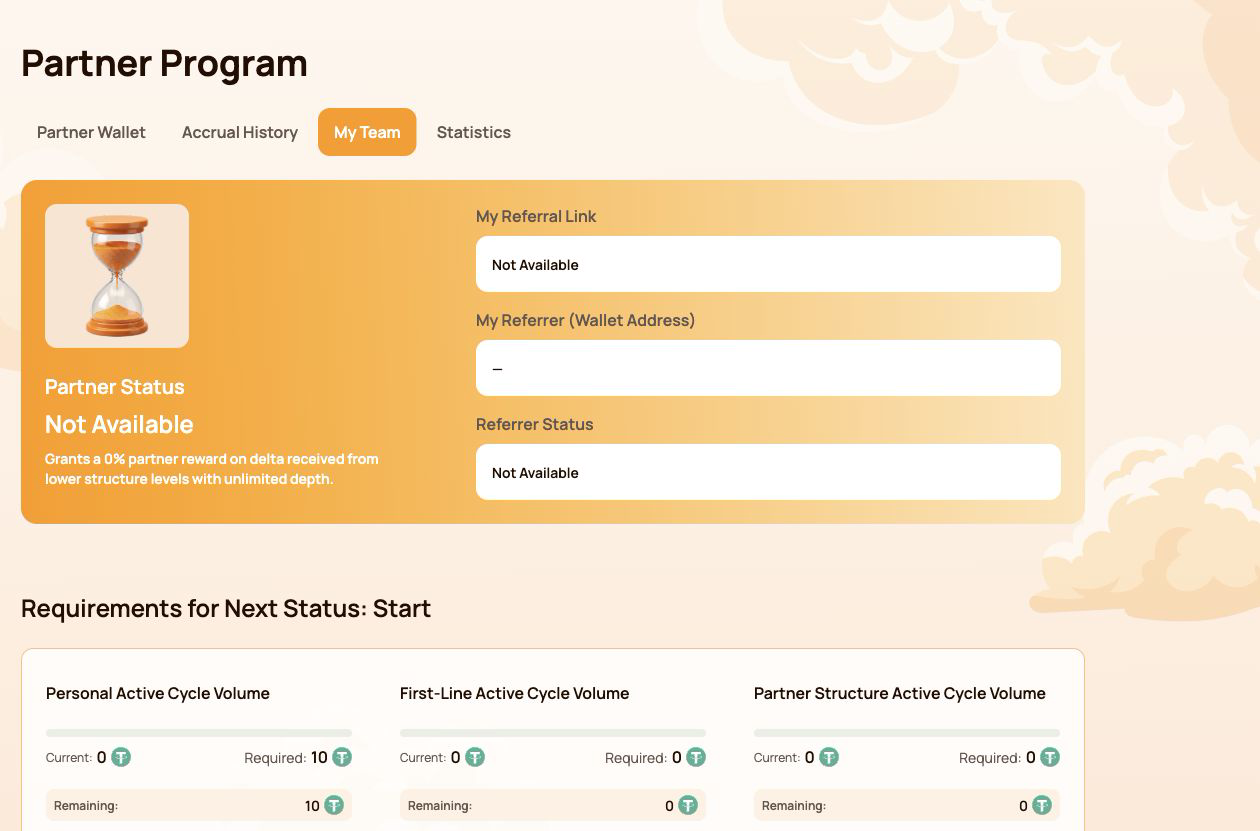
Ekibimde ne görünür
| Alan | Ne demek |
|---|---|
| İş Ortağı Durumu | Mevcut durum ve Yapı Ödülü yüzdesi |
| Referans Bağlantım | Yeni katılımcıları davet etmek için kullanılan kişisel bağlantı |
| Referranım (Cüzdan Adresi) | Katılırken referans bağlantısı kullanılan cüzdan |
| Yönlendiren Durumu | Yönlendirenin Mevcut Ortak Durumu |
Eğer Referans Bağlantım gösterir Kullanılamıyor, ilk olarak bağlı cüzdanın uygun bir Akıllı Döngüye (Smart Cycle) sahip olduğunu ve blok zinciri işleminin onaylandığını kontrol edin.
Atlas ekosisteminde tek bir yapı
Davet edilen bir katılımcı, kalıcı olarak birleştirilmiş Atlas Sistemi İş Ortağı Yapısına bağlanır. Aynı yapı, yeni ekosistem ürünleri ve programları kullanıma sunuldukça bunlar tarafından da kullanılabilir.
Bu şu anlama gelir:
- her yeni Atlas ürünü için bir ekibin yeniden kurulması gerekmez;
- iş ortağı ilişkileri orijinal yönlendirme yapısına bağlı kalmaya devam eder;
- Mevcut Seviye Sıkıştırma Modeli kendi yeterlilik ve ödül kurallarını uygular;
- gelecekteki ortak modelleri, hesaplamalarını, hacimlerini ve ödüllerini ayrı tutarak aynı temel ilişkiyi kullanabilir;
- Aynı hacim, birden fazla programda otomatik olarak aynı anda sayılmaz.
Bir yönlendirme bağlantısı, ödül için otomatik bir hak oluşturmaz. Bir yönlendirme bağlantısı, ortaklık yapısı içindeki cüzdanları birbirine bağlarken, her aktif model kendi yeterlilik kurallarını kontrol eder. Bu, davet edene diğer katılımcının cüzdanı veya fonları üzerinde hiçbir kontrol hakkı vermez.
2. İş Ortaklığı Programı arayüz haritası
Ortaklık Programı bölümü dört sekme içermektedir. Her sekme farklı bir soruyu yanıtlamaktadır.
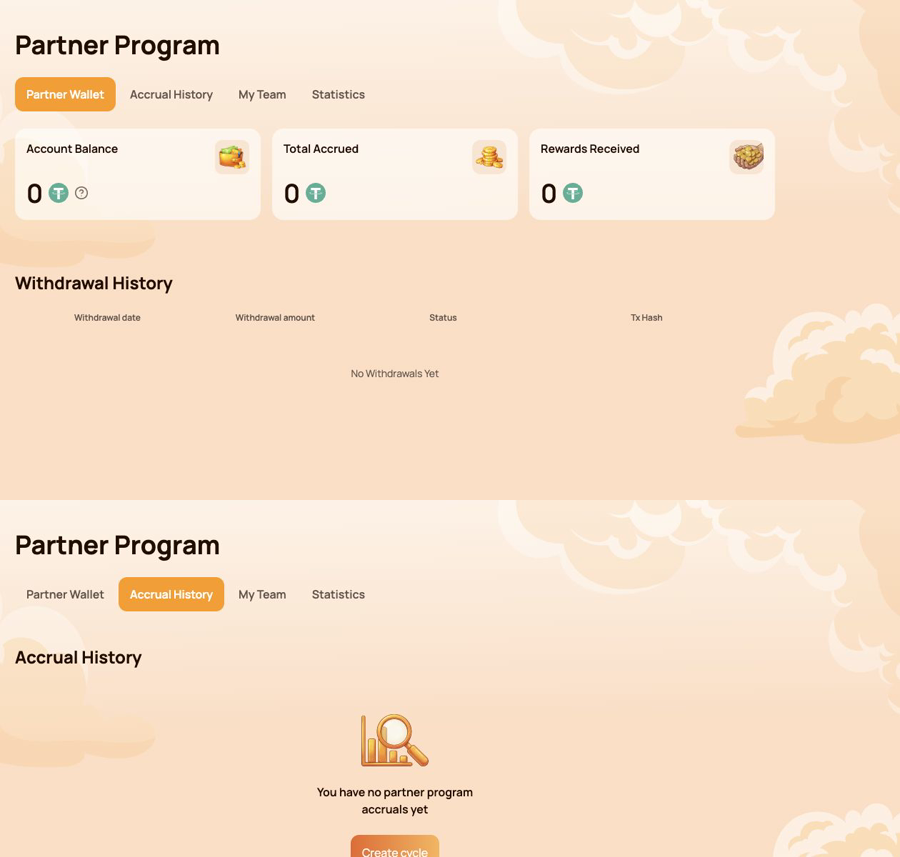
İş Ortağı Cüzdanı — ne aktarılabilir?
Kullan İş Ortağı Cüzdanı kontrol etmek için:
- Hesap Bakiyesi;
- Toplam Tahakkuk Eden;
- Alınan Ödüller;
- Para Çekme Geçmişi;
- Zincir üstü transfer için İşlem Hash'i.
Tahakkuk Geçmişi — ödül nereden geldi?
Kullan Tahakkuk Geçmişi tanımlamak
- Tahakkuk Tarihi;
- Bonus türü;
- Tahakkuk Eden Ödül Miktarı.
Tahakkuk ve blockchain transferi farklı aşamalardır. Önce Tahakkuk Geçmişini, ardından İşçi Cüzdanı'nı (veya İş Ortağı Cüzdanı'nı) ve Para Çekme Geçmişini kontrol edin.
Ekibim — bir sonraki durum raporu için ne gerekiyor?
Kullan Ekibim Gözden geçirmek için:
- tavsiye ve tavsiye eden bilgileri;
- Mevcut İş Ortağı Durumu;
- Mevcut / Gerekli / Kalan hacimler;
- Durum Gereksinimleri;
- Yapı Çizgileri;
- Cüzdan Adresine Göre Ara;
- yapı içerisindeki liderler ve etkinlik.
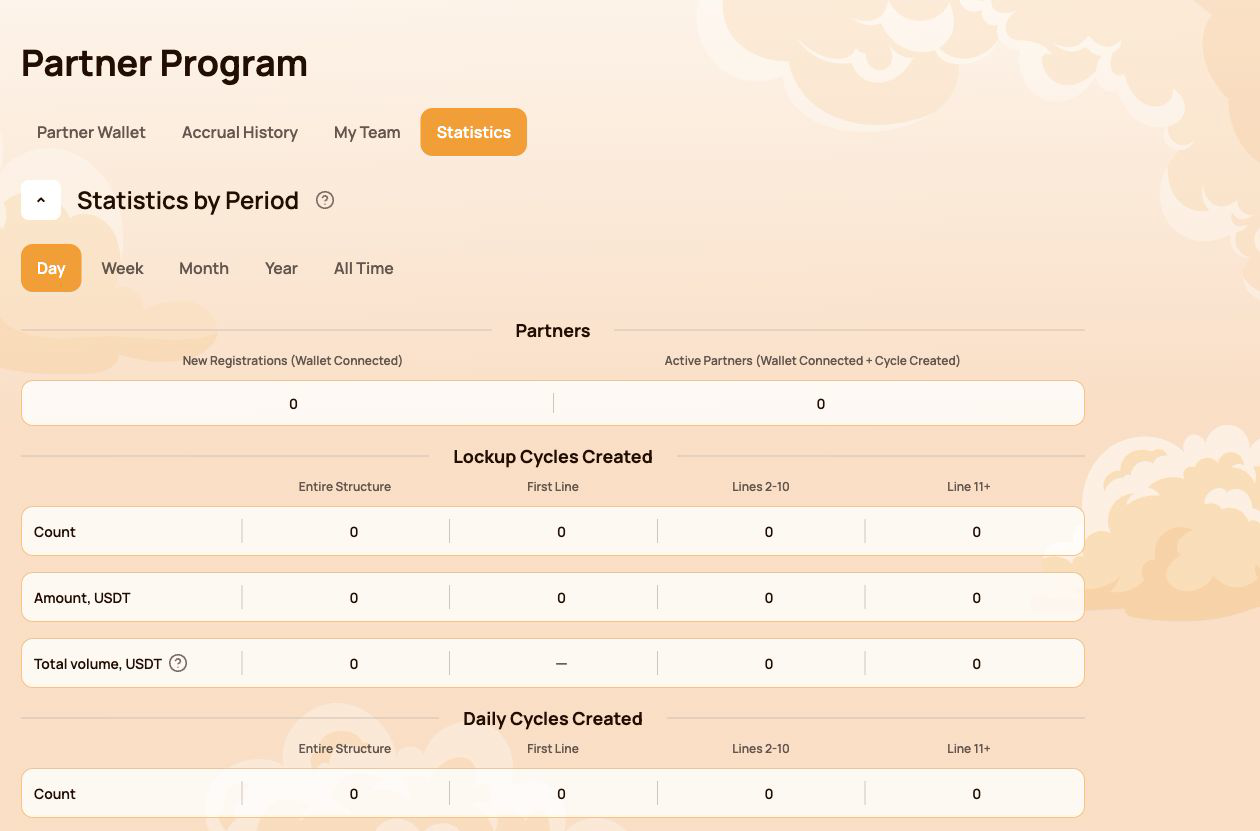
İstatistikler — yapı nasıl gelişiyor?
Kullan İstatistikler karşılaştırmak için
- Gün / Hafta / Ay / Yıl / Tüm Zamanlar;
- Yeni Kayıtlar ve Aktif İş Ortakları;
- Kilitlenme Akışı ve Günlük Akış etkinliği;
- Tüm Yapı, İlk Satır, 2–10. Satırlar ve 11. ve Sonrası Satırlar;
- En Aktif Hatlar.
Göreve göre hızlı rota
| İstiyorum ki… | Aç… |
|---|---|
| Yönlendirme bağlantımı kopyala | Ekibim |
| Sonraki durum için neyin eksik olduğunu kontrol edin | Ekibim → Sonraki Durum İçin Gereksinimler |
| Bir ödülün kaynağını bul | Tahakkuk Geçmişi |
| Otomatik transferi kontrol et | İş Ortağı Cüzdanı → Para Çekme Geçmişi |
| Zincir üstü bir transferi doğrula | İşlem Hash'i → BscScan |
| Yapı içindeki bir katılımcıyı bul | Ekibim → Cüzdan Adresine Göre Ara |
| Zaman içinde yapı aktivitesini karşılaştır | İstatistikler |
Kişisel Kontrol Paneli hesaplamanın sonucunu gösterir. Aşağıdaki bölümler bunun arkasındaki durum, sıkıştırma, akışa özel ve Eşleştirme Ödülü kurallarını açıklamaktadır.
3. İş Ortağı Durumu: yeterlilik nasıl çalışır
İş Ortağı Durumu iki parametreyi belirler: katılımcının Yapı Ödül Oranı ve Master 1'den itibaren, Eşleşen Ödül oranı. Sistem yeterlilik koşullarını otomatik olarak kontrol eder.
Üç gösterge kontrol edilir
| Gösterge | Neler sayılır? |
|---|---|
| Kişisel Aktif Döngü Hacmi | Katılımcının kendi hak kazanan Akıllı Döngüleri |
| Birinci Basamak Aktif Çevrim Hacmi | Kişisel olarak davet edilen katılımcılar tarafından oluşturulan hak kazanma hacmi |
| İş Ortağı Yapısı Aktif Döngü Hacmi | Programın derinlik katsayılarına tabi olarak alt Ortak Yapısı genelindeki nitelikli hacim |
Bir statü almak için, o seviye için gösterilen tüm gereksinimlerin karşılanması gerekir. Eğer bir gereksinim işaretlenmişse Gerekli değil, bu durumu etkilemez.
Tüm 19 İş Ortağı Durumu
| Durum | Kişisel Aktif Döngü Hacmi | Birinci Basamak Aktif Çevrim Hacmi | İş Ortağı Yapısı Aktif Döngü Hacmi | Yapı Ödülü | Eşleşme Ödülü |
|---|---|---|---|---|---|
 Başla Başla |
10 | Gerekli değil | Gerekli değil | 15% | — |
 Oluşturucu 1 Oluşturucu 1 |
50 | 100 | Gerekli değil | 18% | — |
 Yapıcı 2 Yapıcı 2 |
100 | 300 | 1,000 | 21% | — |
 Yapıcı 3 Yapıcı 3 |
200 | 700 | 2,000 | 24% | — |
 Yapıcı 4 Yapıcı 4 |
300 | 1,200 | 4,000 | 27% | — |
 Oluşturucu 5 Oluşturucu 5 |
500 | 2,000 | 7,000 | 30% | — |
 Yapıcı 6 Yapıcı 6 |
700 | 3,000 | 12,000 | 33% | — |
 Oluşturucu 7 Oluşturucu 7 |
1,000 | 4,500 | 18,000 | 36% | — |
 Master 1 Master 1 |
1,500 | 7,000 | 28,000 | 38% | 5% |
 Yüksek Lisans 2 Yüksek Lisans 2 |
2,000 | 10,000 | 40,000 | 40% | 7% |
 Usta 3 Usta 3 |
3,000 | 17,000 | 70,000 | 42% | 9% |
 Usta 4 Usta 4 |
4,000 | 25,000 | 120,000 | 44% | 11% |
 Usta 5 Usta 5 |
5,000 | 35,000 | 200,000 | 46% | 13% |
 Usta 6 Usta 6 |
6,000 | 45,000 | 300,000 | 48% | 15% |
 Usta 7 Usta 7 |
7,000 | 60,000 | 450,000 | 50% | 17% |
 Stratejist Stratejist |
8,000 | 80,000 | 600,000 | 52.5% | 19% |
 Büyükelçi Büyükelçi |
10,000 | 100,000 | 800,000 | 55% | 21% |
 Yönetmen Yönetmen |
12,000 | 120,000 | 1,100,000 | 57.5% | 23% |
 Yönetici Yönetici |
15,000 | 150,000 | 1,500,000 | 60% | 25% |
Tablodaki tüm tutarlar, Atlas arayüzü tarafından kullanılan USDT cinsinden karşılık gelen birimlerle gösterilmektedir.
Takımımda ilerleme nasıl okunur
- Güncel — hacim zaten seçilen gereksinim için sayılmıştır;
- Required — the target for the next status;
- Remaining — the amount still needed to satisfy that requirement.
Check every requirement card, not only the total Partner Structure Active Cycle Volume. A large structure alone does not replace the Personal Active Cycle Volume or First-Line Active Cycle Volume requirement.
A status rate is a qualification parameter used by the reward algorithm. It is not a promised percentage return on a participant's Smart Cycle.
4. Qualification volume, Delta and depth
Several similar-looking values serve different purposes. Keeping them separate makes the Partner Program much easier to understand.
The short version
| Value | Purpose |
|---|---|
| Destek Miktarı | A participant's amount of provided aid in a Smart Cycle |
| İş Ortağı Yapısı Aktif Döngü Hacmi | Used to check Partner Status qualification |
| Delta generated in the lower Partner Structure | The reward calculation base for the applicable branch |
| Yapı Ödülü | The result calculated from Delta according to status-rate differences and compression rules |
The original Support Amount and the generated Delta are not the same value. Partner Rewards are calculated from Delta, not from the full amount placed into a Smart Cycle.
Actual and Weighted Partner Structure Volume
- Actual Partner Structure Volume shows the structure's qualifying volume before depth coefficients are applied.
- Weighted Partner Structure Volume shows the volume after the coefficients are applied and is used for status qualification where the rules require it.
| Structure depth | Coefficient applied to volume |
|---|---|
| Lines 1–5 | 100% |
| Lines 6–10 | 50% |
| Line 11 and deeper | 10% |
Example of weighted volume
Suppose the structure has 1,000 USDT of qualifying volume on each of three depth groups:
| Group | Actual volume | Coefficient | Weighted volume |
|---|---|---|---|
| Lines 1–5 | 1,000 | 100% | 1,000 |
| Lines 6–10 | 1,000 | 50% | 500 |
| Line 11+ | 1,000 | 10% | 100 |
| Total | 3,000 | 1,600 |
This example explains status-volume weighting only. It does not calculate a Partner Reward.
Where to check the numbers
- open İş Ortağı Programı → Ekibim for qualification volumes and next-status progress;
- open İstatistikler to compare structure activity by depth and period;
- open Tahakkuk Geçmişi to see an actual calculated Partner Reward;
- use İş Ortağı Cüzdanı → Para Çekme Geçmişi to verify a completed transfer.
Do not use cycle volume, Partner Structure Volume and Delta as interchangeable terms. Cycle volume is used for status qualification; Delta is the reward calculation base.
5. Compression: who receives which part of the reward
Compression distributes the available Partner Reward according to the percentage qualifications of active partners in the branch. An upline participant receives the difference between their status rate and the rate already realised by a qualified partner below.
The rule in three situations
| Situation below you | What happens |
|---|---|
| The partner's status rate is lower than yours | You receive the positive difference between the two rates |
| There is no qualified partner between you and the Delta source | You may receive your full eligible status rate under the program rules |
| The partner's rate is equal to or higher than yours | You receive 0% from the structure compressed behind that partner |
The position of a wallet at the top of a branch does not guarantee a reward. Qualification and active status determine how the available percentage is distributed.
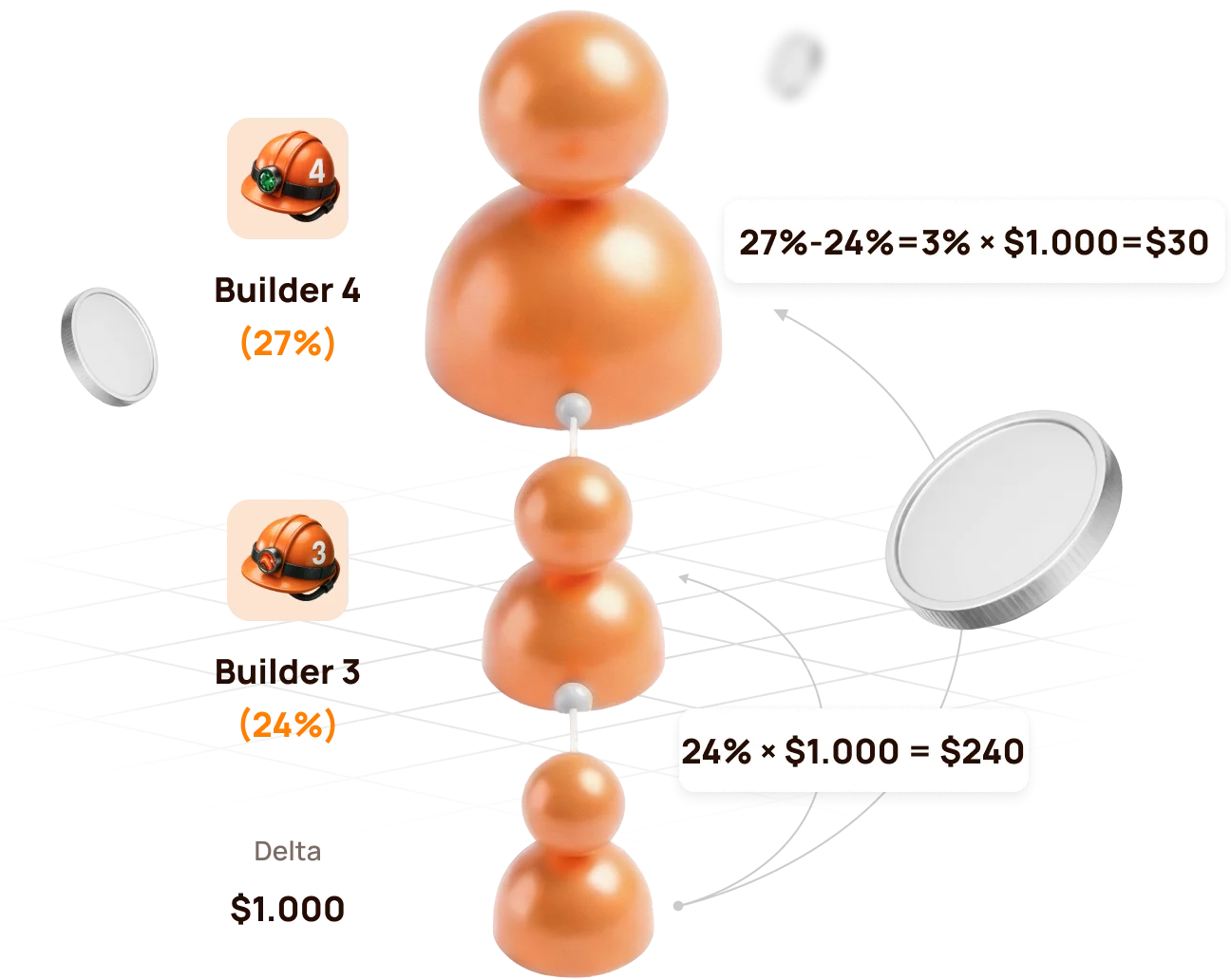
Official example: Builder 4 above Builder 3
The lower structure generates 1,000 USDT of Delta.
| Participant | İş Ortağı Durumu | Rate | Calculation | Partner Reward |
|---|---|---|---|---|
| Lower qualified partner | Yapıcı 3 | 24% | 24% × 1,000 | 240 USDT |
| Upline partner | Yapıcı 4 | 27% | (27% − 24%) × 1,000 | 30 USDT |
| Total distributed by status rates | 27% | 270 USDT |
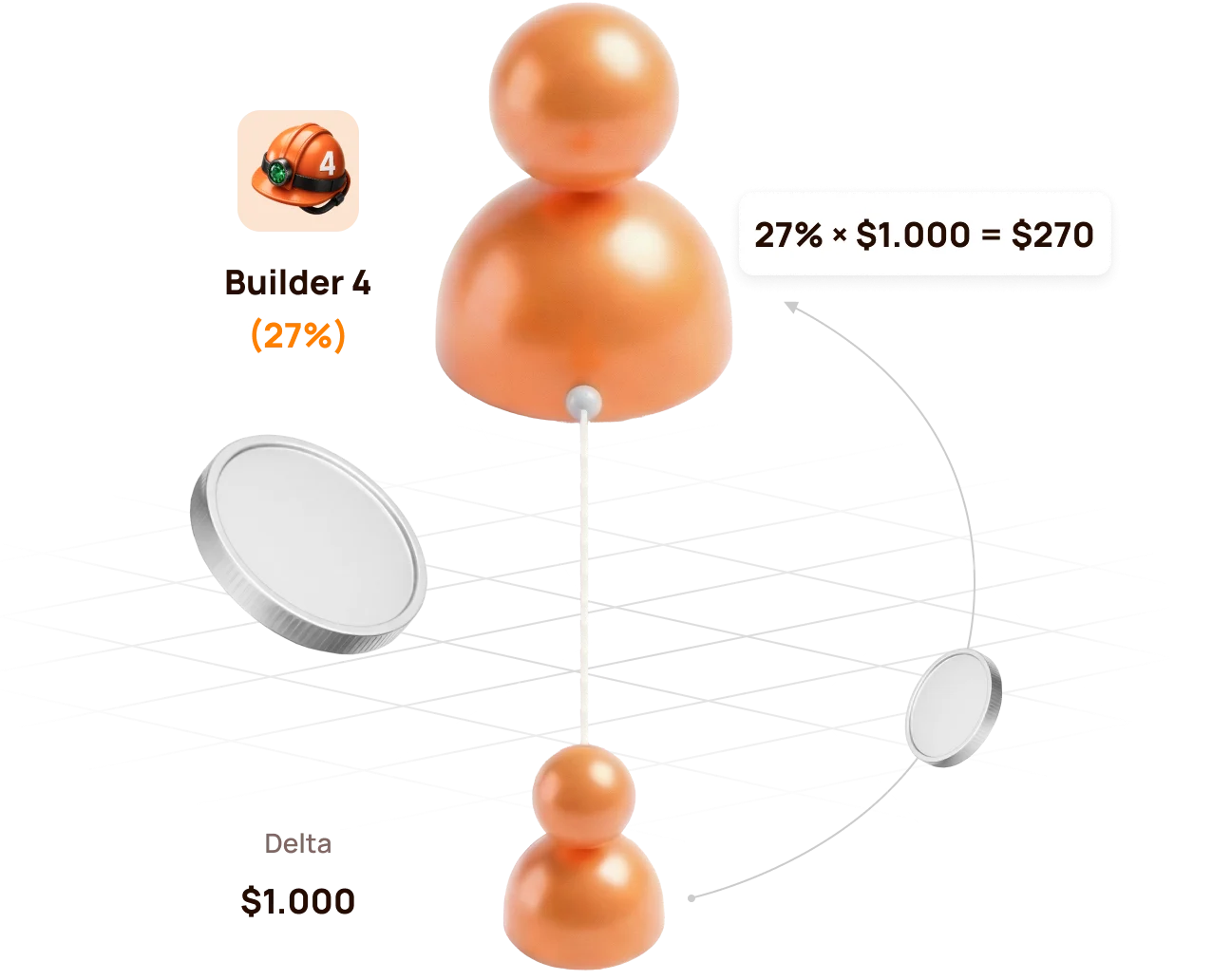
If there is no Builder 3 between the source and Builder 4
Builder 4 can realise the full eligible rate:
27% × 1,000 USDT = 270 USDT
If the lower partner reaches the same or a higher rate
If the lower partner reaches Builder 4 (27%) or a higher status, the upline Builder 4 no longer has a positive percentage difference. The structure behind that partner is compressed for the upline participant.
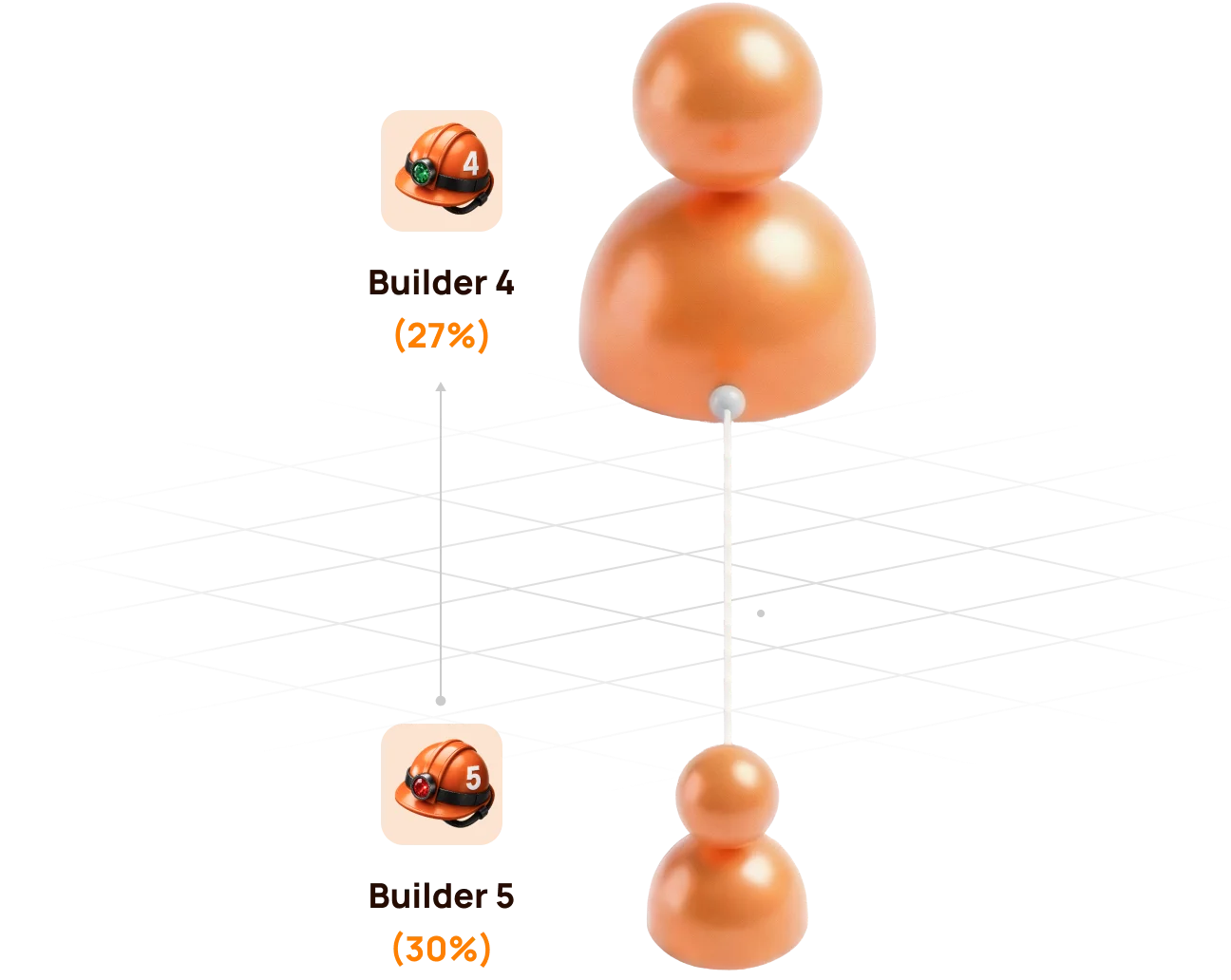
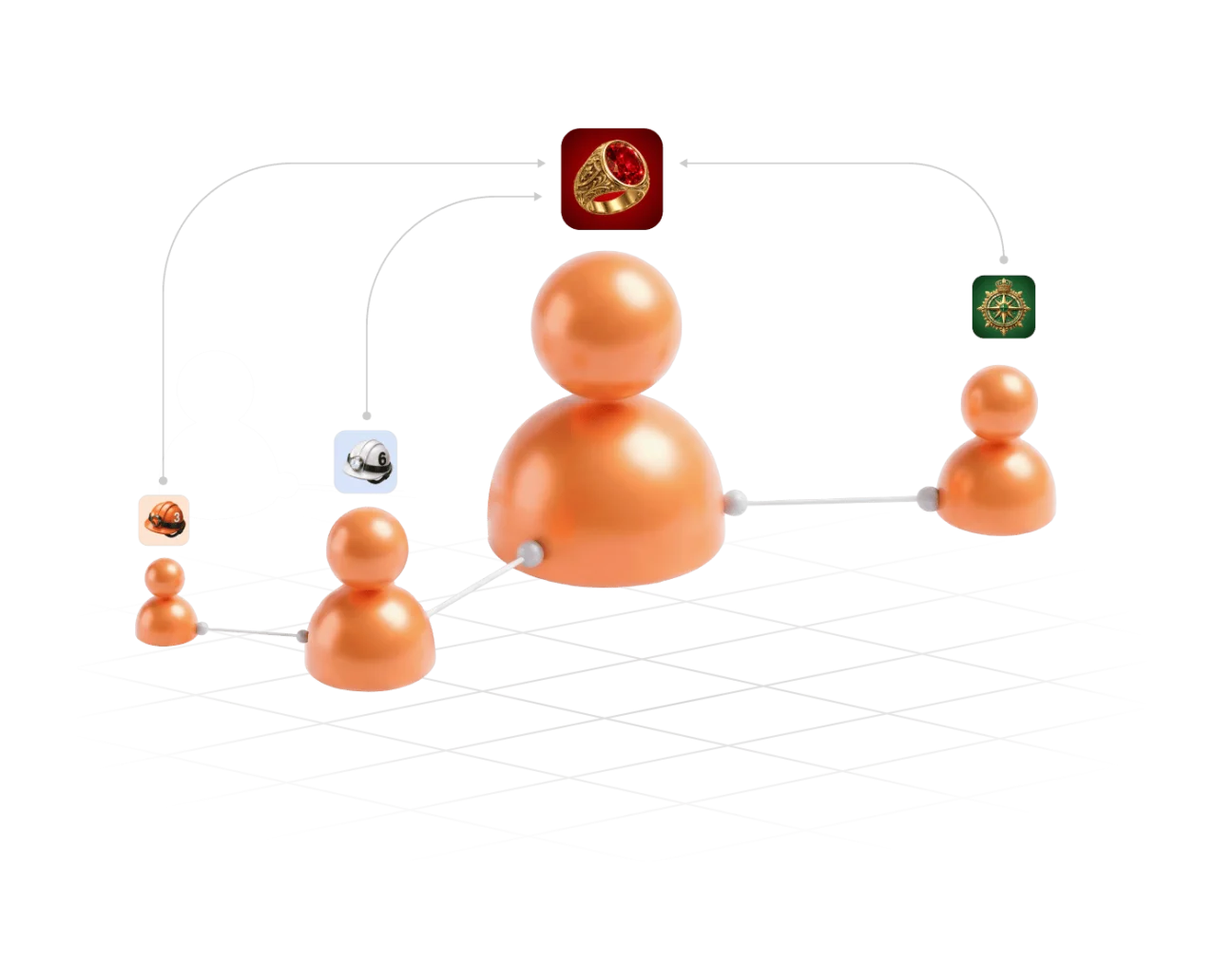
Compression does not remove a participant from the Partner Structure. It changes how the Partner Reward is distributed for the relevant Delta source.
6. Partner Rewards from Lockup Flow
For a qualifying Lockup Flow Smart Cycle, the inviter receives a Partner Reward calculated as a percentage of the invited participant's Delta.
When and how it is calculated
- The invited participant creates a Lockup Flow Smart Cycle.
- The system records the inviter's Partner Status at that moment.
- The applicable status and compression rules are applied to the cycle's Delta.
- The Partner Reward is accrued once when the Smart Cycle is created; the inviter does not wait for the invited participant to Claim.
| Question | Lockup Flow rule |
|---|---|
| What is the calculation base? | The invited participant's Delta, not the full Support Amount |
| Which status rate is used? | The inviter's applicable Partner Status when the invited participant creates the Smart Cycle |
| When is it accrued? | Once, at Smart Cycle creation |
| Where is it shown? | Partner Program → Accrual History |
| Where is the available balance shown? | Partner Program → Partner Wallet |
Automatic transfer rule
- if an accrued Lockup Flow Partner Reward is more than 10 USDT, it is automatically credited to the inviter's wallet after formation;
- an amount below 10 USDT is credited to the Partner Balance;
- when the accumulated Partner Balance reaches 10 USDT, 10 USDT is automatically transferred to the inviter's wallet.
Check the sequence in Accrual History → Partner Wallet → Withdrawal History → Tx Hash.


A Partner Reward accrual and the invited participant's Claim are separate events. The accrual does not mean that the inviter controls or initiates the invited participant's Claim.
7. Partner Rewards and qualification from Daily Flow
For Daily Flow, the inviter's applicable Partner Reward percentage is calculated from the invited participant's Delta. The percentage is determined by the inviter's Partner Status when the invited participant creates the Smart Cycle.
For Günlük Akış, 20% of the Partner Reward is credited when the cycle is created, and the remaining 80% is paid in equal parts over the 200-day cycle. Use Tahakkuk Geçmişi ve İş Ortağı Cüzdanı to verify actual accruals and transfers.
How Daily Flow is counted for status qualification
Daily Flow contributes to the structure's qualifying volume with a coefficient of 0.5. Short-term Smart Cycle plans are counted with a coefficient of 1.0.
| Activity | Amount | Qualification coefficient | Counted volume |
|---|---|---|---|
| Short-term Smart Cycle | 100 USDT | 1.0 | 100 USDT |
| Daily Flow · 200 days | 100 USDT | 0.5 | 50 USDT |
Formula: qualifying volume = short cycles × 1.0 + Daily Flow × 0.5.
The coefficient affects status qualification volume, not the participant's 1.1% / 1.3% daily assistance calculation and not the Partner Reward percentage itself.
Atlas explains the coefficient as a way to prioritise regular short-cycle activity, prevent one large long-term cycle from disproportionately accelerating status growth, and keep qualification conditions balanced across partner teams.
Hybrid visual: use the official Daily Flow qualification graphics showing 100% short cycles ve 50% Daily Flow with the × 0.5 formula.
Daily Flow still contributes to qualification. The coefficient changes how much of its cycle volume is counted; it does not remove Daily Flow from the Partner Program.
8. Matching Reward
Matching Reward is an additional status benefit available from Master 1 onward. It allows a participant to receive the applicable Matching Reward percentage from the Partner Rewards of personally invited leaders.
Qualification condition
Matching Reward is awarded only when the personally invited participant:
- reaches the same Partner Status as the inviter; or
- reaches a higher Partner Status than the inviter.
If the personally invited participant's status is lower, Matching Reward is not awarded from that participant's Partner Rewards.
Matching Reward rates
| Status group | Eşleşme Ödülü |
|---|---|
| Start and Builder 1–7 | Not available |
| Master 1–7 | 5–17% |
| Stratejist | 19% |
| Büyükelçi | 21% |
| Yönetmen | 23% |
| Yönetici | 25% |
How to read the rule
Matching Reward is calculated from the Partner Reward received by the personally invited qualified participant. It is not calculated directly from that participant's Support Amount or total structure turnover.
Master 3 inviterpersonally invited→Master 3+Matching activeMaster 3 inviterpersonally invited→Yüksek Lisans 2Not activeMatching Reward concerns personally invited participants only. The unlimited-depth Structure Reward and the personally invited leader's Matching Reward are different mechanisms.
9. How to verify an accrual and a transfer
Use the dashboard in chronological order. Each screen answers a different question.
Step 1 — find the calculation
Aç Partner Program → Accrual History and check:
- Accrual Date — when the reward was recorded;
- Bonus — which Partner Reward mechanism was applied;
- Accrued Reward Amount — the amount added by the calculation.
An entry in Accrual History confirms an accrual. It does not by itself confirm that USDT has already reached the connected wallet.
Step 2 — check the partner balance
Aç İş Ortağı Cüzdanı and compare:
| Alan | Meaning |
|---|---|
| Account Balance | Amount currently available in the Partner Wallet |
| Total Accrued | Cumulative Partner Rewards recorded by the system |
| Rewards Received | Rewards already processed as received according to the dashboard records |
The Partner Wallet balance is an internal dashboard value. It is not the same as the USDT balance displayed by MetaMask.
Step 3 — verify the blockchain transfer
Aç Withdrawal History, find the relevant transfer and select its Tx Hash. BscScan should show:
- transaction status;
- date and time;
- sender and recipient addresses;
- token and amount;
- network fee and block confirmations.
Before comparing addresses, verify that the same wallet is connected in the Atlas dashboard and MetaMask.
If the numbers do not match immediately
- Check whether a Lockup Flow accrual is still below the automatic-transfer threshold.
- Check whether the record is an accrual rather than a completed withdrawal.
- Confirm the connected wallet address and BNB Smart Chain network.
- Open the Tx Hash instead of relying only on the dashboard total.
- If no Tx Hash exists, save the wallet address, Smart Cycle ID, date and screenshot before contacting support.
10. My Team and Statistics: managing the structure
My Team — qualification and people
Kullan Ekibim when you need to:
- copy the referral link;
- confirm the referrer;
- see the current Partner Status and rate;
- compare Current / Required / Remaining values;
- inspect Structure Lines;
- search for a wallet address;
- identify leaders within the structure.
Statistics — activity and dynamics
Kullan İstatistikler to answer a different set of questions:
- how many new registrations and active partners appeared;
- whether activity came from Lockup Flow or Daily Flow;
- which period changed: Day, Week, Month, Year or All Time;
- where the activity occurred: Entire Structure, First Line, Lines 2–10 or Line 11+;
- which lines are the most active.
Statistics helps explain development of the structure, but it does not replace Accrual History. Activity can exist without producing a Partner Reward for a particular wallet because status, compression and qualification rules still apply.
11. Three worked examples
Example A — Start with no qualified partner between
| Input | Value |
|---|---|
| Participant status | Başla |
| Eligible Structure Reward rate | 15% |
| Delta used in the example | 100 USDT |
| Qualified partner between participant and source | No |
Calculation: 15% × 100 = 15 USDT.
The result is recorded in Tahakkuk Geçmişi according to the applicable flow and accrual rules. This example assumes that no other qualification or compression condition changes the percentage.
Example B — Builder 4 above Builder 3
| Input | Value |
|---|---|
| Upline status | Builder 4 — 27% |
| Lower qualified status | Builder 3 — 24% |
| Delta | 1,000 USDT |
- Builder 3:
24% × 1,000 = 240 USDT; - Builder 4:
(27% − 24%) × 1,000 = 30 USDT.
Example C — Matching Reward for a personally invited Master
Assume a participant has Master 1 status with a 5% Matching Reward rate. Their personally invited participant also reaches Master 1 or higher and receives a Partner Reward of 100 USDT.
Calculation: 5% × 100 = 5 USDT Matching Reward.
The 5% is applied to the personally invited leader's Partner Reward, not to their Support Amount and not to their total structure turnover.
Master 1 inviter · 5%→Partner Reward 100→Matching Reward 5All three examples isolate one rule for learning purposes. Actual dashboard results can combine compression, flow-specific rules, qualification and applicable fees.
12. Why a Partner Reward may be missing
| Gördüğün şey | What to verify |
|---|---|
| Referral link is Kullanılamıyor | A qualifying Smart Cycle of 10 USDT or more exists and its transaction is confirmed |
| Structure activity exists, but no reward appeared | The activity generated Delta and your rate remained positive after compression |
| Lower leader is active, but your Structure Reward is zero | Their status rate may equal or exceed yours |
| Matching Reward is missing | The participant was personally invited and has reached your status or a higher one |
| Lockup Flow amount remains in Partner Balance | The accumulated amount may be below the automatic-transfer threshold |
| Accrual exists, but MetaMask balance did not change | Check Partner Wallet, Withdrawal History and Tx Hash separately |
| Volume looks lower than expected | Compare Actual and Weighted Partner Structure Volume and the 100% / 50% / 10% depth coefficients |
| Search does not show the expected wallet | Recheck the full wallet address and whether it joined through the intended referral link |
Information to prepare for support
- connected wallet address;
- referrer or participant wallet address, if relevant;
- Smart Cycle ID and flow type;
- approximate date and time;
- screenshot of the relevant dashboard tab;
- Tx Hash, if one exists;
- short description of the expected and displayed result.
Never send a seed phrase, private key or wallet password to support.
13. Final checklist and risk warning
Before sharing the referral link
- the official Atlas dashboard is open;
- the intended wallet is connected on BNB Smart Chain;
- a qualifying Smart Cycle is active;
- Referans Bağlantım is available;
- the invited participant understands that wallet actions remain under their own control.
Before interpreting a reward
- identify whether it is Structure Reward or Matching Reward;
- identify whether the source is Lockup Flow or Daily Flow;
- use Delta as the reward base, not Support Amount;
- account for status-rate differences and compression;
- separate Actual and Weighted Partner Structure Volume;
- verify accrual, dashboard balance and blockchain transfer as separate stages.
Risk warning
Participation is voluntary. Delta, Partner Rewards and the return of a Support Amount are not guaranteed. Claims depend on sufficient smart-contract liquidity. Status tables, screenshots and numerical examples explain the current mechanics; they are not a promise of income or future results.

