
Personal Dashboard
The Personal Dashboard is the participant-facing interface for viewing activity, creating support cycles, tracking Smart Cycles, requesting assistance, using the Partner Program and managing profile information.
Use only the official address: app.atlas-system.tech.
The personal dashboard is an interface, not a crypto wallet. Funds remain controlled through the connected non-custodial wallet. Transaction results can be independently verified on BscScan.
1. Interface map
The main navigation remains available across the personal dashboard. Before performing an action, make sure the correct wallet and language are selected.
Top bar
| Element | What it shows | Why it matters |
|---|---|---|
| Days in the system | Time since the wallet first connected to Atlas System | Shows the participation age associated with the connected wallet |
| Voting Balance | The voting weight currently displayed by the interface | Eligibility and calculation follow the governance rules active at that time |
| Connected wallet | Shortened address of the active wallet | Always compare it with the wallet you intend to use before creating a cycle or making a Claim |
| Language | Current interface language | Changes the language of the personal dashboard |
| Notifications | Access to system messages | Opens All, Read and Unread messages |
The connected wallet address is intentionally excluded from the guide screenshots.
Side navigation
| Section | What it is for |
|---|---|
| แดชบอร์ด | Overview of personal activity, active cycles and partner indicators |
| Provide Support | Creation of a new Lockup Flow or Daily Flow cycle |
| My Support Cycles | Active cycles, completed cycles and Operations History |
| โปรแกรมพันธมิตร | Partner wallet, accruals, team structure and statistics |
| Profile | Personal information, contacts, visibility and communication settings |
| Knowledge base | Opens the official Atlas System Knowledge Hub |
How to move around the dashboard
- Select a section in the left menu.
- Check the connected wallet before any transaction-related action.
- Use the language selector if the interface is not displayed in the required language.
- Return to แดชบอร์ด whenever you need a general overview.
- Use Logout when you finish working on a shared or public device.
What to check
- The official domain is
app.atlas-system.tech. - The expected wallet is connected.
- BNB Smart Chain is selected for transaction-related actions.
- No person or support representative should request your seed phrase or private key.
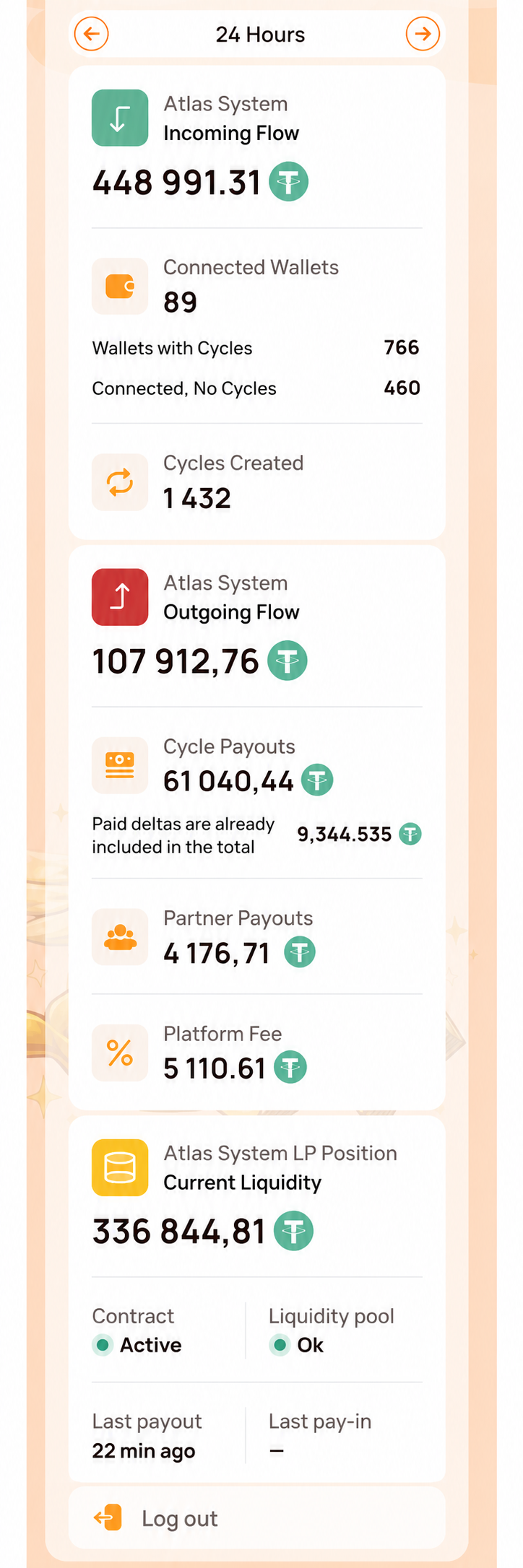
The screenshot begins below the top bar so that the participant's wallet address is not displayed. It focuses only on the side navigation and System Health panel. The main Dashboard area is shown separately in the next visual.
2. Dashboard
What it is
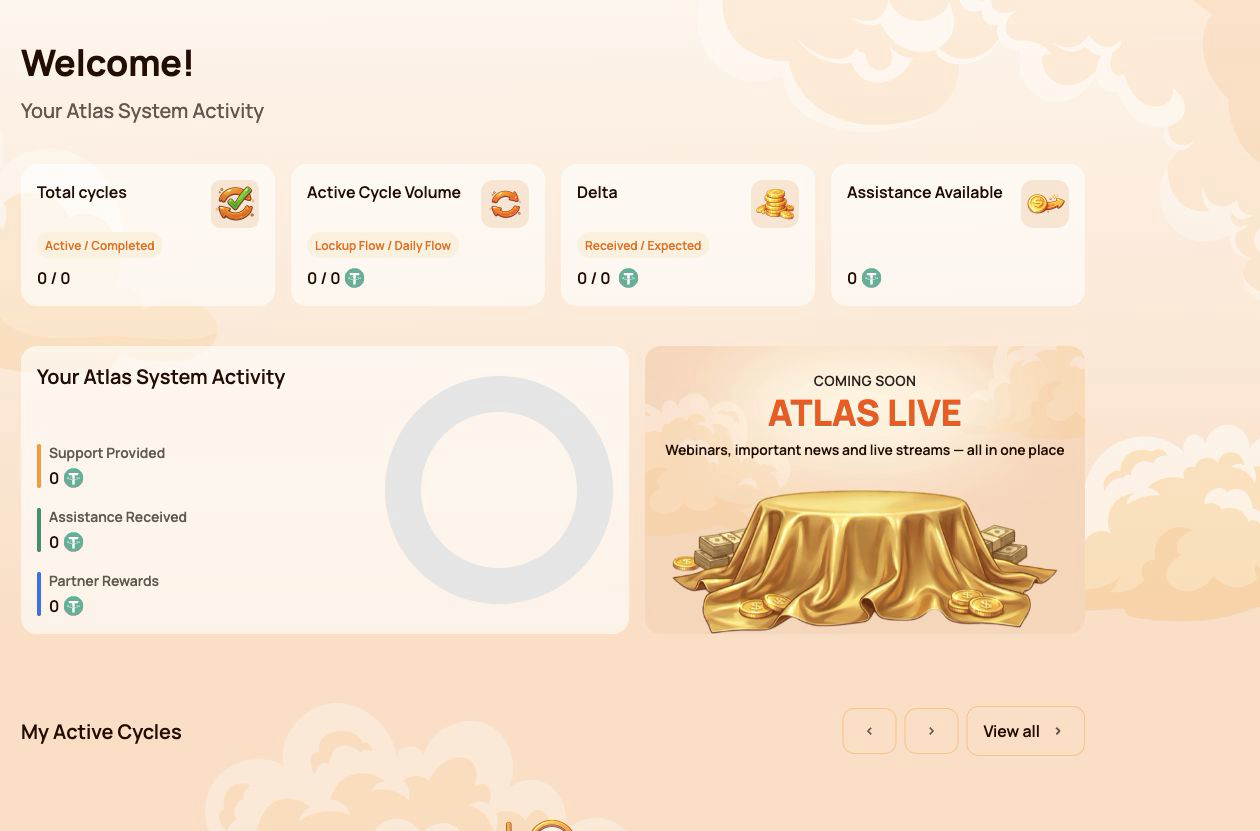
แดชบอร์ด is the main overview screen. It summarises the participant's cycles, activity, available assistance and partner progress without requiring the user to open each section separately.
Why it is needed
Use Dashboard to:
- see the number of active and completed cycles;
- compare Lockup Flow and Daily Flow activity;
- check received and expected Delta;
- see whether assistance is currently available;
- review total support, assistance and partner rewards;
- open current cycles or partner information for more detail.
Main summary cards
Total cycles
Shows the number of Active / Completed cycles.
- Active — cycles currently running under their smart contract conditions.
- Completed — cycles that have finished under the rules of the selected flow.
A newly created cycle may take a short time to appear while the blockchain transaction is being confirmed.
Active Cycle Volume
Shows the active Support Amount broken down by Lockup Flow / Daily Flow.
This is the value assigned to active cycles. It is not the spendable USDT balance in the connected wallet.
Delta
Shows Received / Expected Delta.
- Received Delta — additional assistance already received above the amount of provided support.
- Expected Delta — additional assistance calculated under the current Smart Cycle conditions.
Expected Delta is a calculation, not a guaranteed balance. Availability depends on the smart contract rules and available liquidity.
Assistance Available
Shows the amount currently available to request through Claim.
Before making a Claim, check:
- the relevant cycle;
- connected wallet;
- BNB Smart Chain network;
- BNB balance for gas;
- the amount shown in the wallet confirmation.
Your Atlas System Activity
This block compares three types of participant activity:
| Indicator | Meaning |
|---|---|
| Support Provided | Total amount of support directed into Smart Cycles |
| Assistance Received | Assistance already received through completed Claims |
| Partner Rewards | Rewards received through the Partner Program |
These figures represent different categories and should not be added together as if they were a wallet balance.
My Active Cycles
This block provides quick access to current cycles. Open My Support Cycles when you need the full cycle card, dates, terms, status, Expected Delta, Claim action or transaction information.
If there are no active cycles, the block may be empty.
Partner Status
The Dashboard shows a compact partner summary:
- Current Partner Status;
- Personal Active Cycle Volume;
- First-Line Active Cycle Volume;
- Partner Structure Active Cycle Volume;
- remaining requirements for the next status.
The detailed qualification rules, weighted Partner Structure Volume, structure coefficients and reward examples belong in the separate โปรแกรมพันธมิตร guide.
How to use Dashboard
- Open แดชบอร์ด in the side menu.
- Check the four summary cards at the top.
- Review the activity block to distinguish support, assistance and partner rewards.
- Open My Active Cycles if a cycle requires attention.
- Open the Partner Program section when the partner summary requires more detail.
What to check when values look incorrect
- Confirm that the same wallet used for the operation is connected.
- Wait for blockchain confirmation and refresh the page.
- Compare the information with My Support Cycles → Operations History.
- Verify the transaction on BscScan.
- If the confirmed transaction is still missing, contact support and provide the transaction hash.
Numeric values shown in screenshots are examples and may change at any time.
3. Provide Support
What it is
Provide Support is the section used to create a new Smart Cycle. It contains the same basic sequence for both modes: select a flow, review its conditions, enter the Support Amount, accept the terms and confirm the transaction in the connected wallet.
Use this section when you are ready to create a cycle. To review an existing cycle or make a Claim, open My Support Cycles instead.
Why it is needed
Provide Support allows the participant to:
- choose between Lockup Flow and Daily Flow;
- select or identify the applicable cycle tariff;
- specify the Support Amount in USDT;
- review Expected Assistance before confirming;
- confirm voluntary participation and the terms of use;
- send the transaction request to the connected wallet.
Fields available in both modes
| Field | What it means | What to check |
|---|---|---|
| Choose Cycle Type | Selects Lockup Flow or Daily Flow | Make sure the required mode is highlighted |
| Select Cycle | Shows the selected tariff and its conditions | Check the tariff name, term and calculation |
| Support Amount, USDT | Amount of support directed into the cycle | Use USDT on BNB Smart Chain and check the minimum amount |
| Expected Assistance (Principal + Delta) | Calculated principal and additional assistance | Treat this as a calculation under the smart contract rules, not a guaranteed wallet balance |
| Terms of use | Rules governing participation | Open and read the terms before accepting |
| Voluntary confirmation | Confirms that the participant is acting voluntarily | Both confirmations are required before the button becomes available |
| Provide Support | Sends the operation to the connected wallet | The cycle is not created until the wallet transaction is confirmed |
3.1 Lockup Flow
What it is
Lockup Flow creates a cycle with a fixed term. Assistance becomes available for Claim after the selected term ends, subject to the relevant smart contract rules and available liquidity.
What is shown
- Lockup Flow — Assistance at Term End selector;
- cycle tariff with its term and calculated percentage;
- Support Amount in USDT;
- Expected Assistance shown as Principal + Delta;
- required confirmations;
- Provide Support button;
- notice that the cycle is created only after wallet confirmation.
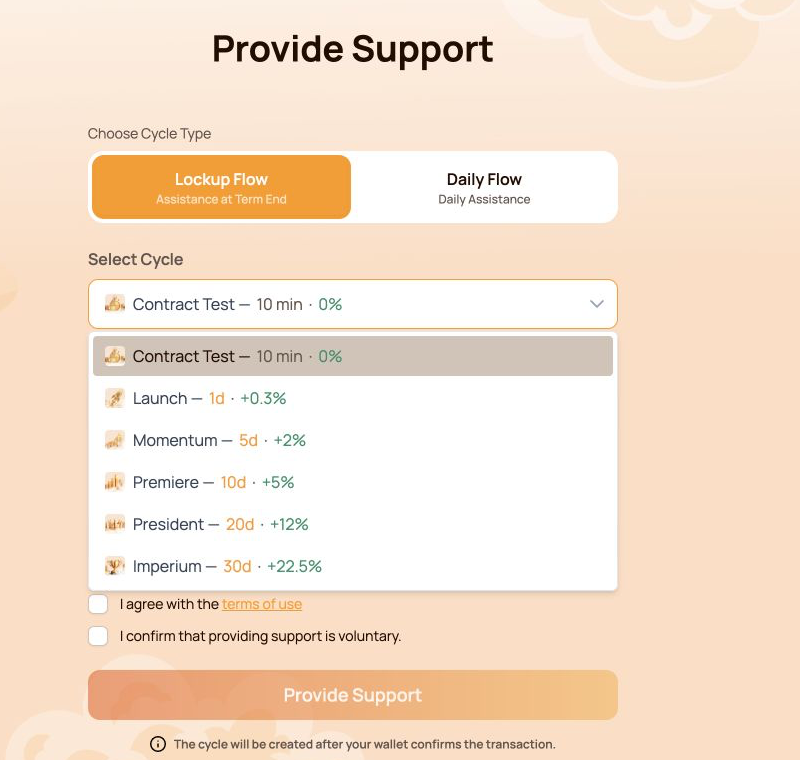
The Contract Test tariff uses a fixed Support Amount of 10 USDT. Its purpose is to let the participant test the full interaction with the smart contract over a short period. Other Lockup Flow tariffs use their own terms and calculations.
Available Lockup Flow cycles
| Cycle | Term | Calculated Delta |
|---|---|---|
| Contract Test | 10 minutes | — |
| Launch | 1 day | +0.3% |
| Momentum | 5 days | +2% |
| Premiere | 10 days | +5% |
| President | 20 days | +12% |
| Imperium | 30 days | +22.5% |
The open selector in the screenshot shows all six options together. Before choosing, compare the term and calculated Delta with the amount you are prepared to direct into the cycle.
How to use it
- Open Provide Support.
- Select Lockup Flow.
- Open Select Cycle and choose the required tariff.
- Check the term and calculated percentage shown next to the tariff.
- Enter the Support Amount. For Contract Test, the amount is fixed at 10 USDT.
- Review Expected Assistance (Principal + Delta).
- Open and accept the terms of use.
- Confirm that providing support is voluntary.
- Click Provide Support.
- Verify the network, token, amount and gas fee in the wallet, then confirm the transaction.
3.2 Daily Flow
What it is
Daily Flow creates a 200-day cycle with the right to request assistance daily under the smart contract conditions. The original Support Amount is included in the daily assistance Claims.
What is different from Lockup Flow
- the cycle lasts 200 days;
- the applicable tariff depends on the Support Amount;
- the form shows Daily accrual;
- assistance can be requested daily according to the contract conditions;
- assistance is not deferred to a single end-of-term Claim.
Current tariff ranges:
| Tariff | Support Amount | Term | Daily payout | Calculated Delta |
|---|---|---|---|---|
| Core | 10–2,000 USDT | 200 days | 1.1% per day | +120% |
| Elite | Above 2,000 USDT | 200 days | 1.3% per day | +160% |
The interface may determine the Daily Flow tariff automatically according to the entered Support Amount.
The original Support Amount is included in the daily assistance Claims. The daily payout and Delta shown in the interface are calculations under the current smart contract conditions and available liquidity.
How to use it
- Open Provide Support.
- Select Daily Flow.
- Check the tariff displayed in Select Cycle.
- Enter the Support Amount. The current minimum is 10 USDT.
- Review Expected Assistance (Principal + Delta) and Daily accrual.
- Open and accept the terms of use.
- Confirm that providing support is voluntary.
- Click Provide Support.
- Verify the transaction details in the wallet and confirm.
- After blockchain confirmation, open My Support Cycles to check the new cycle.
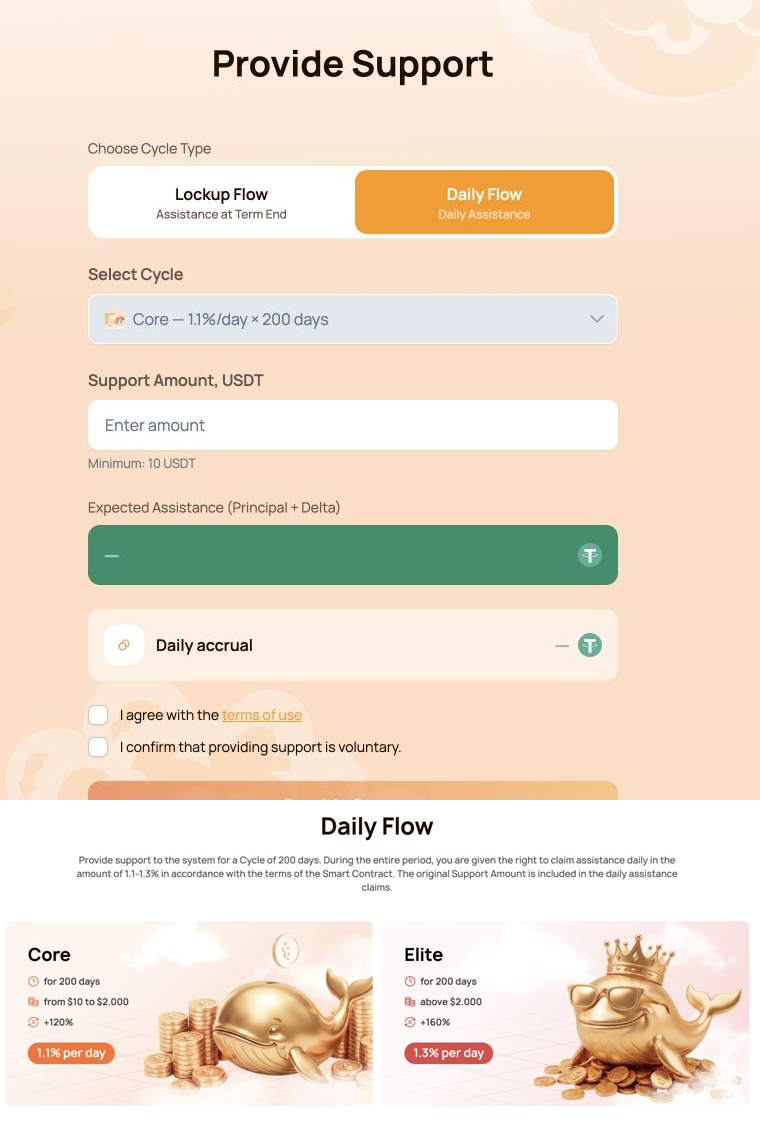
The combined visual shows the Daily Flow form first and the Core/Elite comparison directly below it.
3.3 Wallet confirmation
The Provide Support button does not move funds by itself. It creates a transaction request that must be reviewed and signed in the connected wallet.
Before confirming, check:
- the wallet is connected to BNB Smart Chain;
- the token is USDT BEP-20;
- the Support Amount matches the form;
- the wallet contains enough BNB for gas;
- the destination is the official Atlas System smart contract;
- the transaction was opened from
app.atlas-system.tech.
For the first USDT operation, the wallet may request two confirmations:
- USDT approval for the smart contract;
- creation of the Smart Cycle.
Both transactions require BNB gas. Never enter a seed phrase or private key into the Atlas System website.
If the button is unavailable
Check that:
- the Support Amount meets the minimum and tariff limits;
- both confirmations are selected;
- the wallet is connected;
- the correct network is active;
- the form does not show a validation error.
Lockup Flow tariffs, Daily Flow calculations, cycle statuses and Claim are covered in the separate Smart Cycle guide.
4. My Support Cycles
What it is
My Support Cycles is the section for monitoring cycles after they have been created. It separates current cycles, finished cycles and the history of cycle creation and received assistance.
Use this section to:
- confirm that a new cycle appeared after the blockchain transaction;
- track active Lockup Flow and Daily Flow cycles;
- check terms, dates and calculated Delta;
- find completed cycles;
- review cycle creation and assistance history;
- ค้นหาข้อมูลที่จำเป็นสำหรับการตรวจสอบใน BscScan หรือการขอความช่วยเหลือ
The section contains three main tabs: Active, Completed and Operations History.
4.1 ใช้งานอยู่
What it shows
แท็บ ใช้งานอยู่ มีรอบที่กำลังดำเนินการตามเงื่อนไขของ smart contract
ตัวเลือกรูปแบบด้านบนแยก:
- Lockup Flow — Assistance at Term End;
- Daily Flow — Daily Assistance.
ตัวชี้วัดสรุป:
| Indicator | Meaning |
|---|---|
| Active Cycle Volume | จำนวนเงินสนับสนุนรวมที่จัดสรรให้รอบที่ใช้งานของรูปแบบที่เลือกในปัจจุบัน |
| Expected Delta | ความช่วยเหลือเพิ่มเติมที่คำนวณสำหรับรอบที่ใช้งานอยู่ซึ่งแสดงไว้ |
ข้อมูลรอบอาจประกอบด้วย:
- จำนวนเงินสนับสนุน;
- เงื่อนไข;
- วันที่เริ่มและสิ้นสุด;
- Delta ที่คาดไว้;
- สถานะปัจจุบัน;
- การดำเนินการ Claim ที่พร้อมใช้;
- ธุรกรรมบล็อกเชนที่เกี่ยวข้อง
How to use it
- Open รอบการสนับสนุนของฉัน → ใช้งานอยู่.
- เลือก Lockup Flow หรือ Daily Flow
- ค้นหารอบที่ต้องการตามจำนวนเงินสนับสนุน (Support Amount) ระยะเวลา หรือวันที่
- ตรวจสอบสถานะและการคำนวณปัจจุบัน
- หากสามารถ Claim ได้ ให้ตรวจสอบจำนวนเงินและยืนยันธุรกรรมในกระเป๋าเงิน
สำหรับ Daily Flow จำนวนความช่วยเหลือที่ขอรับได้อาจเปลี่ยนตามการคำนวณรายวันและ Claim ที่เสร็จสิ้นแล้ว
4.2 เสร็จสิ้น
What it shows
แท็บ เสร็จสิ้น มีรอบที่สิ้นสุดตามกฎของรูปแบบที่เลือกและไม่แสดงเป็นรอบที่ใช้งานแล้ว
ตัวชี้วัดสรุป:
| Indicator | Meaning |
|---|---|
| ปริมาณรอบที่เสร็จสิ้น | จำนวนเงินสนับสนุนรวมที่เกี่ยวข้องกับรอบที่เสร็จสิ้นของรูปแบบที่เลือก |
| Received Delta | Delta ที่ได้รับแล้วจากรอบที่เสร็จสิ้นซึ่งแสดงอยู่ |
มีตัวเลือก Lockup Flow และ Daily Flow แบบเดียวกัน ข้อมูลรอบย้อนหลังยังมีประโยชน์ในการตรวจสอบจำนวนเงินสนับสนุน ระยะเวลา วันที่ การคำนวณ และธุรกรรมที่เกี่ยวข้อง
How to use it
- Open รอบการสนับสนุนของฉัน → เสร็จสิ้น.
- เลือกรูปแบบที่ต้องการ
- ค้นหารอบตามจำนวนเงิน ระยะเวลา หรือวันที่
- เปรียบเทียบข้อมูลกับประวัติการดำเนินการ
- ใช้ข้อมูลธุรกรรมเพื่อตรวจสอบอย่างอิสระบน BscScan
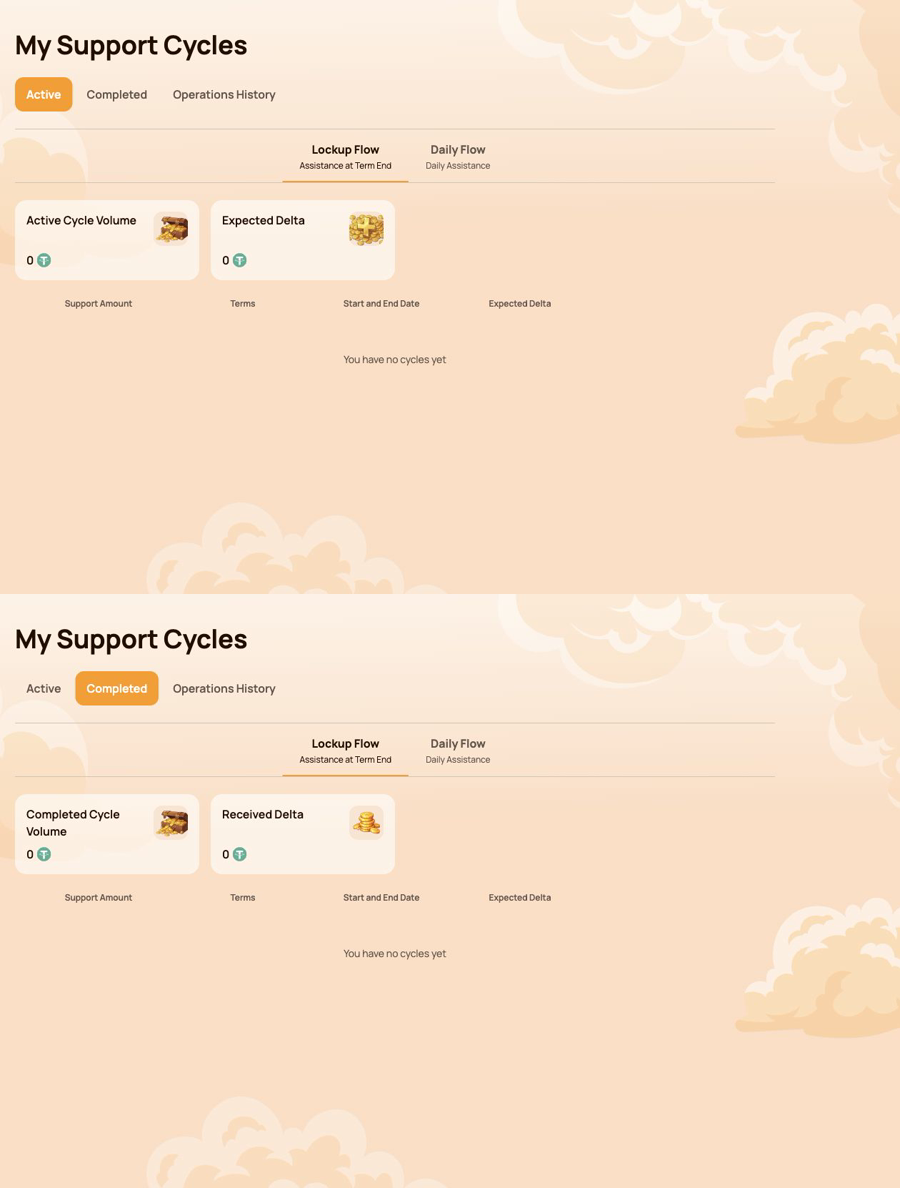
ภาพรวมแสดง ใช้งานอยู่ ก่อน และ เสร็จสิ้น อยู่ด้านล่างโดยตรง กระเป๋าเงินตัวอย่างไม่มีรอบ ภาพหน้าจอจึงแสดงสถานะว่างและส่วนควบคุมที่ใช้ได้โดยไม่เปิดเผยข้อมูลผู้เข้าร่วม
4.3 ประวัติการดำเนินการ
Operations History records the two main types of participant activity related to Smart Cycles.
การสร้างรอบ
ใช้แท็บนี้เพื่อตรวจสอบรอบที่สร้างจากกระเป๋าเงินที่เชื่อมต่อ
ช่องข้อมูลที่แสดง:
- วันที่สร้างรอบ;
- ชื่อรอบ;
- ระยะเวลา;
- จำนวนเงินสนับสนุน
มุมมองนี้มีประโยชน์เมื่อธุรกรรมสร้างรอบได้รับการยืนยันแล้ว แต่ผู้เข้าร่วมต้องตรวจสอบว่ารอบถูกสร้างเมื่อใดและภายใต้เงื่อนไขใด
Assistance Received
ใช้แท็บนี้เพื่อตรวจสอบ Claim ความช่วยเหลือที่เสร็จสิ้นแล้ว
ตัวชี้วัดสรุป:
- คำขอรับความช่วยเหลือที่ได้รับ;
- ปริมาณความช่วยเหลือที่ได้รับ
ช่องข้อมูลที่แสดง:
- รอบ;
- วันที่สร้างรอบ;
- จำนวนเงินที่จ่าย;
- Smart Contract;
- สถานะ
ช่อง Smart contract และสถานะช่วยเชื่อมโยงบันทึกในแดชบอร์ดกับการตรวจสอบ on-chain
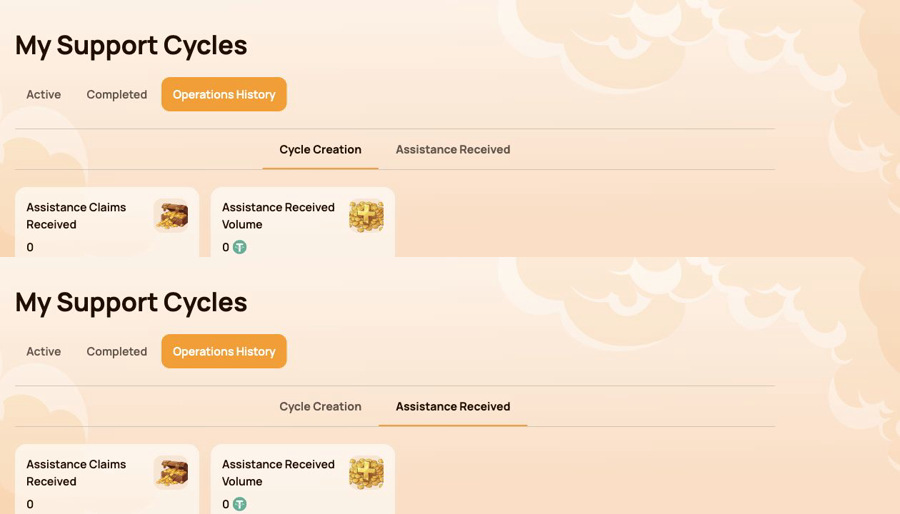
ภาพรวมแสดง การสร้างรอบ ก่อน และ ความช่วยเหลือที่ได้รับ อยู่ด้านล่าง
4.4 หากไม่พบรอบหรือการดำเนินการ
- ยืนยันว่าเชื่อมต่อกระเป๋าเงินเดียวกับที่ใช้ทำธุรกรรม
- ตรวจสอบว่าเลือก BNB Smart Chain แล้ว
- รอการยืนยันจากบล็อกเชนแล้วรีเฟรชแดชบอร์ดส่วนตัว
- ตรวจสอบตัวกรองทั้ง Lockup Flow และ Daily Flow
- ตรวจสอบ ใช้งานอยู่ เสร็จสิ้น และประวัติการดำเนินการ
- เปิดธุรกรรมในกระเป๋าเงินหรือ BscScan
- If the transaction is confirmed but the record is still missing, contact support and provide:
- connected wallet address;
- แฮชธุรกรรม;
- ประเภทรอบและจำนวน;
- เวลาดำเนินการโดยประมาณ;
- ภาพหน้าจอของแท็บที่เกี่ยวข้อง
Cycle statuses and Claim conditions are explained in Smart Cycle. Transaction verification is covered in Contracts & BscScan.
5. โปรแกรมพันธมิตร
The โปรแกรมพันธมิตร section brings together partner rewards, team structure, status progress and activity statistics. Use it to monitor your own partner account and the activity associated with your referral structure.
This section explains the personal dashboard interface. Status rules, qualification volumes, reward calculation and worked examples are covered in the separate โปรแกรมพันธมิตร guide.
ส่วนนี้มีสี่แท็บ:
- Partner Wallet;
- Accrual History;
- My Team;
- สถิติ.
5.1 กระเป๋าเงินพันธมิตร
Partner Wallet shows the current state of partner rewards.
| Indicator | Meaning |
|---|---|
| Account Balance | รางวัลพันธมิตรที่แดชบอร์ดแสดงว่าพร้อมให้รับในขณะนี้ |
| Total Accrued | รางวัลพันธมิตรรวมที่สะสมตามกฎของโปรแกรม |
| Rewards Received | รางวัลพันธมิตรที่ได้รับแล้ว |
The Withdrawal History table records withdrawals and displays:
- วันที่ถอน;
- จำนวนที่ถอน;
- สถานะ;
- Tx Hash
Use Tx Hash to open the related transaction on BscScan and verify it independently. The information tooltip next to Account Balance explains how automatic payouts work.
5.2 ประวัติการสะสม
Accrual History shows how partner rewards were accrued. When accruals are available, the table includes:
- Accrual Date;
- โบนัส;
- Accrued Reward Amount.
ใช้แท็บนี้เมื่อต้องการระบุโบนัสที่ทำให้เกิดยอดสะสม รางวัลที่สะสมกับเงินที่ได้รับเป็นคนละขั้นตอน ให้ตรวจสอบยอดสะสมที่นี่ก่อน แล้วจึงตรวจสอบกระเป๋าเงินพันธมิตรและประวัติการถอน
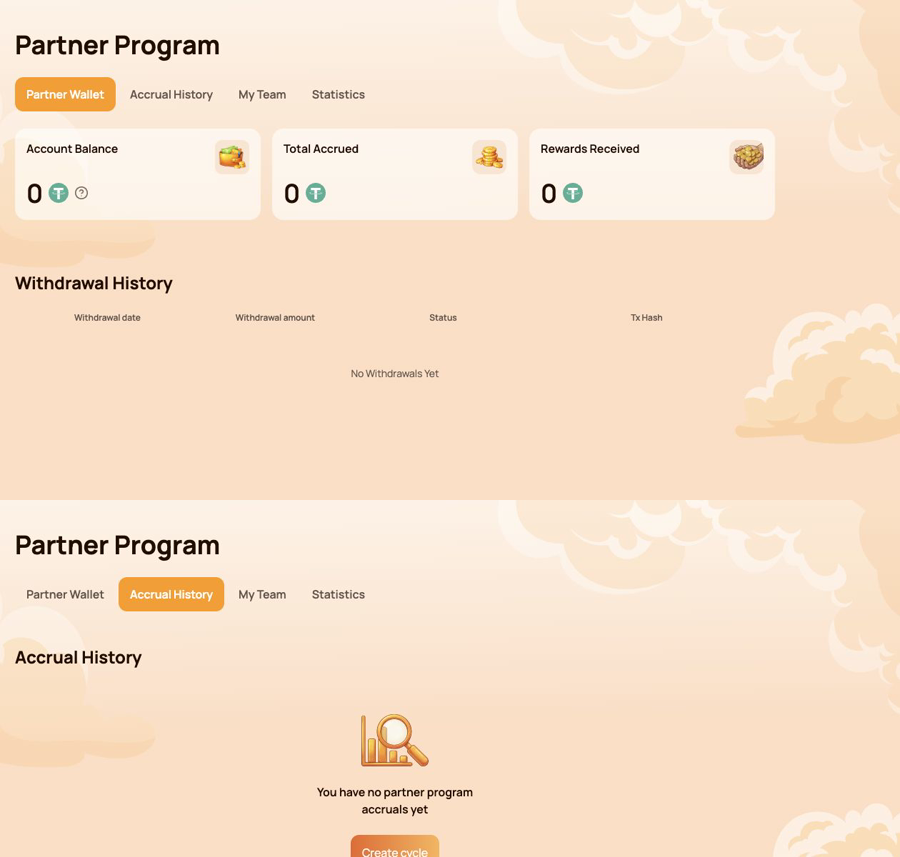
ภาพรวมแสดง กระเป๋าเงินพันธมิตร ก่อน และ ประวัติการสะสม อยู่ด้านล่างโดยตรง
5.3 ทีมของฉัน
My Team is the main workspace for status progress and referral structure.
ข้อมูลพันธมิตร
แผงด้านบนแสดง:
- Partner Status — the current status and its reward rate;
- My Referral Link — the personal link used to invite new participants;
- My Referrer (Wallet Address) — the wallet whose referral link was used;
- Referrer Status — the current status of that referrer.
The personal referral link becomes available after the first qualifying Smart Cycle of 10 USDT or more. If the field shows Not Available, check the cycle and status conditions described in the Partner Program guide.
ข้อกำหนดสำหรับสถานะถัดไป
ความคืบหน้าแสดงสำหรับปริมาณสามประเภท:
- Personal Active Cycle Volume;
- First-Line Active Cycle Volume;
- Partner Structure Active Cycle Volume.
For each requirement, compare Current, Required and Remaining. This makes it clear which condition has already been met and which volume is still needed for the next status.
ข้อกำหนดของสถานะและโครงสร้าง
The Status Requirements table compares all statuses by:
- ปริมาณรอบส่วนตัวที่ใช้งาน;
- ปริมาณรอบที่ใช้งานในสายแรก;
- ปริมาณรอบที่ใช้งานในโครงสร้างพันธมิตร;
- อัตรารางวัลจากโครงสร้างที่มีความลึกไม่จำกัด;
- อัตรา Matching Reward
Below the table, use Structure Lines and Search by Wallet Address to navigate the structure. The results identify the participant wallet and status. The Leaders statistics in the structure section helps identify the most active parts of the team.
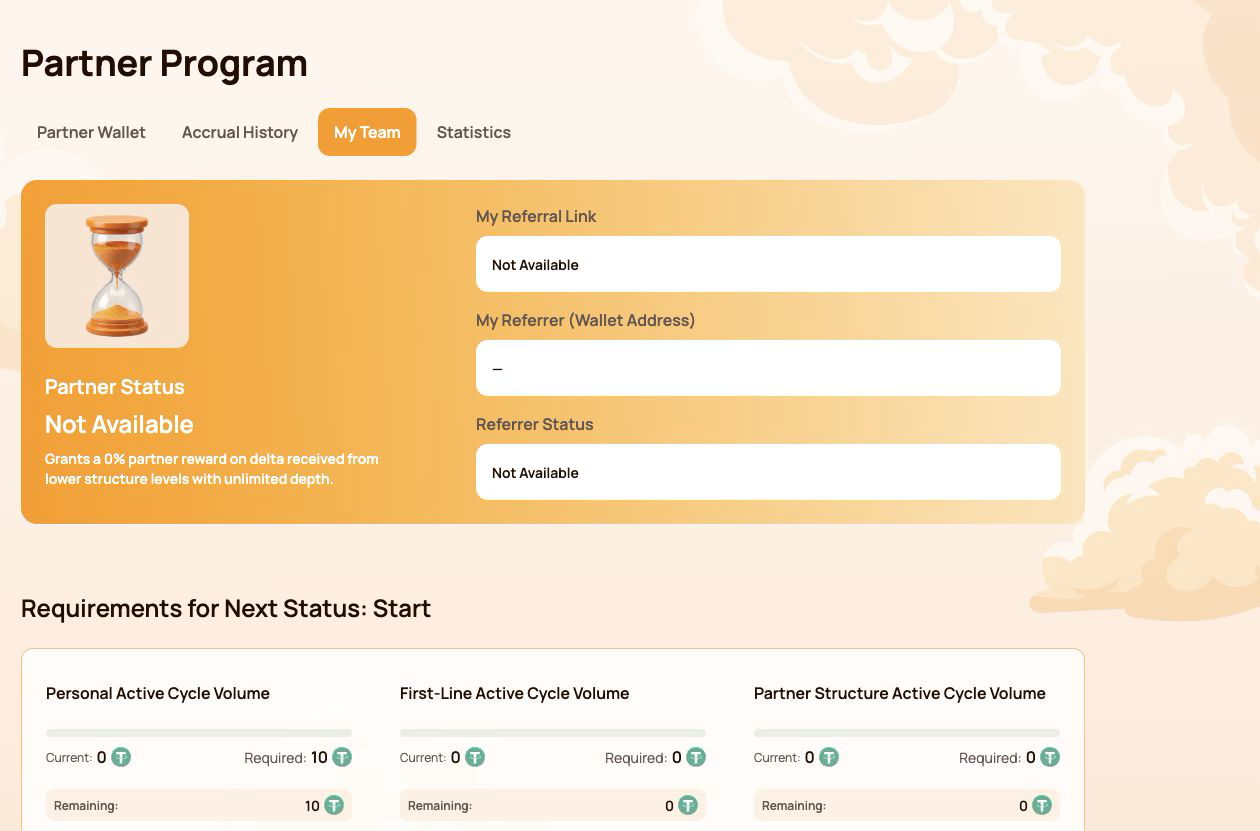
ภาพหน้าจอใช้บัญชีที่ไม่มีสถานะพันธมิตรที่ใช้งานและไม่เปิดเผยที่อยู่กระเป๋าเงินของผู้เข้าร่วม
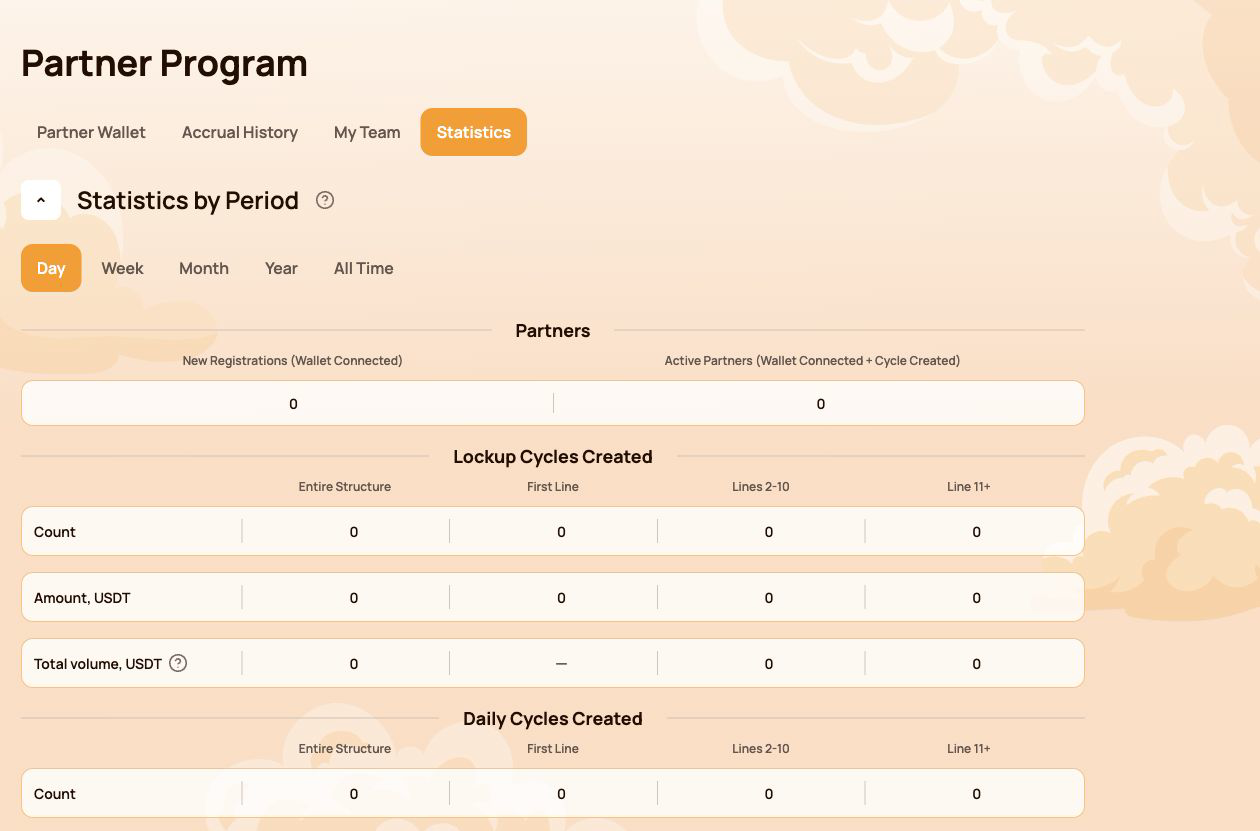
5.4 สถิติ
สถิติ summarizes partner activity for the selected period. Available filters are Day, Week, Month, Year and All Time.
พันธมิตร
- New Registrations (Wallet Connected) — wallets newly connected through the structure;
- Active Partners (Wallet Connected + Cycle Created) — connected partners who also created a cycle.
รอบที่สร้าง
Lockup Flow และ Daily Flow จะแสดงแยกกัน สำหรับแต่ละรูปแบบ แดชบอร์ดจะจัดกลุ่มกิจกรรมตาม:
- โครงสร้างทั้งหมด;
- สายที่หนึ่ง;
- สาย 2–10;
- สาย 11+
ตารางแสดงจำนวนรอบ จำนวนเงินเป็น USDT และปริมาณรวมที่รวมอยู่ในตัวชี้วัดระบบ
ความลึกของโครงสร้างส่งผลต่อปริมาณรวมอย่างไร
The information tooltip next to Total volume explains the coefficients used for structure depth:
| Structure depth | ปริมาณที่นับ |
|---|---|
| สายที่หนึ่ง | 100% สำหรับตัวชี้วัดสายตรงและความลึกไม่จำกัด |
| สาย 2–5 | 100% สำหรับตัวชี้วัดความลึกไม่จำกัด |
| Lines 6–10 | 50% |
| Line 11+ | 10% |
Most Active Lines highlights the leading structure lines and shows their partner count and USDT volume.
5.5 หมายเหตุสำคัญ
- Account Balance in Partner Wallet is a dashboard partner balance; it is not the same as the USDT balance displayed by your wallet application.
- ยอดสะสม การถอน และสถิติใหม่อาจปรากฏหลังบล็อกเชนยืนยันและแดชบอร์ดซิงค์ข้อมูลแล้ว
- ตรวจสอบเสมอว่าเชื่อมต่อกระเป๋าเงินที่ถูกต้องก่อนดูข้อมูลพันธมิตร
- อย่าเผยแพร่ข้อมูลการแนะนำหรือข้อมูลกระเป๋าเงินของผู้เข้าร่วมในภาพหน้าจอโดยไม่ได้รับความยินยอม
- สำหรับการตรวจสอบ on-chain ให้ใช้แฮชธุรกรรมและทะเบียนสัญญาอย่างเป็นทางการ
Status conditions, qualification volumes and reward examples are explained in โปรแกรมพันธมิตร. Terms are defined in อภิธานศัพท์.
6. โปรไฟล์
The Profile section stores the participant information used for communication and partner-facing features. It does not store wallet access credentials and does not replace the connected wallet address.
Open Profile from the left navigation. After making changes, select Save at the bottom of the page.
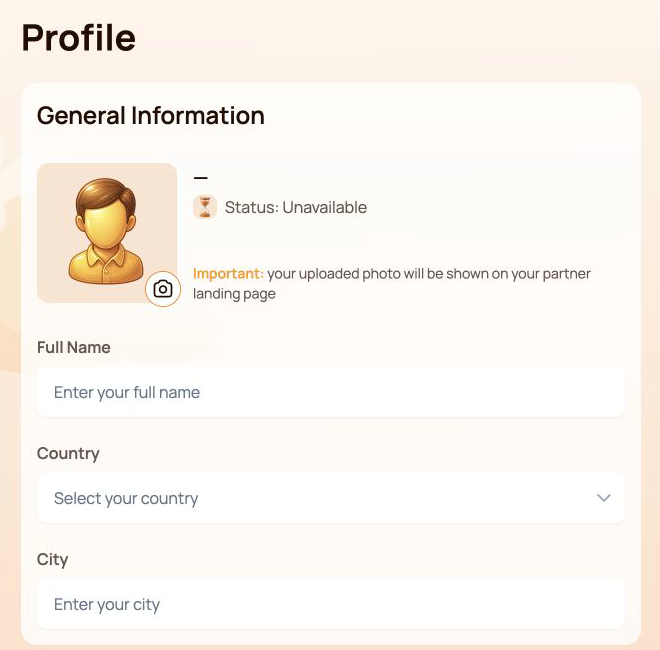
6.1 ข้อมูลทั่วไป
แผงด้านบนประกอบด้วย:
- Avatar — select the camera icon to add or replace the profile image;
- Status — the current partner status associated with the connected wallet;
- Full Name;
- Country;
- City.
The interface warns that the uploaded photo may be shown on the participant's partner landing page. Use only an image that you are comfortable displaying there.
6.2 ข้อมูลติดต่อ
This section contains Phone Number and Email.
The Visible to partners switch controls the partner visibility setting for the contact information block. Before enabling it, check that the entered details are intended to be shared with partners.
6.3 เครือข่ายสังคม
ช่องข้อมูลที่ใช้ได้ ได้แก่:
- Facebook — username or profile link;
- Instagram — username or profile link;
- WhatsApp — phone number or link;
- Telegram — username, link or phone number.
Social networks have their own Visible to partners switch. This setting is separate from the visibility switch in Contact Information.
คุณสามารถเว้นช่องว่างไว้ได้หากไม่ได้ใช้บริการหรือไม่ต้องการให้ข้อมูลนั้นรวมอยู่ในโปรไฟล์
6.4 การตั้งค่าการสื่อสาร
ภาษาสำหรับการสื่อสาร
ภาษาสำหรับการสื่อสาร records the participant's preferred language for communication. Select one of the supported Atlas System languages listed in Notifications and interface language below.
This field is different from the language selector in the top bar: the top-bar control changes the dashboard interface language, while ภาษาสำหรับการสื่อสาร belongs to the saved profile settings.
วิธีการสื่อสารที่ต้องการ
เลือกช่องทางที่คุณต้องการใช้สื่อสาร:
- Telegram;
- WhatsApp;
- อีเมล
กรอกช่องข้อมูลติดต่อหรือเครือข่ายสังคมที่เกี่ยวข้องก่อนเลือกวิธีที่ต้องการ สามารถเลือกได้มากกว่าหนึ่งช่องเมื่อมีหลายช่องทางที่เหมาะสม
Select Save after changing the language, communication methods or any other profile field.
6.5 ความเป็นส่วนตัวและความปลอดภัย
- Enable Visible to partners only for information you intend to share.
- ใช้สวิตช์การมองเห็นสองรายการแยกกัน รายการหนึ่งใช้กับข้อมูลติดต่อและอีกรายการใช้กับเครือข่ายสังคม
- ห้ามป้อนวลีกู้คืน (seed phrase) คีย์ส่วนตัว รหัสผ่านกระเป๋าเงิน รหัสความปลอดภัยแบบใช้ครั้งเดียว หรือรหัสผ่านกระดานแลกเปลี่ยนในช่องโปรไฟล์ใด ๆ
- ฝ่ายสนับสนุนของ Atlas System ไม่ต้องใช้ข้อมูลรับรองสำหรับเข้าถึงกระเป๋าเงินเพื่อตรวจสอบปัญหาโปรไฟล์
- ที่อยู่กระเป๋าเงินแบบย่อในแถบด้านบนใช้ระบุกระเป๋าเงินที่เชื่อมต่อ และแก้ไขจากโปรไฟล์ไม่ได้
6.6 หากระบบไม่บันทึกการเปลี่ยนแปลง
- ยืนยันว่าช่องที่จำเป็นทั้งหมดใช้รูปแบบที่กำหนด
- Select Save and wait for the interface response.
- รีเฟรชหน้าแล้วตรวจสอบว่าค่าต่าง ๆ ยังคงอยู่หรือไม่
- ยืนยันว่ากระเป๋าเงินเดิมยังเชื่อมต่ออยู่
- หากค่าต่าง ๆ หายไปอีก ให้ติดต่อฝ่ายสนับสนุนและแนบภาพหน้าจอโดยไม่เปิดเผยข้อมูลรับรองส่วนตัว
Partner status and the partner landing page are explained in โปรแกรมพันธมิตร. Safe data sharing is covered in ความปลอดภัย.
7. การแจ้งเตือนและภาษาของอินเทอร์เฟซ
ไอคอนกระดิ่งแจ้งเตือนและตัวเลือกภาษาอินเทอร์เฟซอยู่ในแถบด้านบนและใช้ได้ตลอดทั้งแดชบอร์ดส่วนตัว
7.1 การแจ้งเตือน
Select the Notifications bell to open the notification center. Messages are grouped into three tabs:
| แท็บ | What it shows |
|---|---|
| ข้อความทั้งหมด | การแจ้งเตือนทั้งหมดที่มี |
| Read | การแจ้งเตือนที่เปิดดูหรือทำเครื่องหมายว่าอ่านแล้ว |
| ยังไม่ได้อ่าน | การแจ้งเตือนที่ยังไม่ได้อ่าน โดยตัวเลขในวงเล็บคือจำนวนที่ยังไม่ได้อ่านในขณะนี้ |
If the page shows You have no notifications yet, there are currently no messages for the connected account. This is a normal empty state and does not indicate an error.
ข้อจำกัดสำคัญ
การแจ้งเตือนบนแดชบอร์ดมีไว้เพื่อให้ข้อมูล และไม่ใช้แทน:
- สถานะธุรกรรมในกระเป๋าเงิน;
- การยืนยันจากบล็อกเชน;
- บันทึกธุรกรรมบน BscScan;
- the current cycle status in My Support Cycles.
เมื่อการแจ้งเตือนกับธุรกรรม on-chain ดูไม่สอดคล้องกัน ให้ตรวจสอบที่อยู่กระเป๋าเงิน แฮชธุรกรรม และ smart contract ก่อน
7.2 ภาษาของอินเทอร์เฟซ
เลือกภาษาปัจจุบันในแถบด้านบน จากนั้นเลือกภาษาอินเทอร์เฟซที่ต้องการ:
- English;
- Bahasa Indonesia;
- Bahasa Melayu;
- Deutsch;
- Español;
- Français;
- Русский;
- Português;
- Tiếng Việt;
- Türkçe;
- हिन्दी;
- 中文;
- ไทย.
ตัวเลือกที่เลือกจะเปลี่ยนภาษาของแดชบอร์ดส่วนตัว Atlas System ส่วนส่วนขยายกระเป๋าเงิน BscScan และบริการภายนอกอื่นยังใช้การตั้งค่าภาษาของตนเอง
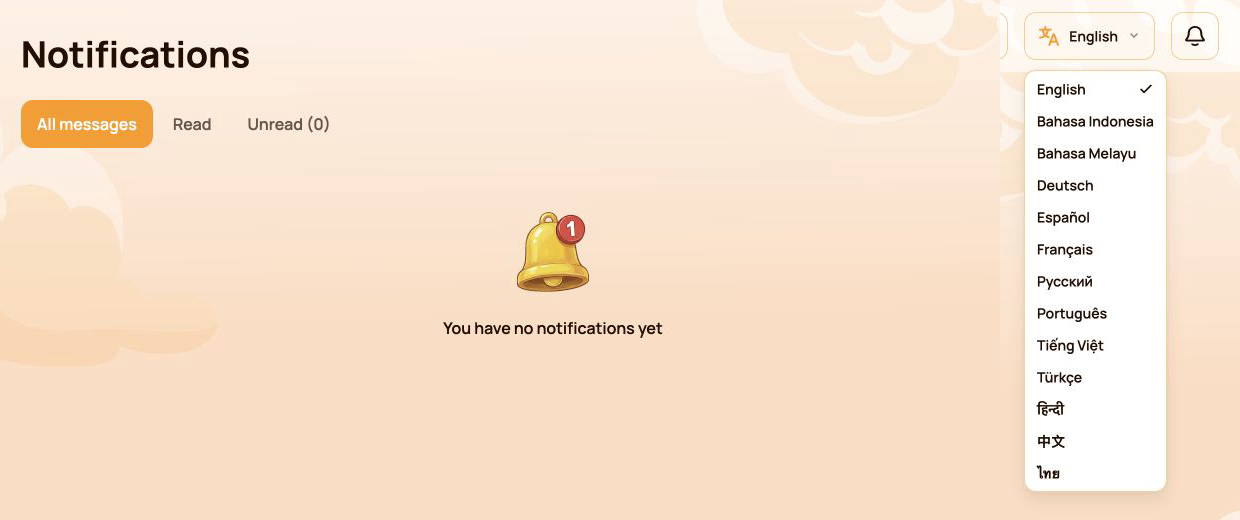
ภาพแสดงรายการภาษาอินเทอร์เฟซทั้งหมด
7.3 ภาษาของอินเทอร์เฟซกับภาษาสำหรับการสื่อสาร
การตั้งค่าสองรายการนี้มีวัตถุประสงค์ต่างกัน:
| การตั้งค่า | ตำแหน่ง | Purpose |
|---|---|---|
| ภาษาอินเทอร์เฟซ | Top bar | เปลี่ยนภาษาที่ใช้ในอินเทอร์เฟซแดชบอร์ดส่วนตัว |
| ภาษาสำหรับการสื่อสาร | Profile | Records the participant's preferred language for communication |
If you want both settings to match, change the top-bar language and then select the same language in Profile → Communication Language and save the profile.
7.4 หากการแจ้งเตือนหรือคำแปลไม่อัปเดต
- ยืนยันว่าเชื่อมต่อกระเป๋าเงินที่ถูกต้อง
- รีเฟรชแดชบอร์ด
- เปิดศูนย์การแจ้งเตือนหรือตัวเลือกภาษาอีกครั้ง
- ตรวจสอบว่าภาษาที่เลือกแสดงอยู่ในแถบด้านบนหรือไม่
- หากข้อความที่คาดไว้ไม่ปรากฏ ให้ตรวจสอบรอบหรือธุรกรรมที่เกี่ยวข้องในส่วนที่ตรงกันของแดชบอร์ดและบน BscScan
- ติดต่อฝ่ายสนับสนุนหากข้อมูลในแดชบอร์ดยังไม่สอดคล้อง พร้อมแนบภาพหน้าจอและแฮชธุรกรรมเมื่อเกี่ยวข้อง
Official translated labels are collected in อภิธานศัพท์. Related issues are covered in การแก้ไขปัญหา.
8. สถานะโดยรวมของระบบ
The Health of System panel is located below the main navigation. It provides an at-a-glance view of system-wide activity and operational status. Use All time or Last 24 hours to select the displayed period.
These indicators describe Atlas System as a whole. They are not the connected participant's wallet balance, personal cycle volume or guaranteed assistance amount.
8.1 ตัวชี้วัด
| Indicator | What it means |
|---|---|
| เวลาของเซิร์ฟเวอร์ | วันที่และเวลาที่แดชบอร์ดใช้เมื่อแสดงภาพรวมสถานะปัจจุบัน |
| รอบที่สร้าง / ปริมาณการสนับสนุนขาเข้า | จำนวนรอบที่สร้างและปริมาณการสนับสนุนขาเข้ารวมในช่วงเวลาที่แสดง |
| รอบที่เสร็จสิ้น / ปริมาณความช่วยเหลือขาออก | จำนวนรอบที่เสร็จสิ้นและปริมาณความช่วยเหลือขาออกรวมในช่วงเวลาที่แสดง |
| ยอดคงเหลือของ smart contract | The current contract balance shown by the dashboard; it is not the participant's wallet balance |
| กระเป๋าเงินที่เชื่อมต่อทั้งหมด | จำนวนกระเป๋าเงินที่แดชบอร์ดบันทึกไว้ในช่วงเวลาที่แสดง |
| Delta ที่จ่ายแล้ว | Delta ที่รวมอยู่ในการดำเนินการช่วยเหลือที่เสร็จสิ้นในช่วงเวลาที่แสดง |
| การจ่ายของโปรแกรมพันธมิตร | การโอนรางวัลพันธมิตรที่บันทึกไว้ในช่วงเวลาที่แสดง |
| ค่าธรรมเนียมแพลตฟอร์ม | ค่าธรรมเนียมแพลตฟอร์มที่บันทึกไว้ในช่วงเวลาที่แสดง โดยค่า gas ของเครือข่ายแยกต่างหาก |
| สัญญา | Current dashboard status of the Atlas System smart contracts, such as Active |
| การจ่ายครั้งล่าสุด | เวลาที่ผ่านไปนับจากการจ่ายล่าสุดที่บันทึกในระบบ |
| พูลสภาพคล่อง | Current dashboard health status of the liquidity pool, such as OK |
สำหรับตัวชี้วัดรอบทั้งสอง ค่าแรกคือจำนวนรอบ และค่าที่สองคือปริมาณ USDT
ภาพหน้าจอแสดงแผงสุขภาพระบบฉบับเต็ม ตัวเลขทั้งหมดเป็นตัวอย่าง ณ เวลาที่บันทึกภาพและจะเปลี่ยนแปลงตามเวลา
8.2 วิธีตีความข้อมูลในแผง
- ไอคอนโล่สถานะโดยรวมสีเขียวช่วยสรุปสถานะปัจจุบันของแดชบอร์ดให้เห็นได้อย่างรวดเร็ว
- Contracts: Active means the dashboard currently reports the contracts as operational.
- Liquidity Pool: OK means the dashboard currently reports the pool health check as normal.
- การจ่ายครั้งล่าสุด is an activity timestamp. A longer interval does not by itself prove that the system is unavailable.
- ยอดคงเหลือของ smart contract และปริมาณรวมทั้งระบบไม่ได้เป็นตัวกำหนดว่าผู้เข้าร่วมรายใดรายหนึ่งสามารถ Claim ได้หรือไม่
- แผงที่แสดงว่าระบบทำงานปกติไม่ใช้แทนการตรวจสอบสถานะธุรกรรมของกระเป๋าเงินรายการใดรายการหนึ่งใน BscScan
8.3 หากตัวชี้วัดดูเหมือนล่าช้าหรือไม่พร้อมใช้งาน
- Check เวลาของเซิร์ฟเวอร์ to understand when the displayed snapshot was recorded.
- รีเฟรชแดชบอร์ดหนึ่งครั้งแล้วตรวจสอบตัวชี้วัดอีกครั้ง
- Open the official สถานะระบบ page for service-wide incidents or maintenance.
- ตรวจสอบที่อยู่สัญญาอย่างเป็นทางการและธุรกรรมล่าสุดใน BscScan
- For a personal transaction, verify its transaction hash and check My Support Cycles or Operations History.
- If the discrepancy remains, contact support with:
- ตัวชี้วัดที่ได้รับผลกระทบ;
- เวลาของเซิร์ฟเวอร์ที่แสดงในแผง;
- connected wallet address;
- แฮชธุรกรรม หากมี;
- ภาพหน้าจอของแผง
Detailed availability is published in สถานะระบบ. Official addresses and on-chain verification are covered in Contracts & BscScan.
9. ดัชนีงานด่วน
ใช้ตารางนี้เมื่อคุณรู้ว่าต้องการทำอะไรแต่ไม่แน่ใจว่าควรเปิดส่วนใดของแดชบอร์ด
| I want to… | Open… |
|---|---|
| ดูกิจกรรมส่วนตัวโดยรวม | แดชบอร์ด |
| สร้างรอบ Lockup หรือ Daily | Provide Support and select the required flow |
| ตรวจสอบรอบที่กำลังดำเนินอยู่หรือ Claim | รอบการสนับสนุนของฉัน → ใช้งานอยู่ |
| ค้นหารอบที่เสร็จสิ้นแล้ว | รอบการสนับสนุนของฉัน → เสร็จสิ้น |
| ตรวจสอบการสร้างรอบหรือความช่วยเหลือที่ได้รับ | Operations History |
| ตรวจสอบรางวัลพันธมิตร การสะสม หรือการถอน | โปรแกรมพันธมิตร → กระเป๋าเงินพันธมิตร / ประวัติการสะสม |
| คัดลอกลิงก์แนะนำหรือตรวจสอบความคืบหน้าของสถานะ | Partner Program → My Team |
| ค้นหาโครงสร้างหรือเปรียบเทียบกิจกรรม | โปรแกรมพันธมิตร → ทีมของฉัน / สถิติ |
| อัปเดตข้อมูลส่วนตัวหรือการมองเห็น | Profile |
| กำหนดภาษาหรือช่องทางการสื่อสาร | โปรไฟล์ → การตั้งค่าการสื่อสาร |
| เปลี่ยนภาษาของแดชบอร์ด | ตัวเลือกภาษาในแถบด้านบน |
| อ่านข้อความระบบ | Notifications |
| ตรวจสอบตัวชี้วัดการทำงานโดยรวม | สุขภาพระบบ → ตลอดเวลา / 24 ชั่วโมงล่าสุด |
| ตรวจสอบธุรกรรมอย่างอิสระ | รายละเอียดธุรกรรมในกระเป๋าเงินและ BscScan |
แนวทางแนะนำสำหรับผู้เข้าร่วมรายใหม่
- Open แดชบอร์ด and confirm that the correct wallet is connected.
- Open Provide Support and review Lockup Flow and Daily Flow before selecting a cycle.
- After the transaction is confirmed, open รอบการสนับสนุนของฉัน → ใช้งานอยู่.
- Use Operations History to review cycle creation and assistance received.
- Use Notifications for system messages and Health of System for overall operational indicators.
For wallet setup, network selection, USDT and BNB requirements, start with เริ่มต้นอย่างรวดเร็ว before using the personal dashboard.

